
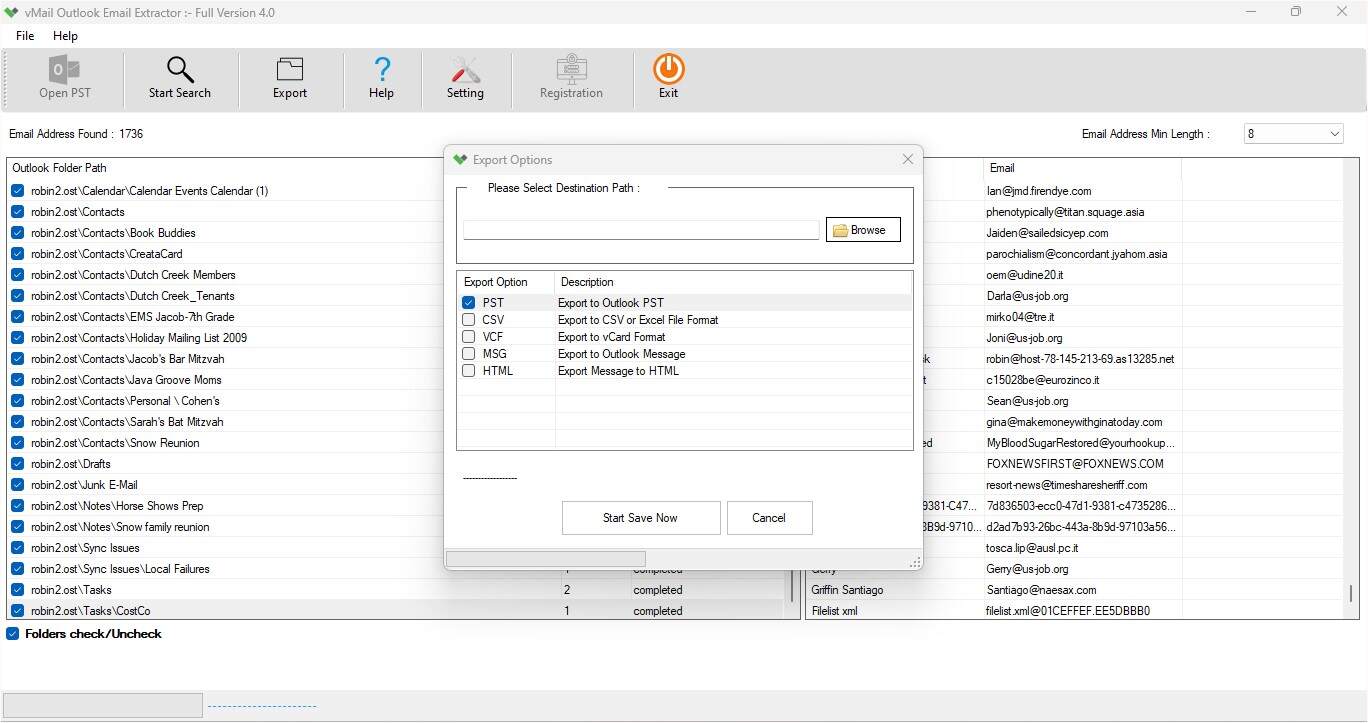
In case of extracting email addresses from Outlook PST files, users require software that is fast, reliable, and user-friendly. Manually performed processes often consume a lot of time and require the installation of Microsoft Outlook on the computer. But there is a solution through which all these problems are addressed. This is vMail PST Email Address Extractor Software, which provides an all-round solution to its users. No matter whether you are looking for email addresses for your professional communications, for creating a contact list, migration of Outlook data, or recovery of emails from outdated PST files, the software has all that you require. The following are some detailed features of the software that make it the best fast email extractor for Outlook.
Fast and Reliable Email Address Extraction
The software has been developed using advanced scanning technology that enables users to extract email addresses from Outlook PST files in a fast and safe way. There is no change made to the original file while extracting emails since it scans all the emails in the PST file. During the process of extraction, all the emails are extracted in their original format, which existed in the PST file.
No Microsoft Outlook Installation Required
One of the most significant advantages of vMail PST Email Address Extractor Software is the independent operation of the tool. Unlike other tools, this one does not need Microsoft Outlook to be installed on your computer in order to extract email addresses from an Outlook PST File. All you need to do is load the PST file into the tool, and it will automatically scan and show all the mailbox data. This ability will prove itself very helpful for those users who don’t have Outlook installed on their computer anymore or want to extract a PST file from another computer.
Preview Outlook Mailbox Before Extraction
Before beginning the extraction process, the software presents a preview of all Outlook items. With the help of this function, users can review all the items of an Outlook mailbox, including emails, contacts, calendars, notes, journals, and tasks. Thus, you can make sure that you choose the right PST file to extract its information.
Extract Emails Together with Attachments
This program does not limit itself to extracting only the email addresses. It helps extract complete Outlook emails, including attachments as well. All the attachments are linked to the respective emails so that no important document, image, PDF, spreadsheet, or other files get separated during the process of extraction. Other important parameters like formatting, sender/receiver of emails, subject line, timestamps, etc., are saved too, allowing the users to have a replica of their Outlook data.
Extracted Data Can Be Saved in Multiple File Formats
As the needs of various users may vary, this software offers multiple file formats for saving the extracted data. Once the data from Outlook is extracted, users can save it in PST, CSV, VCF, MSG, or HTML file formats. This gives great flexibility to the extracted data as it can now be utilized using various email clients, contact managers, databases, or other backup systems of choice without needing any further conversion utility.
Supports Password-Protected PST Files
For many users, their PST files are secured by passwords that ensure the files are not accessed by anyone else. In such cases, it is hard to manually retrieve data from the file. The vMail PST Email Address Extractor Software is able to handle password-protected PST files and ensures that users are able to extract data from the mailbox safely. The software will process the protected PST files without interfering with the security settings or damaging the mailbox at all.
Email Address Filtering Features
Outlook mailboxes usually store hundreds or even thousands of email addresses over several years. It can take one many hours to look for the email addresses needed. For this reason, the software has advanced filtering features that enable one to extract email addresses. One is able to choose particular folders or items in the mailbox to limit unnecessary processing of data.
Supports Both ANSI and Unicode PST Files
Microsoft Outlook generates PST files in two types of formats, i.e., ANSI and Unicode. ANSI PST files were used by older versions of Microsoft Outlook, whereas Unicode PST files are generated by newer versions of Microsoft Outlook. vMail PST Email Address Extractor Software is completely compatible with both types of formats, without any problem. No matter how old your PST file is or which version of Microsoft Outlook you are using, this software will help you scan and extract email addresses from Outlook easily.
Batch Processing of Several PST Files
In many cases, people need to handle several PST files together. Opening and processing each file separately requires a lot of time. In order to reduce the hassle, this software has a powerful batch processing facility. Users can import several PST files at once and extract email addresses from Outlook PST files within a single process.
Maintains Complete Data Integrity
Preservation of the mailbox details is among the most effective aspects of this software. In the course of extraction, it helps to preserve folder structure, email formatting, email address, subject lines, attachments, internet header, etc. Nothing related to the mailbox details gets changed or deleted throughout the whole extraction process. It provides users with an exact copy of the Outlook data without affecting the original PST file at all.
Recover Data from Corrupted PST Files
Corrupted or damaged PST files are usually not available for use with Microsoft Outlook. Instead of losing such valuable information as email addresses and other mailbox details, users can apply the vMail PST Email Address Extractor Software. This software allows scanning corrupted PST files and retrieving mailbox information. Even when the file is not available for use within Microsoft Outlook, the software can help to retrieve valuable email addresses and other mailbox information.
User-Friendly Interface for Everyone
The program comes with an easy-to-use and user-friendly interface. No matter whether you are a beginner, a home user, a businessperson, or an IT manager, you can easily carry out the process of extraction without any prior technical expertise. All options are neatly arranged, and the program takes the user through all steps, which makes Outlook email extraction an easy job.
Fast Performance
Another feature of the PST Email Extractor Software is its fast performance. The program features optimized scan algorithms, which allow the processing of large PST files very fast. Without having to wait for several hours, you can extract several thousand email addresses without having any effect on your system.
Supports Large Outlook PST Files
Outlook users have a tendency to store all their emails within one PST file, which results in very large file sizes. Large PST files can cause some problems when using manual processes or regular software. On the contrary, fast email extractor Software handles oversized PST files without losing speed and accuracy. The software works well no matter whether your mailbox has just hundreds or millions of records.
Compatibility With All Outlook Versions
This software can handle PST files of almost any Microsoft Outlook version. Whether your PST file is made from Outlook 2003, Outlook 2007, Outlook 2010, Outlook 2013, Outlook 2016, Outlook 2019, Outlook 2021, or newer versions, the software extracts email addresses without any compatibility issues. You don’t need different software for different Outlook versions.
Supports All Windows Operating Systems
Besides being compatible with Outlook, the software also works well with all popular Windows operating systems. This software works perfectly on Windows 11, Windows 10, Windows 8.1, Windows 8, Windows 7, and Windows Server operating systems. The software can be installed and used on both personal and enterprise servers without any issues related to the operating system.
Why Should You Select vMail PST Email Address Extractor Software?
There are many Outlook extraction applications in the market. However, PST Email Extractor Software is different from others because of its speed, efficiency, and ease of use. The application does not require Outlook installation; it allows extracting data from damaged or password-protected PST files; it extracts all mailbox information with attached files, preserves all email properties, and gives many save options.
In all, the software contains all that is needed to effectively and safely obtain email addresses from Outlook PST files. If you need to recover emails, prepare lists of contacts, transfer information from the mailbox, create backups, or anything else, then with vMail PST Email Address Extractor Software, you will be able to do it easily and with great accuracy.

Comments