
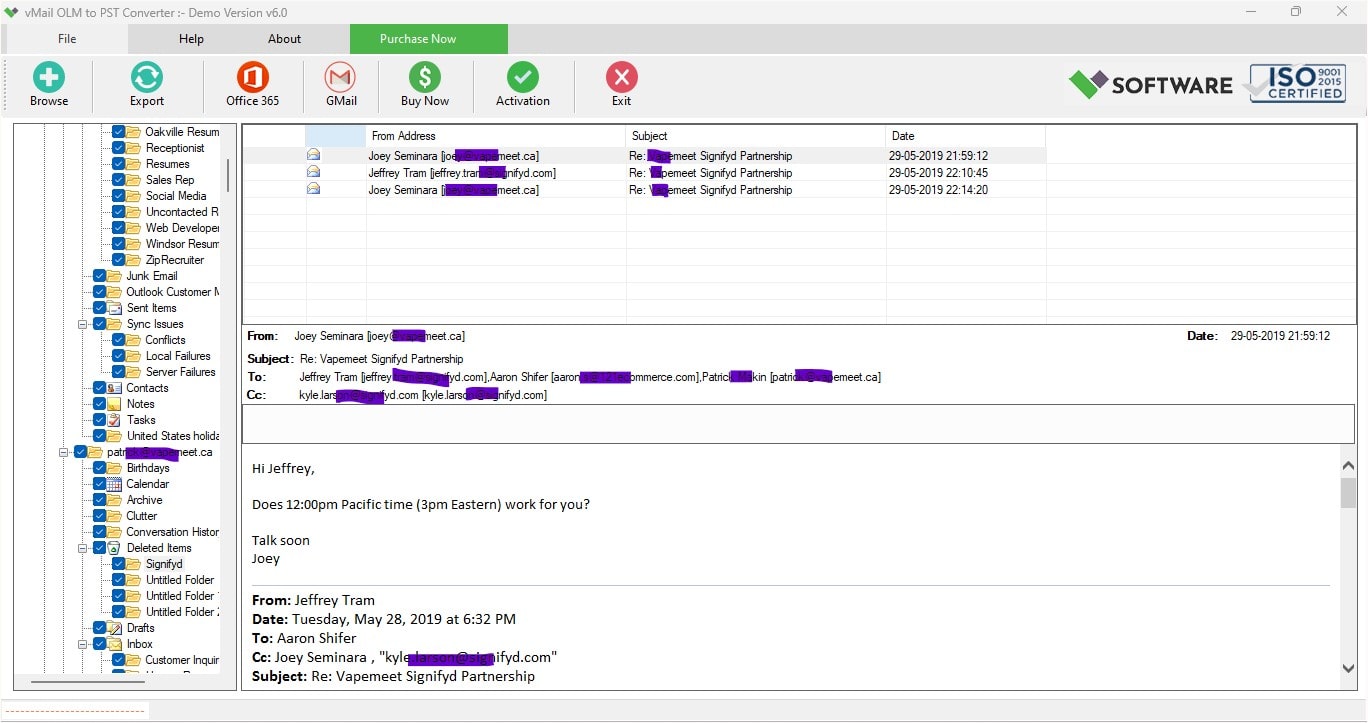
In the case where Mac Outlook users need to transfer their mailbox information to the Windows-based Outlook setup, the process of conversion of OLM to PST file format becomes significant. Nonetheless, before downloading the OLM to PST Converter software, there are certain aspects to be considered to determine whether the converter will suit their needs. The right selection of the converter software will make it easier for users to process emails, attachments, contacts, calendars, tasks, and other information within the mailbox. The vMail OLM to PST Converter gives a simple approach to such conversion.
Why Is OLM to PST Conversion Required?
In Microsoft Outlook for Mac, the OLM file format is used for storing mailbox data, whereas PST files are used in Outlook for Windows. Since both file formats are not the same, the OLM file format is not directly supported in the Windows version of Microsoft Outlook. Hence, conversion from OLM to PST becomes essential for users who wish to use their Mac Outlook mailbox data in the Windows version of Outlook.
There are many reasons why one would require OLM to PST conversion. They may be changing computers, may have to switch operating systems, transfer business mailbox data, or may wish to access their Mac Outlook mailbox archive data on a Windows machine. Transferring all the emails and folders manually may become difficult in case there is a huge volume of data in the mailbox. The process can be made easy with the help of OLM to PST converter.
OLM to PST Converter Download: What to Check Before Installing
Before downloading the OLM to PST Converter Software, one should first make sure that the application supports the OLM files he/she has to convert. A good application must include the easiest way to import the source file and scan its mailbox data. This will allow one to work with his/her Mac Outlook data easily and conveniently.
Another aspect that must be considered is the software interface. It is crucial since not all users have enough technical skills to deal with mailbox file conversion. vMail OLM to PST Converter Software was created with a convenient workflow, which means that users can import an OLM file, scan the mailbox data, preview it, pick the necessary information, and then export it into PST.
One more thing to consider is the preview facility included in the software. Previewing the mailbox data is very helpful for the users because one can view emails, folders, and other available data before the actual export starts. This will be especially useful in the case with big OLM files because it will allow users to find necessary information and not to process unnecessary data.
Check Data Preservation Features
Preservation of data is another significant factor to consider prior to the installation of OLM converter software. When converting from OLM to PST files, users usually prefer that all mailbox data stays arranged. Therefore, the software must offer features such as the opportunity to preserve the folder hierarchy and convert supported mailbox items.
The vMail OLM to PST Converter Software supports the preservation of folder hierarchy when performing conversions. As a result, users can view their converted emails in an organized way after opening the PST file. Along with this, attachments and other supported mailbox items may be processed together with the email messages, which allows preserving the mailbox usability.
When installing the program, it would be useful to know if there is the possibility of selective conversion provided by the software. Such a feature may be useful if users are not interested in converting everything from the large OLM file.
Check Batch Conversion and Large Mailbox Support
Another aspect to consider prior to downloading an OLM to PST Converter is the capability of the program to convert several OLM files at once. People having a lot of mailbox archives might want to use a program that allows them to perform batch processing and not convert each file separately, but according to all the features offered by the software.
Mailbox archives may include thousands of emails along with a lot of attachments. It is therefore important for users to consider the capacity of the software to deal with lots of mailbox data.
Check the Conversion Process Before Installing
A good converter program should make the whole conversion procedure clear. When using the vMail OLM to PST Converter Software, one will first load the necessary OLM file. After that, scanning of the mailbox will be scanned, and the available data will be displayed. Then, the user can view the folders and the mailbox entries and choose what should be exported.
In choosing the necessary data, PST can be selected as the target format. Users will choose where the new file should be saved and will start converting the data. When the procedure is done, the newly created PST file can be viewed through an appropriate Outlook application.
This process will allow users to convert OLM to PST without relying on any difficult procedures.
Why Choose vMail OLM to PST Converter Software?
Choosing the appropriate software for your needs is crucial since the data stored in mailboxes may include valuable information for both professional and private purposes over the years. The vMail OLM to PST Converter Software possesses all the tools aimed at making the conversion process easier for its users. These tools may include a simple interface, mailbox preview, selective conversion, hierarchy maintenance, attachment handling, and batch conversion.
One of the advantages of using specialized software is that people will be able to deal with their mailbox data within the conversion process instead of having to perform complicated and difficult manual actions.
Final Words
An OLM to PST Converter Download cannot be performed without first examining the features, interface, compatibility, previews, data safety, and conversion process of the program. These aspects can assist users in making the right decision regarding the tool they will use for their mailbox needs.
An OLM to PST Converter Download: Things to Check Before Installing contains all the main aspects users should pay attention to before choosing the tool. The vMail OLM to PST Converter Software is an effective way to convert OLM to PST and organize your mailbox while performing selective data processing. For all users who require a good OLM to PST conversion, it is better to check all these aspects before installing the program.

Comments