
Mailbox items in Microsoft Outlook for Mac are stored in OLM files, whereas mailbox items in Outlook for Windows are saved in PST files. This can sometimes be problematic for Mac Outlook users who are required to transfer their email, contact, calendar, task, and other mailbox items to the Windows-based version of Microsoft Outlook. In these cases, a vMail OLM to PST Converter will serve as a useful tool to help manage the conversion process. Best Free OLM to PST Converter for Mac Outlook Users does just that.
Why Do Mac Outlook Users Need OLM to PST Conversion?
OLM is the file format for a mailbox that goes along with Outlook for Mac, while PST is the file format used typically with Outlook for Windows. As the two file formats are not the same, it means that you cannot just open an OLM file in Outlook for Windows and use its mailbox contents. This is one of the major reasons why users need help to convert OLM to PST.
Conversion from OLM to PST may be necessary if you have changed your platform from Mac to Windows, switched your working environment, transferred your mailbox data to another computer, or would like to view your archived Mac Outlook emails via Windows Outlook. The manual transfer of mailbox data is a rather difficult process that takes much time.
Best Free OLM to PST Converter for Mac Outlook Users
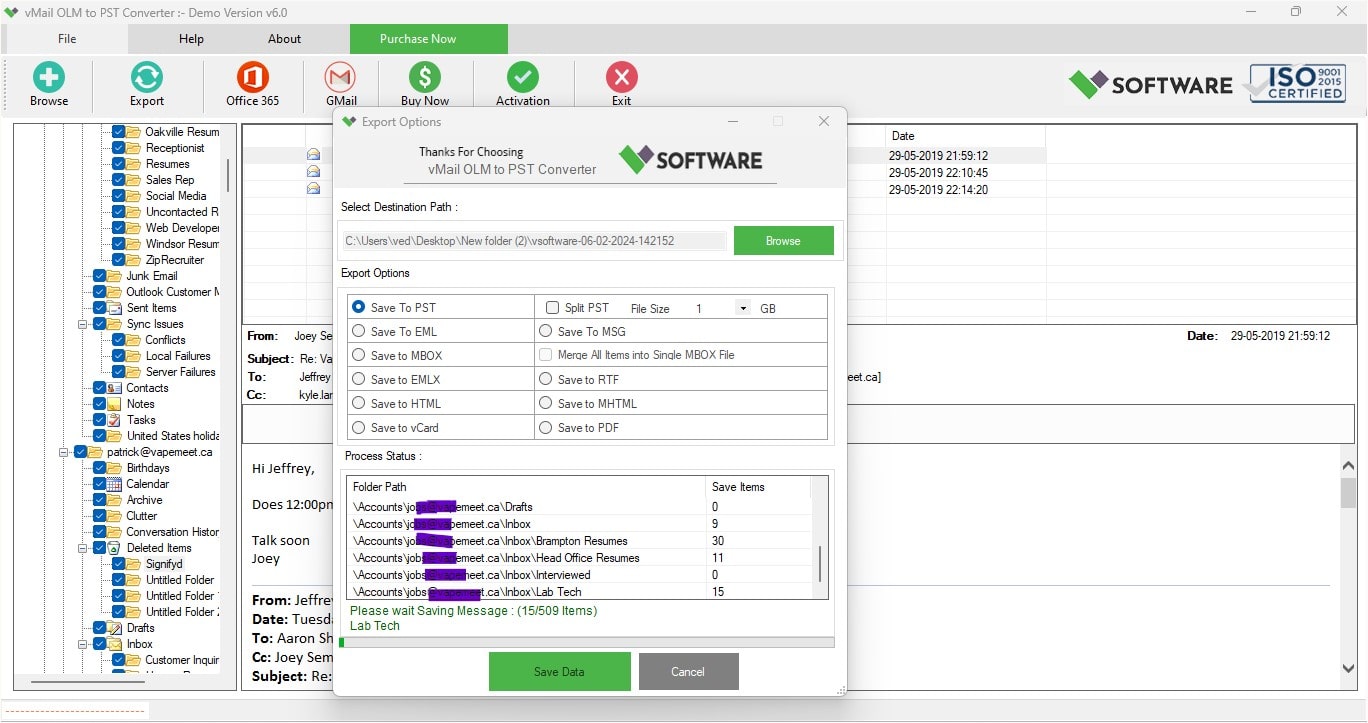
The Best Free OLM to PST Converter for Mac Outlook Users will have a user-friendly interface, precise conversion, and handling of various mailbox items. The vMail OLM to PST Converter Software enables users to convert OLM files to PST without following any complex technical steps.
In this software, users have the ability to choose their OLM files and scan the mailbox data prior to conversion. Users can check their emails and other mailbox folders by using the preview facility before they export. In case an OLM file contains too much data, then it is easier for users to process their required data by using this feature.
Another feature that the software provides is that it retains the exact hierarchy of folders while conversion. Emails, folders, attachments, and other supported mailbox items can be converted while maintaining their hierarchy in the PST file.
How to Convert OLM to PST?
The process of changing an OLM file into a PST file requires a number of simple steps. Firstly, vMail OLM to PST Converter Software should be installed and launched on a Windows-based computer. Secondly, the necessary OLM file must be added to the program, and the program is supposed to perform scanning of the mailbox content.
Having done the scan, one will be able to view the folders and items available. Thirdly, the necessary information has to be selected for the conversion and the desired output format (PST) must be chosen. Fourthly, the place of storage for the new file must be specified. Then the conversion process can be started. Upon the completion of the process, the created PST file can be opened in the appropriate Outlook software.
Thus, the conversion of the OLM file into the PST file becomes much easier for users with a limited knowledge of technology.
Key Features of the OLM to PST Converter Software
One of the key advantages of the vMail OLM to PST Converter Software is its intuitive interface. The conversion process does not require any complicated configuration settings. The software is appropriate for both technical and non-technical users who need to convert OLM mailbox files.
Another advantage is that users have the opportunity to view mailbox data prior to its export. They can view the folders available and choose the necessary data. This allows avoiding the conversion of unnecessary mailbox data.
The software keeps the original structure of folders when converting OLM to PST files. Therefore, users are able to preserve the organized structure of their mailbox and not receive all the converted emails in one place. Keeping attachments together with the emails is another crucial point of the conversion process.
Batch processing would also be useful for users who have several OLM files. In lieu of processing individual OLM files, the user can process multiple OLM files based on their needs. Batch processing may help users save time in case of large mailboxes.
This software application has been designed in such a way that OLM to PST conversion becomes easy with the help of an easy-to-use workflow. Users can load an OLM file, view data, choose necessary content, select PST as the destination format, and finally export it.
Why Choose a Dedicated OLM to PST Converter?
A conversion tool is always considered more convenient than manual conversion techniques. Manual techniques may need some extra processes and do not have any easy way of keeping the mailbox organized. The vMail OLM to PST Converter Software is specially designed for people who wish to convert Mac Outlook OLM files into PST files.
It becomes especially important for those people who use Mac Outlook and now wish to change their system to Windows Outlook. There is no need for a person to invest a lot of time in converting emails and folders one by one.
The software will also help to control one's mailbox data through preview and selective conversion capabilities. This could be helpful if one is dealing with large OLM files that contain years' worth of emails, attachments, contacts, and other mailbox data.
Conclusion
Converting mailbox data from Mac Outlook to Windows Outlook may pose a challenge since the two file formats are different. Conversion software will make it easier to convert OLM to PST without having to transfer mailbox data manually. The Best Free OLM to PST Converter for Mac Outlook Users is a good approach of converting OLM to PST.
Due to some unique functionalities such as previewing mailboxes, selective conversion, retaining folder structure, handling attachments, and a user-friendly interface, the use of vMail OLM to PST Converter Software could be useful for easier OLM to PST conversion. For those Mac Outlook users who would like to transfer their mailbox information to Windows Outlook, a good converter could make their task easy.

Comments