
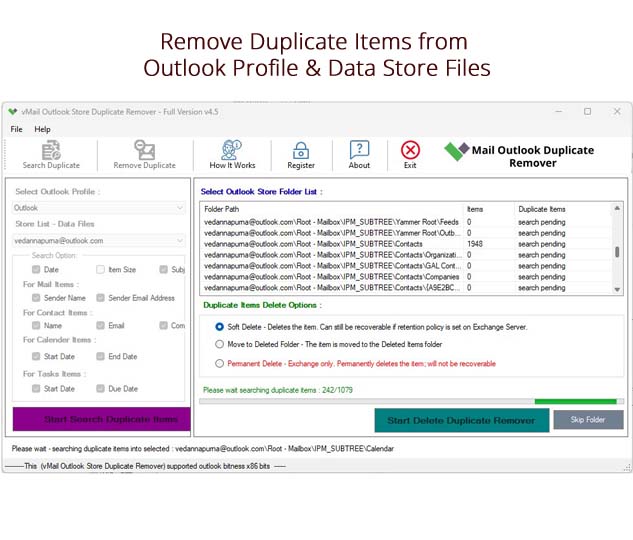
Microsoft Outlook is a popular program for organizing email, contacts, calendars, tasks, notes, and journal. Duplicates may accumulate in Outlook data files because of multiple synchronizations, import operations, backup restoration, and even movement of mailbox information from one account to another. This causes unnecessary difficulties in mailbox management and increases the volume of stored information. Professional vMail Outlook Duplicate Remover Software will help you perform an efficient scan and delete all duplicates from Outlook OST and PST data files without examining each and every folder.
Duplicates are not limited by emails. Multiple duplicates of contacts, calendars, tasks, notes, and journals may be found in your Outlook data file. With many thousands of items in a mailbox, you will need some time to find them manually.
Why Remove Duplicate Items from Outlook?
There are various reasons why duplicate entries can exist in Outlook. These include multiple synchronizations, importation of the same PST file multiple times, creation of duplicate copies as backups, and transfer of mailbox contents between different Outlook accounts. Over time, this causes problems for users trying to find the necessary information since the mailbox gets cluttered with many emails and other information.
Outlook PST File Duplicate Email Remover is a software that enables users to search for duplicate emails and other duplicate items in their Outlook data files. This utility program has the capability to scan OST and PST files and detect duplicate items using data such as text, subject, sender email, sender name, receiver name, and contact information.
Scan Both OST and PST Files
Among the key benefits of this program is the possibility to use it for work with both Outlook OST and PST files. There is no necessity to install separate programs for working with different types of Outlook data files. Using vMail Outlook Duplicate Remover Software, you will be able to scan existing data and find duplicates among your emails, contacts, calendars, tasks, notes, and journals.
In addition, it is possible to work with both ANSI and Unicode PST files. This allows users to handle PST files created with various versions of Outlook. The program works without any restrictions related to file size.
Find Duplicate Emails Using Multiple Criteria
Every email with repeated looks does not have to be a duplicate. Hence, it is better to use different attributes of the email when checking for duplicates so that the scanning process is made more effective. The tool can use such attributes as text, contact, subject, sender's email, sender's name, and receiver's name when searching for duplicate items.
Such a feature makes the Outlook PST File Duplicate Email Remover handy for people who have been accumulating emails for many years. One will no longer need to compare the emails manually but will scan the emails using the software.
Remove Duplicate Emails in Bulk
Deleting duplicate emails manually can prove to be time-consuming, especially if there are hundreds and even thousands of them stored in Outlook. The utility offers a batch deletion feature that lets users delete duplicate emails, contacts, calendars, tasks, notes, journals, and all types of Outlook information in one go.
The utility also allows the user to detect and delete duplicate Outlook information in one go. It gives an option to the user whether he wants to delete duplicates within Outlook folders or across them. This is helpful in cases where duplicates are spread across different folders.
How To Remove Duplicate Files From Outlook
In case you are asking yourself How To Remove Duplicate Files From Outlook, then there is a specific duplicate removal tool that makes everything simple. Firstly, add an OST or PST file that has to be analyzed for duplicates. This program scans the chosen data file and finds duplicate emails or other Outlook items.
When the scanning procedure ends, the user will have the opportunity to check out all the duplicates found and remove them. After that, when all the duplicate items are deleted, the rest of the Outlook data will be saved into a new PST file.
Create a New PST File After Removing Duplicates
One of the good things about this software is that it enables one to create a new PST file containing all the rest of the Outlook data after removing duplicates. Thus, users will have a new file that will have all the necessary information about mailboxes, but no duplicates.
This feature can be quite handy for those users who want to keep the original PST as a backup and make a cleaner one. In this way, this software does not modify anything in the original PST files but just creates a new one without any duplicates.
Remove Deleted Folder Data
The Deleted Items folder in Outlook may also consist of unnecessary emails and other mailbox elements. The software allows for the removal of deleted emails and other Outlook data from the Deleted Items folder. This may assist users in further eliminating unnecessary mailbox clutter.
Support for Outlook and Windows Versions
This software is compatible with Outlook 2021, 2019, 2016, 2010, and even previous versions of Outlook. It is compatible with Windows 11, Windows 10, Windows 8.1, Windows 8, Windows 7, Vista, and XP.
The wide range of compatibility makes the vMail Outlook Duplicate Remover Software a good choice for users using both old and new Outlook systems. If the mailbox is stored in an OST or PST file, the user can scan the file and find out which duplicates he/she does not need.
Conclusion
Duplicated email messages and other redundant Outlook entries could complicate the handling of mailboxes and use up unnecessary space. Rather than manually browsing each folder, users can take the help of an Outlook PST File Duplicate Email Remover to find and remove duplicate emails, contacts, calendar, tasks, notes, and journals.
The vMail Outlook Duplicate Remover Software is compatible with OST as well as PST files; offers several options for duplicate detection; enables removal of multiple duplicates simultaneously; supports ANSI as well as Unicode PST files; works with large-size data files; and is capable of saving the processed PST file to another PST file. For those who are searching for an efficient means of How To Remove Duplicate Files From Outlook, here is a handy tool to manage your Outlook data and Remove Duplicate Items From PST Data without altering the original structure of the data file.

Comments