
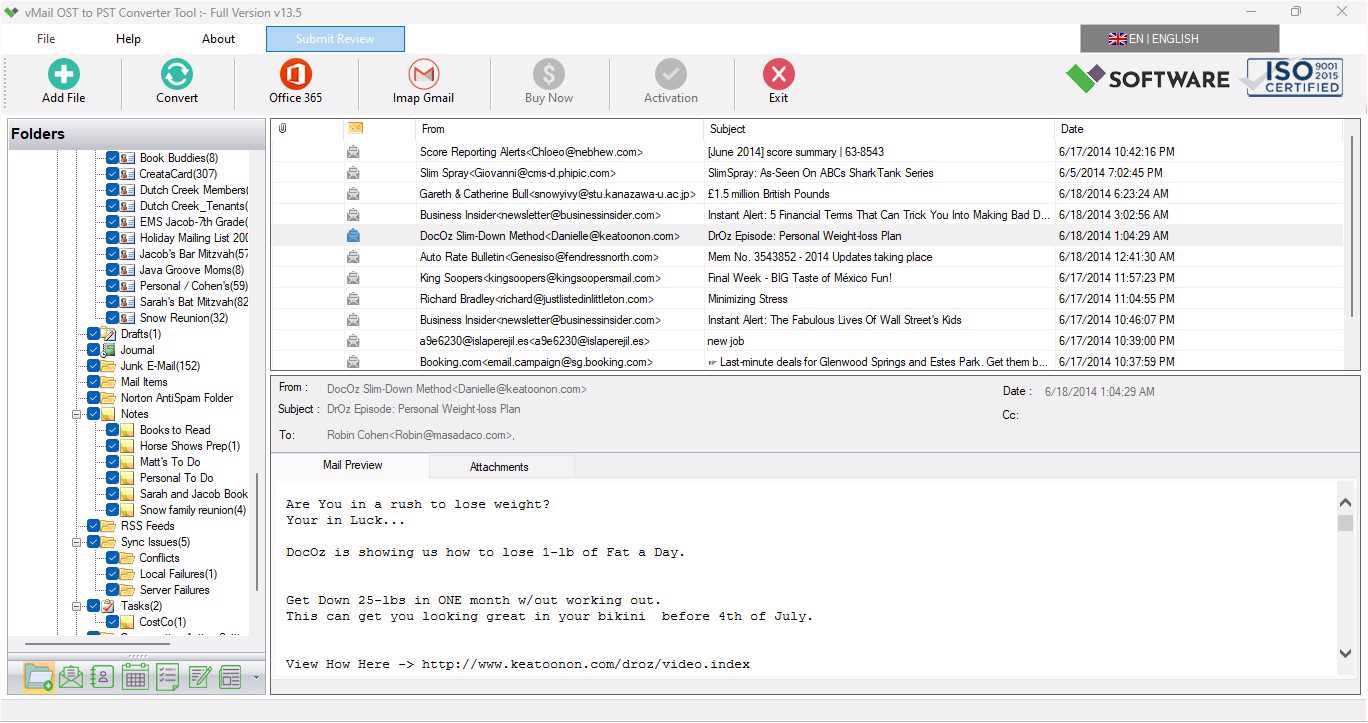
All mailbox data, such as emails, contacts, calendar events, tasks, notes, attachments, and other items in the form of an OST file, is stored by Outlook while using Exchange, Microsoft 365, or other compatible mail accounts. An OST file might become unreadable owing to synchronization problems, errors in Outlook, problems with profiles, hardware failure, or corruption in the file. In such cases, there should be some way for users to retrieve their mailbox data. An advanced vMail OST to PST Converter Tool is a good solution to retrieve data from unreadable, corrupted, orphan, encrypted, or password-protected OST files.
Why Convert OST to PST?
The OST file format is meant for use offline and synchronization with a corresponding account or server. In case the original account or Outlook profile does not exist anymore, the task of accessing the information stored by the file might prove to be complicated. PST is a portable Outlook data file meant for storage, backup, and migration of mailbox data.
OST to PST converter offers a great way of regaining access to your Outlook data. By using a reliable converter, you will be able to convert OST to PST without having to extract all the emails and mailbox items separately. All the mail folder data, including Inbox, Sent Items, Outbox, Deleted Items, Contacts, Calendars, Tasks, Notes, and other available data are recovered.
Advanced OST Recovery and Conversion
Apart from being a tool for normal conversion of files, the OST file converter tool is also an OST recovery tool. In other words, it can recover corrupt and damaged OST files that might have been corrupted due to errors in synchronization, hardware failure, viruses, forcing Outlook to close abruptly, etc. Hence, the use of the OST file to PST converter becomes necessary when the OST file cannot be accessed normally.
In addition to the above-highlighted features, it is also capable of handling encrypted and password-protected OST files. Instead of relying completely on the user’s Outlook profile, he/she can perform scanning of the OST file and view what mailbox items can be recovered before actually saving the recovered items.
Preserve Emails, Attachments, and Folder Structure
In the conversion process from OST to PST, preservation of the original email information is essential. The vMail software ensures that email features like 'To,' 'CC', 'BCC,' 'Subject,' 'Date and Time,' and attachments are preserved. It further ensures the retention of original structure of folders in the mailbox, making the retrieval of the converted information easy for users.
The program is capable of restoring various Outlook components like emails, contacts, calendars, tasks, notes, and other mailbox files. The program provides the preview feature, which enables users to check their restored emails before converting them into PST format.
Multiple Export Options
However, despite PST being among the most commonly used output types, there might be cases where other export types may be required by users. The vmail OST to PST converter tool provides a number of output options that help the user export OST files into PST, MBOX, MSG, EML, EMLX, HTML, PDF, RTF, vCard, and vCal files.
Thus, the OST to PST converter helps the user in cases where he wishes to export the mailbox data to another email client, have a readable version of the emails, and even export contacts and calendar data separately.
Support for Large and Different Outlook OST Files
Large OST files can become hard to manage as they tend to consist of emails and attachments that span over years. The program has support for OST files without any Exchange OST file size limitation as well as an option to split a large PST output into small PST files, thus making it more manageable.
The tool has support for OST files related to Microsoft 365 and Outlook 2021, 2019, 2016, 2013, 2010, 2007, and older versions.
Export OST Data to Office 365, Gmail, and Other Accounts
Many modern-day users have to transfer their Outlook data to somewhere other than PST files on their hard drives. The program allows the user to export the data in the mailbox in the OST format to Office 365 and Exchange Server. Besides, the OST file can be imported to Gmail, as well as many other e-mail environments, such as IMAP, Yahoo Mail, Yandex, and Rediff Mail.
The program offers Azure App Authorization and MFA migration features when moving data to Office 365 accounts.
Simple and User-Friendly Conversion Process
The process of converting OST to PST is supposed to be simple for users. They will only need to upload their OST file, scan and view the available items from the mailbox, select the necessary folders or data, and set PST as the target format. After setting the target, the software will then work on the data from the OST and generate the necessary PST file.
For users working with damaged or inaccessible mailbox data, an advanced OST to PST converter offers a viable solution for recovering the necessary data while keeping the conversion process simple.
Conclusion
If the OST file gets corrupted, then merely depending on Outlook is insufficient when trying to retrieve mailbox information. In order to recover OST data and convert it to an accessible PST file, an appropriate vMail OST to PST Converter Tool is required. Thanks to its capability to work with damaged, encrypted, and password-protected OST files; support different types of output formats; email preview; folder recovery; the ability to process large files; and even exporting data to Office 365 and Gmail, the OST to PST converter tool makes mailbox information recovery and conversion easy and convenient.
For all those who require an OST to PST converter tool for their mailbox information recovery and conversion, there is a special solution available

Comments