
Microsoft Outlook and Apple Mail utilize different email file formats in which the emails are stored. While Microsoft Outlook stores emails in the PST file format, Apple Mail works with the MBOX file format. For the above reasons, when a user switches from Outlook to Apple Mail, he needs to convert his PST files to MBOX files to make those emails accessible via Apple Mail.
vMail PST to MBOX Converter Software is the utility that helps to convert PST to MBOX files. The converted MBOX files can be used by applications including Apple Mail, Thunderbird, Spicebird, SeaMonkey, Netscape, and Eudora. It converts all the details of Outlook emails including emails, contacts, calendars, etc. along with maintaining the properties of emails including To, CC, BCC, subject, date-time, and attachment, etc.
Why Convert PST to MBOX for Apple Mail?
Apple Mail does not support opening Outlook PST files. Consequently, just moving a PST file from a PC to a Mac will not allow the user to use the mailbox in the Apple Mail program. The data must be converted to a format like MBOX.
This conversion becomes necessary for users if they have moved from Microsoft Outlook to Apple Mail or wish to use an old Outlook mailbox on a Mac. It will help users migrate all important emails without losing any data by converting PST to MBOX format and then importing the MBOX mailbox into Apple Mail.
However, manually migrating emails becomes challenging for users when the PST file consists of many emails, attachments, contacts, and calendar items. The converter makes this process easier by scanning the PST file, showing what data is there in it, and generating MBOX files out of it.
How to Convert PST to MBOX for Apple Mail?
The vMail PST to MBOX Converter Software makes it easy to convert PST to MBOX format. Since the software runs on Windows, the conversion from PST-to-MBOX needs to be done in a suitable Windows environment. Once the conversion is over, the MBOX files that are generated can be moved to the Mac computer and used in Apple Mail. The website of the software mentions Windows 11, 10, 8.1, 8, 7, Vista, and XP as the supported Windows environments.
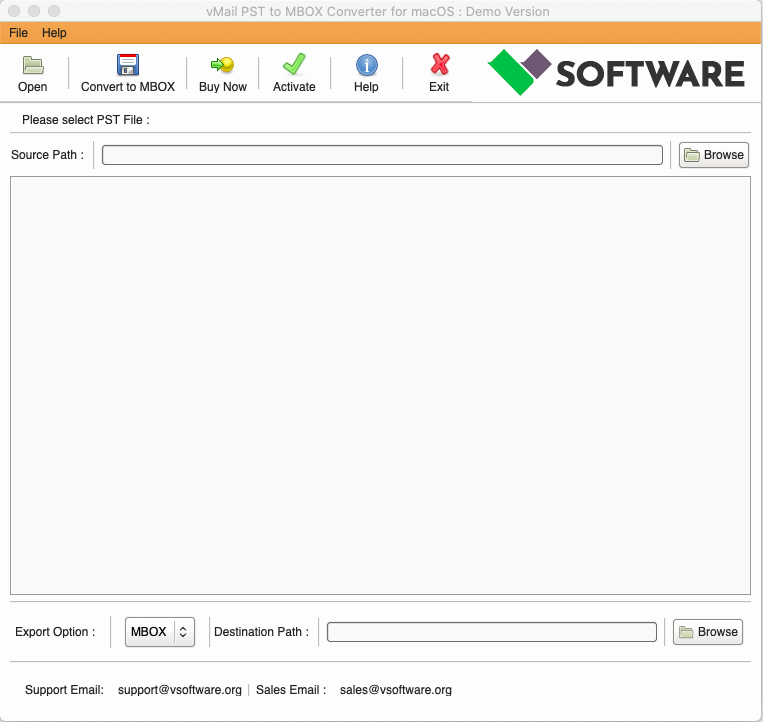
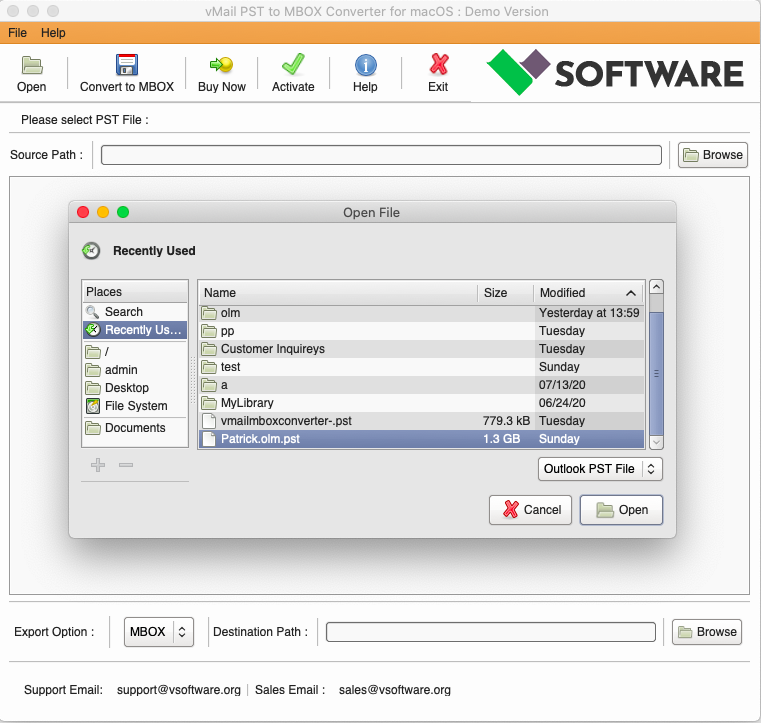
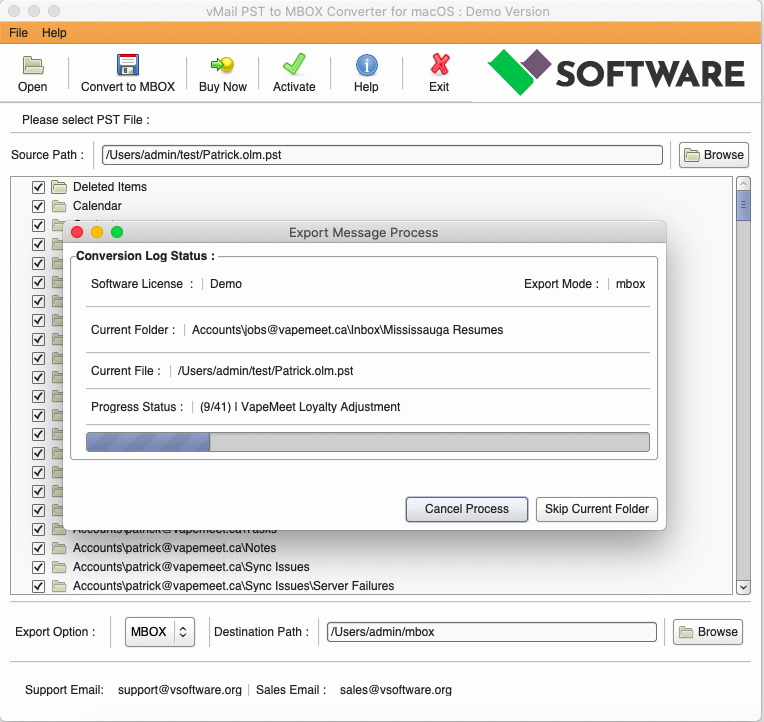
To start the process of conversion, one needs to install and open the converter software on the Windows computer. Then the PST file, which needs to be converted to MBOX, should be added to the software. This software scans the Outlook PST file and shows the mailbox data. One can preview emails before starting the process of conversion.
The basic process is:
STEP 1: Open vMail PST to MBOX Converter
STEP 2: Browse & Select Outlook PST file
STEP 3: Scan the Outlook PST file Data

STEP 4: Start The Conversion Process
Features Useful for Apple Mail Migration
The best PST to MBOX converter must ensure reliable conversion as well as maintain mailbox information. The vMail utility can work with PST files of different versions of Outlook, including Outlook 2021, 2019, 2016, 2013, 2010, and 2007. It can also work with older PST files. In addition, it can process ANSI and Unicode PST files as mentioned in the product FAQ.
One more helpful feature is that there is no restriction on the size of the PST file for conversion with this converter. This feature can be really helpful for users who have larger Outlook files with thousands of emails and attachments stored in them. Also, the converter allows you to view emails in preview mode before saving them in MBOX format. The demo version of the converter allows previewing data and saving up to 30 items per folder.
The program also preserves vital properties of the email when converting. Such details as To, CC, BCC, subject, date-time, and attachments can be preserved. This will help ensure that the converted emails can be used even after they are transferred to Apple Mail.
There is also an option to work with password-protected PST files. According to the product page, this software can convert password-protected PST files of Outlook into MBOX. Also, it can retrieve data from PST files and export it to MBOX.
Export Outlook Emails to Apple Mail
The key aim of this migration process is to Export Outlook emails stored in the PST file to MBOX in order to allow access to the emails via Apple Mail application.
This migration approach is extremely helpful for users who changed from Outlook to Apple Mail applications but want to access their previous email correspondence. Instead of manually copying each email, migrating the entire PST file to MBOX offers a better solution.
However, the converted MBOX format can be useful not only for the Apple Mail application. As described in the product description, MBOX files created in this process can be used with Apple Mail, Thunderbird, Spicebird, SeaMonkey, Netscape and Eudora applications.
Conclusion
Transferring emails from Outlook to Apple Mail will require conversion since PST and MBOX are two different mailbox formats. Using vMail PST to MBOX Converter Software will allow converting Outlook PST files into MBOX format, maintaining email properties and attachment details. While the conversion software runs on the Windows operating system, its MBOX files can be moved onto a Mac computer and opened by the Apple Mail application.
In case a user is in search of the best PST to MBOX converter, the demo version is capable of viewing emails along with some basic saving features. By doing the PST to MBOX conversion, one can export Outlook emails from Outlook to make them accessible via Apple Mail without any manual transfer of emails.

Comments