
It should be noted that MSG files are often created by Microsoft Outlook and are used for storing individual email messages with properties, attachments, formatting, etc., as well as other mailbox data. Nonetheless, when people have lots of MSG files, managing them may become quite complicated. In order to make their management easier, one might consider converting them to a PST file format, which is used by Microsoft Outlook. In this case, the main issue is to convert the files carefully in order to save all data related to emails.
There is a number of tools for MSG to PST conversion, which make the procedure rather easy. The vMail MSG to PST Converter is one of them. As it is stated on the product page, it converts MSG files to PST format, retaining email properties and folder structure. Moreover, it is possible to use it for conversion without having Microsoft Outlook installed on one's computer.
Why Convert MSG Files to PST?
The MSG file normally contains one individual Outlook message whereas PST is an Outlook data file that can contain a set of mailbox items in an organized manner. When users have a large number of MSG files, they would find opening each one to be a tiresome task. This is why converting them to PST makes it possible for them to manage several messages at once using Outlook.
There is also a need to convert MSG to Outlook when the user wants to merge individually saved Outlook messages in a central mailbox environment. The use of PST can help users to maintain several emails, attachments, contacts, calendar entries, tasks, notes, and other mailbox items within a single file.
The other requirement is the need to convert Outlook messages to PST when the user has already extracted individual Outlook messages, and now he needs to restore them in a more organized Outlook data file. This way, there is no need to open each file individually.
How to Convert MSG to PST Without Losing Email Data
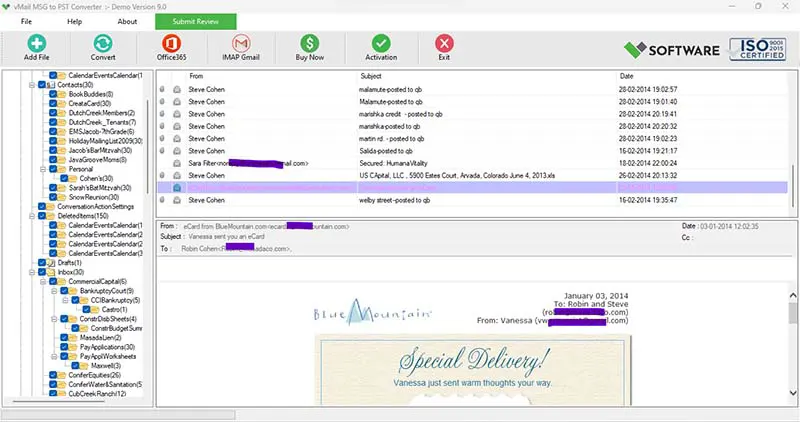
The best way forward would be to employ an MSG converter program that will allow one to preserve the data while converting. The vMail MSG to PST Converter has features that enable you to select your MSG file(s), view your mailbox details, use the date filter, and export your selected data into PST and other formats. The program preserves all your emails' formats and properties.
First, install and run the MSG to PST Converter software and click the "Continue" option. Navigate to the location of your MSG files and import the necessary files. This program allows you to choose single or multiple MSG files, especially when you need to convert many email messages at once.
Upon inserting the files, the tool offers a preview of the MSG data that is present. It enables users to see emails as well as other supported objects, along with attachments, before initiating the conversion process. Previewing the source data is helpful in that it helps users check if the necessary messages are available and pick out the right data for conversion.
In the next step, users need to set the desired output format as PST. If the MSG data size is large, then users can configure the conversion settings and begin the process. According to the product page, the software can handle MSG files without any limitation on the file size, up to 50 GB, and split MSG files into PST when needed.
Important Features for Safe MSG to PST Conversion
Among the main benefits of the MSG to PST converter application is that it can handle more than one file at a time without having to manually move each message into the converter. Batch processing saves a lot of time for big email folders.
Data integrity is also an important issue. In MSG to PST conversions, users usually wish to preserve all the information of their emails, including the original email body, subject, sender, recipients, date information, attachments, formatting, and other properties. The vMail program is intended to keep the folder structure, email format, and properties while converting.
The program also offers preview capabilities. Users can look at the MSG items, like emails, contacts, calendars, tasks, notes, journals, and attachments, before the conversion.
Another advantage of this program is the ability to filter files by date. The program doesn't have to convert all files, because users can choose those files that were created during a certain time period.
There are many output formats that this software supports. Apart from PST, the product page mentions MBOX, EML, EMLX, vCard, and vCal among others. The application is also able to export MSG files to Office 365, Gmail/G-Suite, and Live Exchange Server.
Convert MSG to PST Without Installing Outlook
However, there may arise some questions related to the necessity of the Outlook program for carrying out this conversion. As it is stated in the software description, users will be able to perform conversion of their messages from Outlook to PST format without having Outlook installed on their PC.
This software works on Windows OS, and the system requirements provided by the producer are: Windows 11, 10, 8.1, and 8; min. 4 GB RAM, 150 MB free installation space.
Final Thoughts
Conversion of individual MSG files to PST is one of the practical ways that can be used to sort out and arrange Outlook emails into one file. The conversion process should be designed to keep vital email details instead of changing file formats. The use of an MSG converter tool will make the process of conversion easier since it is capable of handling batch conversions, previewing, selective conversion, attachments, folders, and email details.
The vMail MSG to PST Converter allows you to convert MSG to PST while maintaining important mailbox details and can do the job even without the installation of Outlook. If you want to consolidate archived emails, arrange many MSG files, or just want to prepare email data for Outlook, the use of an MSG to PST converter tool is much easier.

Comments