
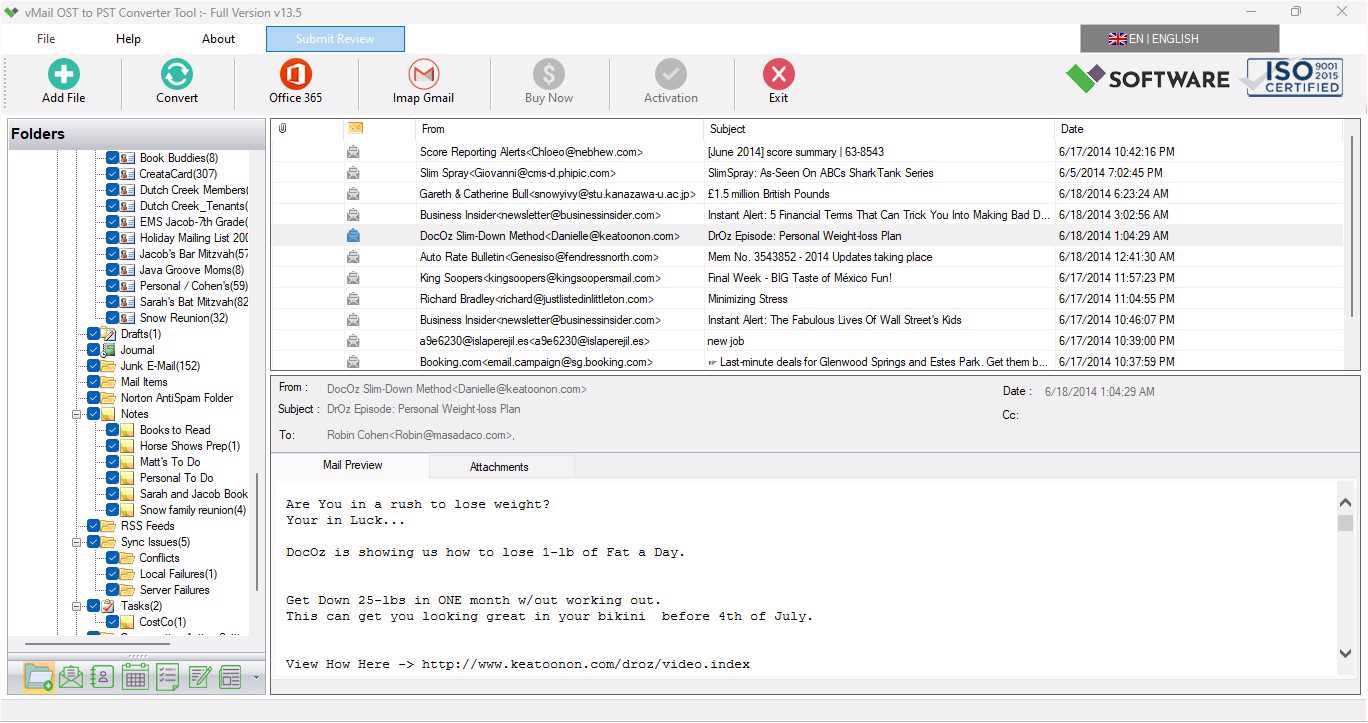
Outlook file management is not easy when the OST files are inaccessible, corrupt, or lose connection with the Exchange Server. At that time, the user finds the need for a safe procedure to do OST to PST Conversion without any loss of emails, contact information, calendar, or attachments. If you are looking for the best option for OST to PST File Conversion, then this article can be very helpful for you.
There is one such easy and safe tool available in 2026, which is called vMail OST to PST Converter Software. This software facilitates the user to convert OST mailbox files to PST files.
Why Need to Convert OST to PST File?
OST files operate in offline mode with Microsoft Outlook and Exchange Server. However, in certain cases, the following problems may occur when you need to convert OST files into PST files:
- Crashed Exchange Server
- Damaged Outlook Profile
- Inaccessible OST File
- The necessity to transfer data to another Outlook profile
- Backing up the mailbox data
- Moving from one computer system to another
- Synchronization problem with Outlook
- All these scenarios require converting the OST file to the PST file.
Best Option - OST to PST Converter Software
The vMail OST to PST Converter Software is a powerful utility used for converting Outlook OST files into PST files without altering the data structure of the files. The software is compatible with all versions of Outlook and Windows and can be used to export email messages with full details about mailboxes.
The program is very convenient to use, even for those without any technical background, due to its easy-to-use interface.
Main Features of the Software- Outlook OST Converter Software
Some main features of the OST converter software are listed below on the website:
Safely Convert OST to PST File
This software allows users to safely convert OST files into PST format without losing any important data. During the conversion process, it preserves email formatting, attachments, metadata, and the complete folder hierarchy to maintain data originality.
Converts Corrupted and Orphan OST Files
The OST to PST Converter tool can efficiently recover damaged, inaccessible, or orphan Outlook OST files and convert them into healthy PSTs along with emails, contacts, calendars, tasks, notes, etc. It lets you access mailbox data even when the Exchange Server connection is unavailable.
Keeps Original Folder Structure
The Outlook OST Converter to PST software easily repairs corrupted OST File with maintains the original mailbox folder structure during the OST to PST Migration process. All emails and mailbox folders remain correctly organized after conversion.
View Before Converting
Users can preview mailbox items such as emails, contacts, calendars, and attachments before starting the conversion. This feature helps verify data accuracy before exporting.
Convert Multiple Formats
The OST Converter Software is designed in such a way that one can easily convert various mailbox items such as emails, contacts, calendar, task, notes, journals, and attachments without any data loss. And also save Outlook OST File into PST, EML, MSG, HTML, MHTML, EMLX, Gmail Server, Live Exchange Server, Office 365, IMAP, etc.
Supports All Outlook Version Compatibility
The software is compatible with all major Outlook versions, including Outlook 2021, 2019, 2016, 2013, 2010, and older versions. Users are able to easily access and convert OST files from various versions of Outlook without experiencing compatibility problems when converting the files.
Easy-To-Use User-Friendly Interface
The vMail Outlook OST to PST Converter software features an easy-to-use, user-friendly interface that enables users of all backgrounds to easily convert OST files using the software without having to be tech-savvy.

Comments