
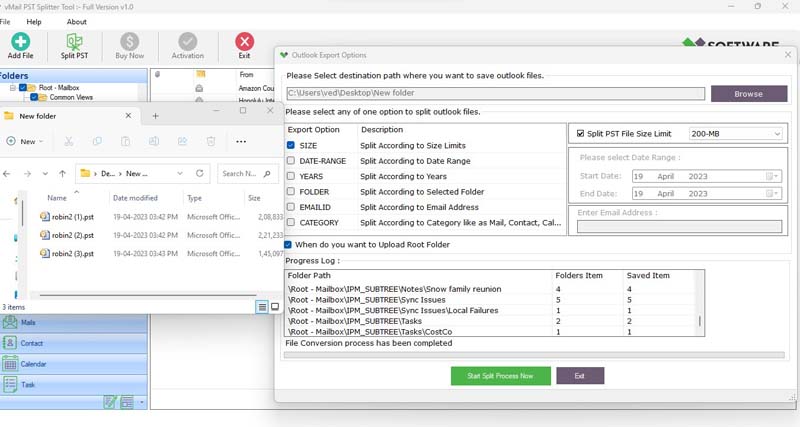
Managing Outlook data becomes difficult and most challenging for users when the Outlook PST File grows too large. Oversized PST Files can lead to file corruption, slow performance, and even complete inaccessibility. If you have ever faced issues like Outlook freezing or error messages while opening your mailbox, chances are your Outlook PST files have exceeded their recommended size limit. To avoid such problems, using a professional and reliable vMail Outlook PST Split tool is the best and smartest solution.
Why Do PST Oversize Errors Occur?
MS Outlook stores emails, contacts, calendars, tasks, notes, and other mailbox data in PST Files. Over time, as mailboxes, emails, and attachments accumulate, the Outlook PST File size increases. Older versions of MS Outlook have strict limits (like 2 GB), while the latest versions let upto 50GB. Some common reasons for PST Oversize errors include:
- Large attachments such as documents and videos.
- Lack of daily file maintenance.
- Multiple mailbox items are stored in a single PST File.
- Continuous email storage without clean-up.
When the file becomes too large, slow down, Outlook may crash, or display errors like “ PST file reached maximum size.”
Why You Should Split Large PST Files
For maintaining Outlook performance, it is essential to split large Outlook PST Files into smaller, manageable parts. Splitting helps in:
- Split PST helps to improve Outlook speed and efficiency.
- Making backup and conversion easier.
- If you split the PST File then you can reduce change of file corruption.
- Enhancing overall data management.
Instead of manually dividing data, using a professional Outlook PST File Split Tool ensures accuracy by splitting the larger PST File.
Smart Solution – vMail PST Split Tool
The wonderful and most trustworthy vMail Outlook PST Split Tool is best to split oversized and large PST Files without making changes in the original database. The Outlook PST File Splitter Software allows users to split files based on date, size, folders, emails, or year, making the entire process efficient and flexible.
Whether you are an IT professional or individual user, this Outlook PST File Splitter Software simplifies the process and ensures your data remains secure and safe.
Key Features of vMail PST Splitter Tool
1. Split PST by Size
By using the Outlook PST Splitter Tool, you can split a large Outlook PST File into smaller sizes, such as 2GB, 5GB, or 10GB. This helps prevent future oversize errors.
2. Split by Date or Year
Download the best vMail Outlook PST Split tool, which can split large Outlook PST Files based on exact date ranges or years.
3. Maintain Folder Structure
During splitting the large Outlook PST File, the software preserves folder structure, email attachments, email formatting, and properties- to, bcc, cc, time, etc by the software.
4. No Data Loss Guarantee
One of the major advantages of this vMail PST Split tool is that it keeps all email attachments, formatting, and properties- to, bcc, cc, time, subjects, and from, etc.
5. Supports All Outlook Versions
The vMail PST split tool works effortlessly with all major Outlook versions, such as Outlook 2021, 2018, 2016, 2013, 2010, and previous versions etc, making it a reliable choice for all users.
6. Easy-to-Use Interface
Even non-technical users can effortlessly operate the vMail PST split tool without any complications. Use it and split large Outlook PST files into small PST File upto 50GB.
Conclusion
Oversized PST Files can disrupt your workflow and lead to serious data issues if not handled correctly. Instead of waiting for errors to occurs it is better to take preventive action. By using the best Outlook PST Splitter tool, users can split their large PST File into small PST File upto 50GB.
The vMail Outlook PST Split tool provides a secure, smart way to split oversized Outlook PST Files without errors. With its advanced features and easy interface, you can maintain your PST Outlook data and avoid oversize errors permanently.
Start managing your Outlook PST files smartly today and keep your Outlook running smoothly without interruptions.

Comments