
If you are working with MS Exchange Server, you may have come across Exchange EDB Files. These files store mailboxes, including emails, contacts, calendars, tasks, notes, journals, inbox items, and outbox items. However, several users face a common problem—they cannot open EDB files directly. This problem often arises due to corruption, server crashes, or a lack of access to the Exchange environment.
If you are stuck in this situation, don’t worry. The best option is to perform an Exchange EDB to PST Conversion, which lets you access your mailboxes' data in MS Outlook easily. In this blog, we will discuss the reason behind this issue and the easiest way to resolve it easily and instantly.
Why Cannot You Open an EDB File?
Exchange EDB Files are designed to work only with MS Exchange Server. Unlike Outlook PST Files, they cannot be opened directly in Outlook. Here are many common reasons why you may be unable to access your Exchange EDB File.
- Exchange Server is crashed or down.
- Database corruption due to a crash and unexpected shutdown.
- Orphaned and corrupted Exchange EDB Files.
- Lack of an exchange environment.
- Permission or Access Issues.
In such cases, manual methods become very complicated and time-consuming. This is why all users prefer a professional Exchange EDB Converter to PST Solution.
Why Convert EDB to PST?
Repairing corrupted, damaged Exchange EDB files and converting EDBF Files into PST format offers many advantages.
- Easy access to Emails and mailbox data in Outlook.
- Not required the dependency on Exchange Server.
- Take a secure backup of the Significant Exchange Emails with attachments.
- Simplified the Exchange data migration process.
- It supports selective mailboxes and email recovery and conversion.
This is why Exchange EDB to PST Conversion is widely recommended by IT professionals and organizations.
Manual Method vs Professional Solution
There are manual ways to recover data from EDB files and convert Exchange EDB to PST Outlook, such as using the Exchange Management Shell or Recovery database. However, these methods come with limitations.
Limitations of Manual Methods
- Required technical expertise.
- Time - consuming process
- Risk of data loss or corruption.
- Not suitable for large, corrupt, or damaged Exchange EDB Files.
- Need an active Exchange Server.
Because of these drawbacks, most users favor an automated solution like vMail EDB to PST Converter Software that easily works to repair corrupted, damaged EDB files, recover Exchange mailboxes and emails with attachments, and Export EDB files to PST files without data loss.
Instant Solution: vMail EDB to PST Converter Software
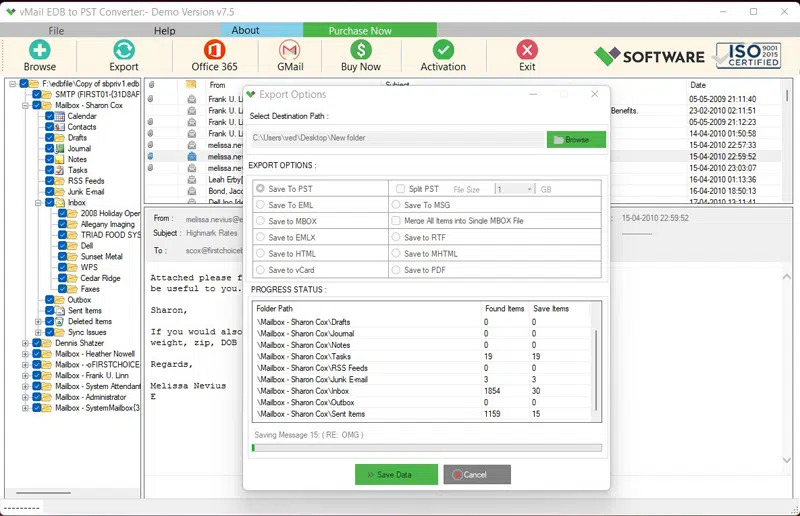
vMail Exchange EDB to PST Converter Software is 100% safe and secure application that fixes all issues of EDB files and repairs damaged Exchange mailboxes included emails, contacts, calendars, tasks, notes, etc. Software is designed to simplify the EDB to PST Conversion Process. Software allows users to convert EDB Files into PST Outlook files without requiring an Exchange Server.
Key Features of the Best EDB Converter to PST Software
Quick and Accurate Conversion
Download vMail EDB to PST Converter Software ensures fast conversion of Exchange EDB Files with maintains data integrity without data loss. EDB Converter to PST Software allows you to quickly and accurately convert from an EDB File to a PST file.
Supports Corrupted EDB Files
EDB to PST Conversion Software supports corrupted Exchange EDB Files for repairing the database and converting the Exchange Mailboxes EDB file to a PST file with emails, contacts, calendars, tasks, notes, and other formats.
No Exchange Dependency
Now with the best EDB Converter Software, you can perform Exchange EDB to PST Conversion with emails and attachments without installing Exchange Server and MS Outlook application without problem.
Preview Before Conversion
vMail EDB to PST Converter Software provides a complete preview of Exchange Emails, contacts, calendars, tasks, notes, inbox items, etc before converting EDB to PST File. Software supports all Exchange versions and Outlook Versions.
Maintains Folder Structure
The vMail EDB to PST Converter Software preserves the original folder hierarchy, email formatting, and attachments during EDB to PST Conversion. Software will not make changes in the database during conversion.
Selective Conversion Option
The Free EDB to PST Converter Software allows users to convert specific mailboxes or folders as needed. You can choose the date filtering option to filter the emails by dates for a selective mailbox and email conversion.
Multiple Saving options
You can recover and convert the data from EDB files into PST, MBOX, EML, MSG, HTML, MHTML, PDF, RTF, and vCard formats. And you can also convert EDB files to Gmail/ G-suits, Exchange Server, and IMAP Server.
Conclusion
Facing issues while opening an Exchange EDB file is fairly common, especially when the Exchange Server is inaccessible or the file is corrupted. Instead of struggling with complex manual methods, the best approach is to perform an EDB to PST conversion using a reliable tool.
The vMail EDB to PST Converter Software provides a quick, secure, and hassle-free way to convert Exchange EDB to PST. With its advanced features and user-friendly interface, you can instantly access your mailbox data in Outlook without any complications.
So, if you cannot open your EDB file, don’t panic—just convert it to PST and regain access to your data instantly.

Comments