
However, the most commonly used email client software is the Microsoft Outlook email client, and within the Outlook email client, all the information is kept in the form of the PST File, which is a Personal Storage Table. Even though the PST File can be used flawlessly within the Outlook email client, the problem that arises here is that the email client software, such as Thunderbird, Apple Mail, and Eudora, cannot support the PST File, which can only be opened in the form of the MBOX File.
We'll discuss the best method for successfully exporting and converting Outlook PST file data in the upcoming blog. Knowing how to convert Outlook PST files into MBOX format is crucial, regardless of whether you are making a permanent switch or simply wanting a safe form of backup.
Why Export PST File to MBOX?
The reasons why users would like to switch are several:
- Cross-Platform Compatibility: MBOX format can be viewed by a wide range of applications, unlike the PST format, which can be viewed with Thunderbird, Apple Mail, Entourage, SeaMonkey, and others.
- Increased Accessibility – Many people are fond of using MBOX because of its simple architecture and is accessible on all systems.
- Platform Migration - Upgrading from Outlook to Thunderbird or Apple Mail requires conversion of PST files to MBOX files, thereby providing easy access to the data.
- Backup & Archiving - MBOX format is small and easy to manage.
Obviously, converting PST to MBOX will be useful, as this will boost the efficiency and efficacy of your vital email records.
Manual Methods to Convert PST to MBOX File
Some manual techniques have been helpful, but for ease, let's employ some professional techniques. There are two techniques for sure.
Method 1: Export PST to MBOX via Microsoft Outlook
- First, open Outlook, then go to File, then to Open & Export, then to
- For "Export to a file," choose "Outlook Data File (.pst)
- Save the exported PST file to your system.
- Now, sync Outlook with another email client, such as Thunderbird, using services such as IMAP (like Gmail or Yahoo Mail).
- Export the synchronized mailbox in the MBOX format from Thunderbird.
This is a workaround method, which, though it eventually helps to perform conversion from PST to MBOX, incorporates some extra procedures to complete data synchronizing, and this, too, takes some extra time to finish.
Method 2: Using Apple Mail
MBOX file format can be opened with Apple Mail as well. The data can be migrated from an Exchange server with the following steps:
- Firstly, it requires configuring your Outlook account via Apple Mail.
- Enable emails to sync completely.
- Select Mailbox > Export Mailbox in Apple Mail.
- Save the file as. mbox on your Mac.
You have now successfully made the available PST files accessible in an MBOX file. Similarly, large PST files may not work while being synchronized. This may take a considerable amount of time.
Limitations of Manual Conversion
Even though there are manual ways of doing this, there are usually severe complications that are encountered and are possibly capable of interfering with the successful export to MBOX
- Require multiple email accounts.
- Too time-consuming, especially when dealing with large files.
- The risk that data may become corrupted or incomplete during transfer.
- Unable to manage large PST files.
Most users prefer a professional approach for a seamless PST to MBOX converter due to these disadvantages.
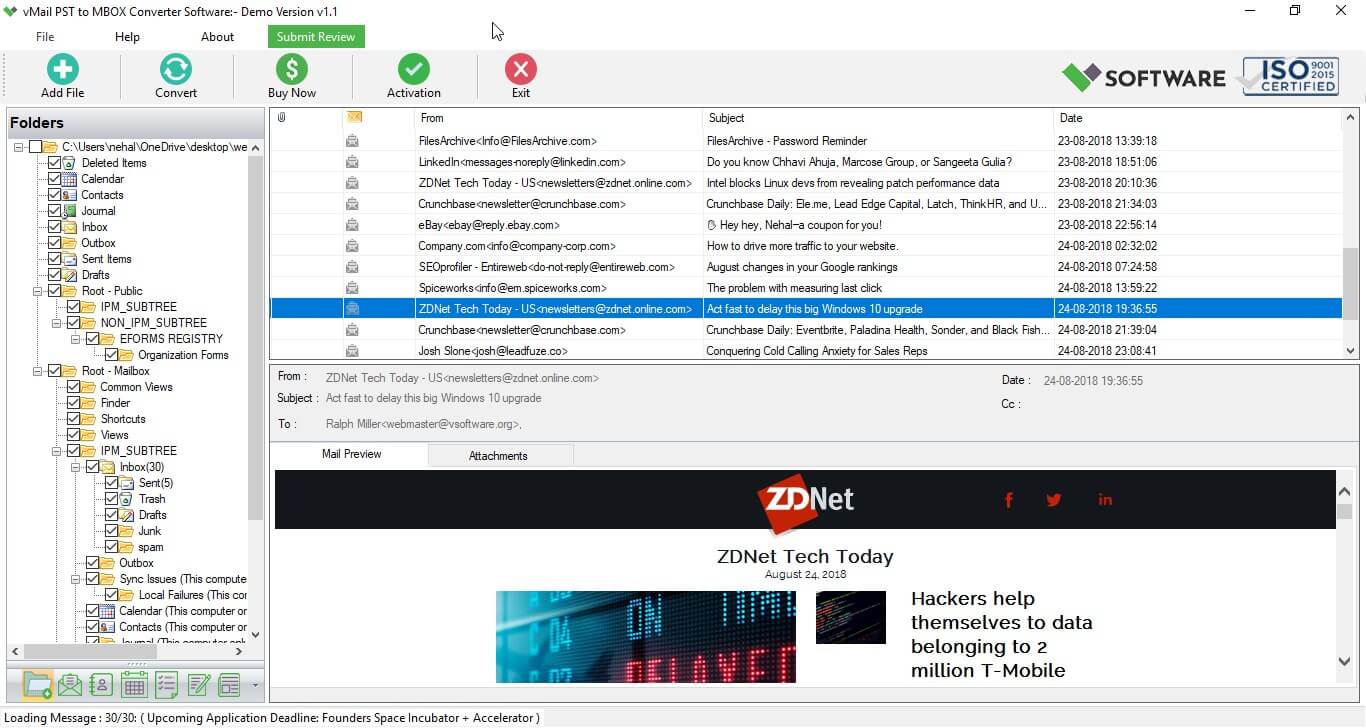
Professional Method: Use vMail PST to MBOX Converter Software
The most reliable and easy way to convert PST emails to MBOX format is using vMail PST to MBOX Converter Software that easily works to recover data from Outlook PST files and convert PST to MBOX with emails, contacts, calendars, tasks, notes, and other items. This tool guarantees secure access to data without compromising confidentiality or risking loss after exporting Outlook emails to a MBOX file without data loss. Utilize the power ofthe advanced PST File Converter software to unleash the full potential of email data, which can enable you to:
- Effortlessly convert PST to MBOX file.
- Conversion of PST file to MBOX Format in a Secure Way
- The supported mail clients by the MBOX file are Thunderbird, Spicebird, SeaMonkey, and Netscape.
- No data loss is at risk when converting from PST to MBOX.
- Maintains all the properties of emails like To, CC, BCC, Date-Time, Subject & Attachments.
- Restore data from password-protected PST files
- There is no limit on the size of a PST file that can be converted.
- Compatibility with Outlook 2021, 2019, 2016, 2013, 2010, and 2007 versions of the PST file
- Allow previewing recovered emails before conversion of PST to MBOX.
- This version is updated to support the Latest Version of Windows with an Outlook PST File.
- Migrate Outlook to MBOX using vMail PST to MBOX Tool
Steps to convert PST to MBOX with Attachments
STEP 1: Open vMail PST to MBOX Converter

STEP 2: Browse & Select Outlook PST file

STEP 3: Scanning Outlook PST file Data

STEP 4: Start The Conversion Process


Comments