
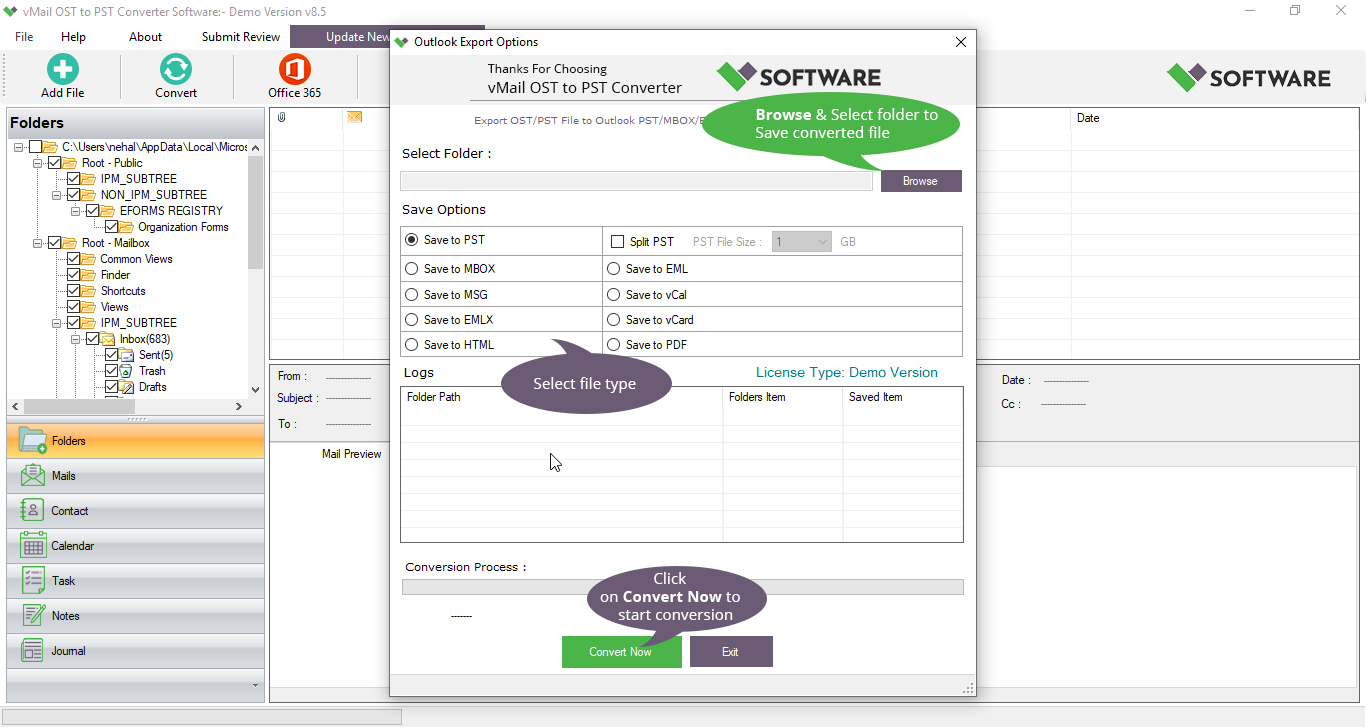
Yes, converting Outlook OST Files to PST Files is important for MS Outlook. There are many scenarios when users desire to convert OST to PST. For example, when users want to back up their mailbox, move data to another system, or recover the emails from a damaged, corrupted, or orphaned Outlook OST File. Manual techniques can be risky and time-consuming, so a specialized OST Converter to PST Software plays the best role in this condition without data loss.
When Outlook or Exchange Server faces unexpected crashes, users may lose access to their Mailbox data. This is the situation where OST to PST Conversion plays an important role. By converting the Outlook data into PST format, users can regain all access to their emails, contacts, calendars, attachments, journals, notes, and other mailbox items without relying on the original server.
Common Situations Requiring OST to PST Conversion
- Exchange Server Crashes or Downtime: If the Exchange server becomes corrupt or goes offline, then users may not be able to access their Outlook data. Converting OST to PST allows data recovery in such cases.
- Outlook Profile Errors: When Outlook profiles are accidentally corrupted, damaged, or deleted, PST Files can act as a backup to restore emails.
- System Migration or Upgradation: During offline 365 migration or system changes, converting Outlook OST Files to PST ensures an easy data transfer.
- Backup and Archival Needs: Storing PST files is a good way to maintain offline backups of your important mailbox items.
- Access on Another Device: The PST File can be imported into Outlook on any other system easily, ensuring data flexibility.
Why Choose an Automated OST to PST Converter Tool?
Manually converting an OST File into a PST file can be complicated and risky, especially for users who have no technical knowledge. A professional vMail Outlook OST converter to PST Software is easy to use and converts data from the OST File to the PST File. It ensures a smooth, error-free process for converting data. Software can handle large, corrupted, and password-protected OST Files to extract the data to convert it into a PST file with maintains folder structure and preserving the integrity of emails with attachments. Moreover, the software supports selective data conversion, letting its users select specific folders and emails to Export data completely with a preview.
The best OST to PST Converter software also minimizes the chances of data loss or corruption during conversion. An automated tool can work even if the Outlook OST files are corrupted, damaged, or inaccessible, but manual methods are totally dependent on Outlook and Exchange connectivity. It will not perform in the absence of an Exchange and Outlook connection.
How to Convert OST to PST Using a Professional Tool
Follow these simple steps to perform OST to PST conversion with an advanced utility:
- Install and Launch the Tool
Download and install the vMail OST converter to PST software on your system. Open the tool after installation. - Add OST File
Now, click on the “Add File” option to browse and choose your Offline OST file from the system. - Preview Mailbox Data
The software will automatically scan and preview the mailbox items, such as journals, tasks, notes, emails, attachments, contacts, and calendars. You can preview data before conversion. - Choose Output Format
Now you can choose the PST as your desired file format. Or you can choose different exporting options, such as- like MBOX, EML, MSG, and Office 365. - Apply Filters (Optional)
You can use the filter option that is based on dates to export data within a specific date range or folder, contingent on your needs. - Start Conversion
Now it’s time to choose the destination folder where you want to save the converted PST file and click “Convert.” The process will start, and you’ll get a report when it’s complete. - Import PST to Outlook
After conversion, open Outlook and import the newly created PST file. Your mailbox items will appear in Outlook as before.
Advantages of Using a Reliable OST to PST Converter Software
A professional OST to PST converter tool offers several key advantages over manual methods:
- Preserves Folder Structure: It maintains all folder structures during the conversion of OST files to PST Files.
- Conserves Metadata and Attachments: It keeps all attributes like To, Cc, Bcc, Date, and attachments safe.
- Grips Large Files: It supports handling large OST files to convert into PST files and other formats without data corruption.
- Batch Conversion: Allows multiple OST files to be converted to PST in one go.
- Preview Option: Lets you verify data before saving it.
- High Compatibility: Supports all Outlook and Windows versions.
These features make the Outlook OST converter the best choice for users seeking accuracy and speed.
Final Thoughts
Converting Outlook OST Files to PST is not just a recovery step—it’s a smart data management practice that ensures you always have access to your essential Outlook data. Whether it is due to server issues, profile corruption, or migration required, performing the OST to PST Conversion gives you full control over your mailbox content.
By downloading this vMail OST to PST Converter software, it becomes possible to convert complete data of your OST file with speed, accuracy, and safety. Instead of the Manual techniques, choose a professional vMail Outlook OST Converter software that ensures a perfect result every time.
In short, if you ever face a situation where your Outlook data becomes corrupted or inaccessible, don’t panic; easily use a trustworthy OST Converter to PST Software and regain your data in just a few minutes. With the right methods, you can ensure data accessibility and reliability at all times.

Comments