
The process of email migration may turn out to be tough in the case of large MBOX files that store years of emails with attachments, images, etc. MBOX format is popular in such email software as Mozilla Thunderbird, Apple Mail, Eudora, Entourage, SeaMonkey, as well as several other mail clients. Nevertheless, if users wish to migrate their mailbox data to Microsoft Outlook, it is necessary to convert MBOX data to PST format, since Microsoft Outlook uses the PST file format for storing data.
It becomes especially difficult if MBOX files are large and store thousands of emails with important attachments. A mere conversion is not enough, and users should care about preserving such important elements of emails as attachments, formatting, metadata, hyperlinks, and the structure of folders. With the help of a reliable IDC MBOX to PST converter, it is possible to process large MBOX files and save emails in PST format. The conversion process helps users manage their mailbox data in Outlook without manually transferring each email and attachment.
Why Convert Large MBOX Files to PST?
Many common email clients support MBOX files; however, Microsoft Outlook does not have a direct option for importing MBOX files. Hence, while changing from Thunderbird, Apple Mail, Eudora, and other email clients using the MBOX format to Outlook, there should be a conversion technique to adopt.
Outlook offers several features for management of business and personal emails, contacts, calendar entries, tasks, notes, and other mailbox items. Many organizations opt for Outlook because of its compatibility with Microsoft 365, Exchange Server, and other business applications.
In case of a mailbox file containing several hundred or thousands of emails, manual transfer of each item will be time-consuming and unfeasible. Moreover, in case of emails containing attachments, it becomes more tedious. Professional software can process the mailbox data automatically and make the complete migration process easier for users.
Why Are Attachments Important During MBOX to PST Conversion?
Attachments are a crucial aspect of both business and personal email communication. Attachments may include documents, invoices, presentations, images, spreadsheets, contracts, reports, and many other files required by users after migration. Loss of attachments during the conversion process will affect the completeness of the converted mailbox.
Therefore, when converting MBOX to PST, users are advised to adopt the right method of conversion where all the contents of the emails are maintained. The email contents should include the body of the email, attachments, sender information, recipient information, subject, date, hyperlinks, images, metadata, and many other properties.
The professional email conversion process is created with the aim of maintaining all these details so that users can open them together with attachments in Outlook. This makes it easier for users to continue accessing their previous email communication after migration.
Make Use of a Professional MBOX to PST Converter
A professional vMail MBOX to PST converter provides a mechanism for moving mailbox data into PST files in an automated way. Rather than working with individual emails, the user needs only to select the MBOX files, and then the tool will start working on them.
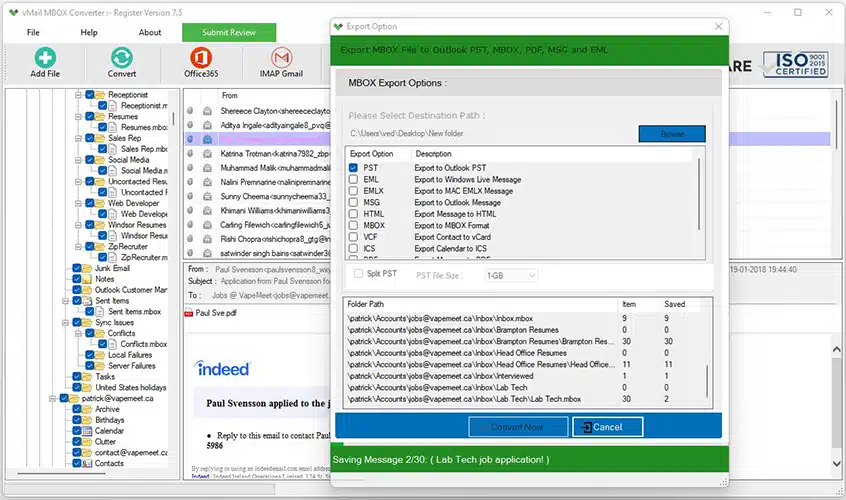
It is helpful to both individuals and companies who want to move their emails to PST files. The user can select the MBOX files that they want to convert, view the mailbox content, select PST as the output format, select the destination folder, and finally start the conversion process.
The software can handle the selected mailbox data in an organized manner and makes the conversion process easier for users dealing with large MBOX files.
Preserve Attachments and Email Properties
The preservation of email properties while converting MBOX is one of the most crucial elements. A trustworthy converter must preserve all the necessary information connected to each email.
As far as migration from MBOX to PST is concerned, it is possible to maintain such attributes of emails as details about senders and recipients, CC/BCC fields, subjects, timestamps, email formats, hyperlinks, images, attachments, and other meta-information.
Attachments stay associated with every particular email. Thus, it becomes easy for users to get access to attached files upon opening of the converted PST file in Outlook.
Convert Multiple MBOX Files in One Process
There might be many MBOX files present in an organization that belong to various users or email accounts. The conversion of each MBOX file takes a lot of time.
It is possible to use professional tools for the conversion of MBOX files to make the process more efficient. Batch conversion saves time and effort by performing similar tasks repeatedly.
For instance, an IT administrator in an organization can have various MBOX files present on the system, which are acquired from various employees' mailboxes. It becomes quite easy to convert all those files using the batch conversion feature. Instead of processing every MBOX file separately, multiple files can be handled in one process.
Preview MBOX Data Before Conversion
The preview feature might prove to be helpful when handling large mailbox archives. Prior to actually starting the conversion process, users can look through the mailbox information available and choose those folders and emails that need to be migrated.
The preview may include the mailbox folders, email content, attachments, information about the sender, recipient, and many other pieces of data that might be included. In addition, it allows users to ensure that all needed data is selected for storage as PST. Thus, by using the preview of the mailbox, the users will not have to transfer the data they do not want to have, especially if dealing with large MBOX files.
Maintain Original Folder Structure
Mailbox organization is another important aspect that should be considered during the process of migration. Emails accumulated for years may be stored in different folders and subfolders according to specific projects, customers, departments, or personal preferences. If users decide to transfer their MBOX files to PST format, maintaining this structure will facilitate further management of the mailbox after the process of migration is completed. A reliable MBOX converter is able to preserve various folders such as Inbox, Sent Items, Drafts, Trash, Archive, and many other folders. There will be no need to organize the migrated mailbox in Outlook after opening the PST file if all folders of the original mailbox are preserved.
Support for Various MBOX Email Clients
The MBOX format does not pertain to a single email client. Various programs employ MBOX to save mailbox information. Mozilla Thunderbird, Apple Mail, Eudora, Entourage, SeaMonkey, and many other email clients can create and use MBOX-format mailboxes. In this case, the suitable conversion software program should have the capability to perform the conversion process of MBOX files from different supported email clients. Following the conversion process, the email information will be available in the form of a PST file in Outlook. This implies that users can migrate the mailbox information from supported MBOX email clients to Outlook without having to transfer the individual emails manually.
Selective Conversion of Mailbox Data
Migrating an entire mailbox is not always necessary. The user may need only certain folders or email data. A selective migration can be effective in such cases since it gives users the opportunity to select only the required mailbox data.
For instance, a user may need only to migrate the inbox and sent items but not the archive folders from the past. Selecting only the required data helps save conversion time and storage space for the generated PST file.
Export MBOX Data to Outlook PST
An MBOX converter primarily converts the source MBOX mailbox into a PST file compatible with Microsoft Outlook. After completing the conversion, the generated PST file can be opened or imported into Microsoft Outlook.
Using an MBOX to Outlook PST converter makes the work of users migrating from an MBOX-supported email client to Outlook much easier. There is no need to copy messages manually, as the whole process of conversion is done automatically.
The PST file generated after conversion will have emails, attachments, folders, formatting, and other supported mailbox properties. This makes the converted PST file suitable for further use in Microsoft Outlook.
Can a Free MBOX Converter Handle Large Files?
When people require migrating their mailbox data, the most common search term they use is the “free MBOX converter.” Although free converters can be effective for simple needs, advanced users may require bulk migration, attachment support, preview options, and migration of large files.
The first thing that one should consider when selecting a converter for a business mailbox or thousands of emails is the capacity of the selected tool to migrate the entire mailbox and ensure that attachments are not lost during the process.
Professional software often offers demo versions that can help users check its effectiveness. Users can review the available features and test the conversion process before deciding on complete migration.
Conclusion
Converting big MBOX files into PST can be difficult when there are numerous emails and valuable attachments in your mailbox. A manual approach might take time and might not suit large-scale email migration processes.
vMail MBOX to PST converter tool can be a better choice to convert MBOX to PST file format while retaining valuable email properties and attachments. Many aspects such as batch conversion, mailbox previewing, selective conversion, preserving the folder hierarchy, and conversion of huge MBOX files may help in the process of migration.
In case you need MBOX to PST conversion for your own purpose or even MBOX to Outlook PST migration in a corporate setting, the choice of proper conversion software will guarantee the safety of your emails. If you decide to try a free MBOX converter, then it would be better to start with the trial version.

Comments