
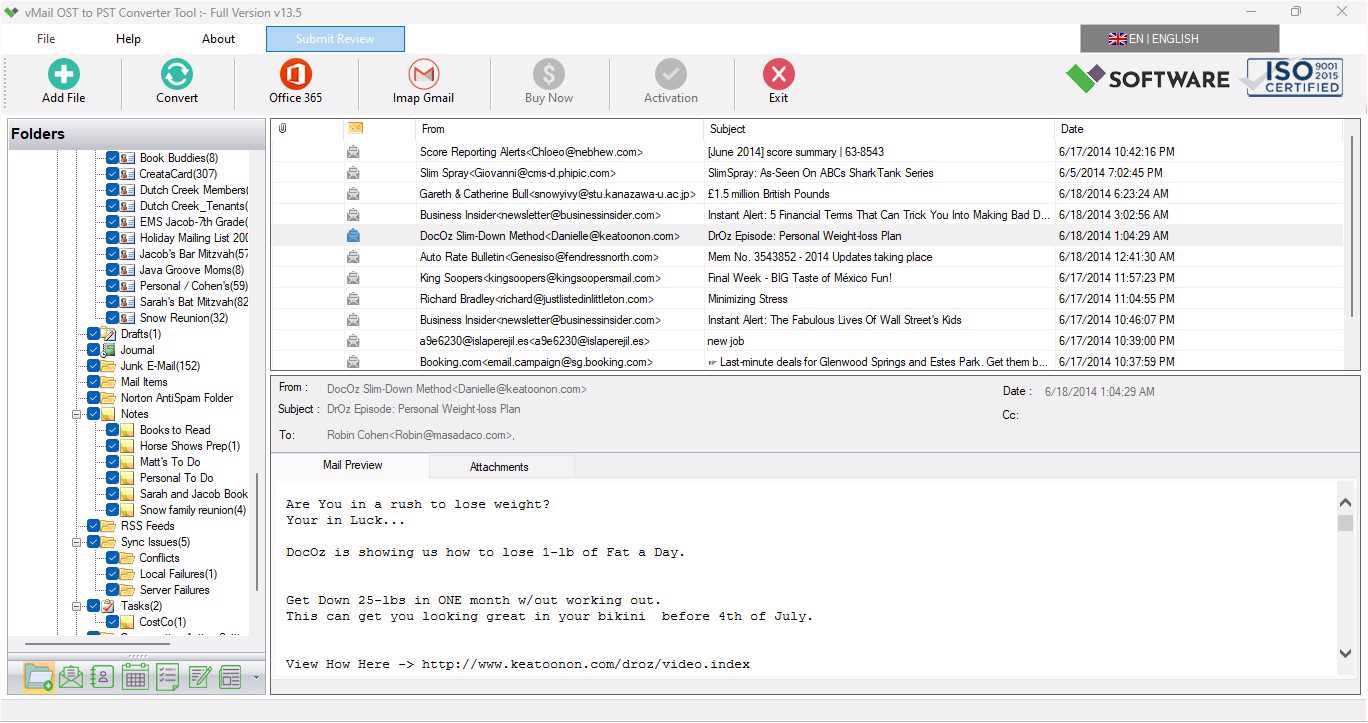
Microsoft Outlook is extensively used for the management of emails, contacts, calendar, tasks, notes, and other mailbox data. If Outlook is linked to an Exchange Server, Microsoft 365, or an IMAP account, then the mailbox data is usually stored in the OST file. The OST file helps the user to access the mailbox data even when the account is not accessible. But if errors occur in Outlook, then the OST file becomes inaccessible, corrupt, orphaned, or tough to manage.
In such cases, exporting the data from the OST file to PST becomes a good solution for accessing mailbox data again. The use of a reliable vMail OST to PST converter will assist users in extracting emails and other mailbox data from the OST file and saving the data in a PST file.
Why Do Outlook Errors Occur with OST Files?
OST files have much to do with the Outlook profile and the account that was used to create the file. In case of absence of an Exchange account, corruption of the Outlook profile, lack of synchronization, or damage to the OST file, people can experience different Outlook errors.
Outlook not opening, synchronization problems, lost emails, inability to access mailbox folders, or any error related to the OST file can happen. In certain cases, the OST file can become orphaned after the account is deleted or the user profile is modified.
OST files cannot be simply imported into Outlook, unlike PST files, and it is necessary to export OST to PST.
How OST to PST Conversion Helps Fix Outlook Problems
PST is a portable Outlook data file that can be read, imported, backed up, and exported among various Outlook profiles. As such, conversion of an inaccessible or orphaned OST file to PST will make management of mailbox data easier.
In the process of OST to PST conversion, it becomes possible to export emails, attachments, contacts, calendars, tasks, notes, journals, and any other items that are present in the mailbox into the OST file. Being converted into PST format, mailbox data can be accessed by the user without having to use the original connection to Exchange.
This technique can be helpful when there is a need to access data previously stored in email without the availability of the original account anymore.
Use a Professional OST to PST Converter Software
The use of a professional vMail OST to PST converter tool is an automated technique of extracting data from the OST file. Rather than trying to carry out complex procedures manually, it becomes easy for a user to open the OST file, look at the available content, pick up the needed mailbox data, and save it as PST file.
The software is capable of processing the mailbox data along with some key email attributes.
Recover Emails and Other Mailbox Items
Some of the key reasons for the need of OST to PST migration include retrieving valuable data stored within mailboxes. An efficient conversion process can help in extracting emails along with their attachments, sender/recipient details, subject, dates, links, formatting, and other properties.
Some of the other items that may be retrieved through OST to PST conversion include contacts, calendars, tasks, notes, journals, and folders.
The converted data can be accessed through the PST file in Microsoft Outlook.
Preview OST Data Before Exporting
In cases where the OST file has too much information, it might be useful for users to take a look at their mailbox before proceeding with the conversion. This can be accomplished through the use of the preview functionality, which shows the user the different folders and the information in the mailbox.
This way, the user will be able to identify the information needed for conversion and avoid converting anything that is not necessary. Previewing is particularly useful when the OST file includes years of email correspondence or numerous folders.
Maintain Folder Structure and Email Properties
Organization of mailbox is another critical thing that is necessary for OST recovery. The mailbox will have folders such as Inbox, Sent Items, Drafts, Deleted Items, Archive, and custom folders. Failure to maintain the organizational structure makes the recovered mailbox hard to work with.
The good news is that the right conversion utility maintains the folder structure of the mailbox when exporting OST files into PST files. Even email formats, attachments, properties, and other details can be preserved.
Hence, it becomes possible for users to open the PST file in Outlook and use the mailbox just as it was.
Recover Data from Corrupt or Orphaned OST Files
Corruption is one of the primary factors why users need Exchange OST recovery tools. The OST file becomes unreadable due to syncing issues, power failure, software glitches, profile problems, and other similar scenarios.
The advanced OST conversion tool helps scan the OST file and retrieve mailbox data that is present in it. This may be useful in the scenario where the Outlook profile does not work properly.
Alternatively, if the OST file is orphaned owing to the non-availability of the Exchange account, then converting the file into PST format enables users to access mailbox data.
Selective OST Data Export
There may be instances when all the contents of the OST file need not necessarily be converted. Only particular folders or emails may need to be converted to PST files. This will make the conversion process easier as users will be able to select the required data only.
For instance, while converting, only Inbox and Sent Items could be selected without including any extra archive folders. Selective export can prove to be beneficial for organizations in case they want to retrieve particular employees' mailbox data.
Support for Large OST Files
These users tend to keep several years' worth of emails, thereby generating bulky OST files. Manual conversion of such files may be quite challenging and lengthy.
Professional OST converter software is intended to convert OST files that contain huge volumes of mailbox information. This software scans the file and shows all the contents that are then exported in the required PST format and other formats such as EML, MSG, HTML, EMLX, MHTML, Office 365, PDF, Gmail/ G-suits and Live Exchange Server.
This approach is thus well-suited for people who have to extract a lot of information from OST files due to Outlook issues.
Steps to Export OST to PST
- The conversion procedure is quite simple and involves the following steps:
- Installation of the OST to PST converter software and its launch.
- Loading of the required OST file and scanning of the mailbox.
- Previewing of the found emails and folders and selecting of the required data to convert, along with choosing of the PST format as an output format.
- After the completion of the process, the created PST file can be opened or imported into Microsoft Outlook.
Conclusion
Errors related to the inaccessibility, corruption, or orphaning of OST files can result in trouble accessing important information from the mailboxes. Rather than relying on difficult manual techniques, users can simply convert Outlook OST to PST and retrieve their mailbox data.
Professional vMail OST to PST converter offers features such as mailbox preview, selective conversion, retention of folder hierarchy, retrieval of email properties, and handling of large OST files. The availability of such features makes exporting OST to PST a feasible solution in case Outlook cannot access the original OST file data.
In the case of mailbox issues with Exchange, the OST to PST conversion can also prove to be a useful Exchange OST recovery method.

Comments