
Microsoft Outlook is frequently employed for managing emails, contacts, calendar entries, tasks, notes, and other information stored in the mailbox. Outlook keeps information related to the mailbox in PST files, while Thunderbird uses MBOX format for managing emails. If a user wants to transfer their Outlook mailbox to Thunderbird, the PST file cannot be imported by Thunderbird because it doesn’t have any native support for PST files. In this regard, there should be a solution for the conversion of PST to MBOX to get access to emails stored in Outlook in Thunderbird.
A professional vMail PST to MBOX Converter Software allows users to convert PST to MBOX format with all email content and attributes remaining intact. The converter works with both one and several PST files to enable a user to Export Outlook emails to a Thunderbird-compliant format.
Why Convert PST to MBOX for Thunderbird?
Thunderbird is a well-known open-source mail program that offers various capabilities to manage emails, folders, attachments, and multiple email accounts. People who would like to switch from Outlook or have access to their Outlook mailbox via Thunderbird should first perform the conversion of their PST file to some other format that will be recognized by Thunderbird.
The PST file is compatible only with Microsoft Outlook; on the other hand, MBOX format is compatible not only with Thunderbird but also with other email programs. Consequently, PST to MBOX conversion is required when people would like to migrate their Outlook mailbox to Thunderbird.
Migration may become complicated if the PST file consists of many emails and attachments. It is better to use a professional converter to automate this process.
Challenges of Manual PST to MBOX Conversion
Transferring Outlook emails manually might seem simple when the number of emails is limited, but things become difficult when users have to transfer PST files having lots of emails. People will have to open each email file, save it in another format, and then transfer it to Thunderbird, which would take a lot of time.
Manual ways of transferring emails might even be unable to retain the folder structure, attachment, formatting of the email, and other properties. Manually moving each email is not at all an easy task for the users with archived emails for many years now.
The use of the best PST to MBOX converter will make everything simple for people to do.
Convert Single or Multiple PST Files
Some of the beneficial features of professional software used for conversion include the ability to convert not only a single PST file but also several PST files at once. If a user wishes to convert just a single PST file, he or she can do it.
If the need arises to convert several PST files at once, such an option will be convenient for users because the user can convert several mailboxes at once and save a lot of time.
Preserve Emails and Attachments
Email migration does not mean moving only the message content. Some other properties like email address of the sender and recipient, email subject, date, CC/BCC, attachments, hyperlinks, images, and email format have to be kept.
vMail PST to MBOX Converter Software will help you to preserve all these properties when you are converting PST to MBOX. Your attachments will stay attached to respective emails and you will be able to view the necessary documents once you import your MBOX file to Thunderbird.
It makes the process easier for everyone.
Maintain Folder Hierarchy
The mailbox could have several folders and sub-folders created for various projects, clients, departments, and individual discussions. If this organization gets lost during the migration, finding emails after migrating to Thunderbird becomes challenging.
The conversion utility ensures that all your mailbox folders stay intact during the PST to MBOX conversion process. In-box, Sent items, Drafts, Deleted Items, Archive folder, and even customized folders could be converted as is, allowing users to manage their emails without having to spend extra time organizing them again.
Preview PST Data Before Conversion
With large PST files, users don't necessarily want to transfer all the mailbox items. Using a preview tool, users can view the data available for conversion to a different format.
Users will see the mailbox folders, emails, attachments, and other pieces of information and decide what should be converted. Previewing helps to control the process of conversion and helps to prevent moving any extra content from the mailbox.
Previewing is particularly important when the PST file consists of years of email correspondence.
Select PST to MBOX Conversion
Not all mailbox conversions demand conversion of the whole PST file. In some cases, users would like to convert certain folders only.
In selective conversion, the user is able to select the necessary folders and convert PST to MBOX only the required information. For instance, the user may decide to move Inbox and Sent items without moving archived folders.
The time taken in the selective conversion process is saved, and it also helps to save space on the MBOX file.
Support Large PST Files
Big Outlook PST files may have many emails, attachments, and mailbox history dating back several years. Manual work with such files is time-consuming.
Professional converters are aimed at working with all sizes of PST files quickly. That is why it is a perfect solution for people who want to migrate their Outlook archive to Thunderbird manually.
Export Outlook Emails to MBOX
The main objective of this procedure is to Export Outlook emails from the PST Files in the form of MBOX files. After the completion of the export process, these MBOX files can then be imported using the Thunderbird Mailbox configuration settings.
The data, after being exported, can maintain all the features of the mail, such as emails, attachments, folders, and others.
How to Convert PST to MBOX for Thunderbird?
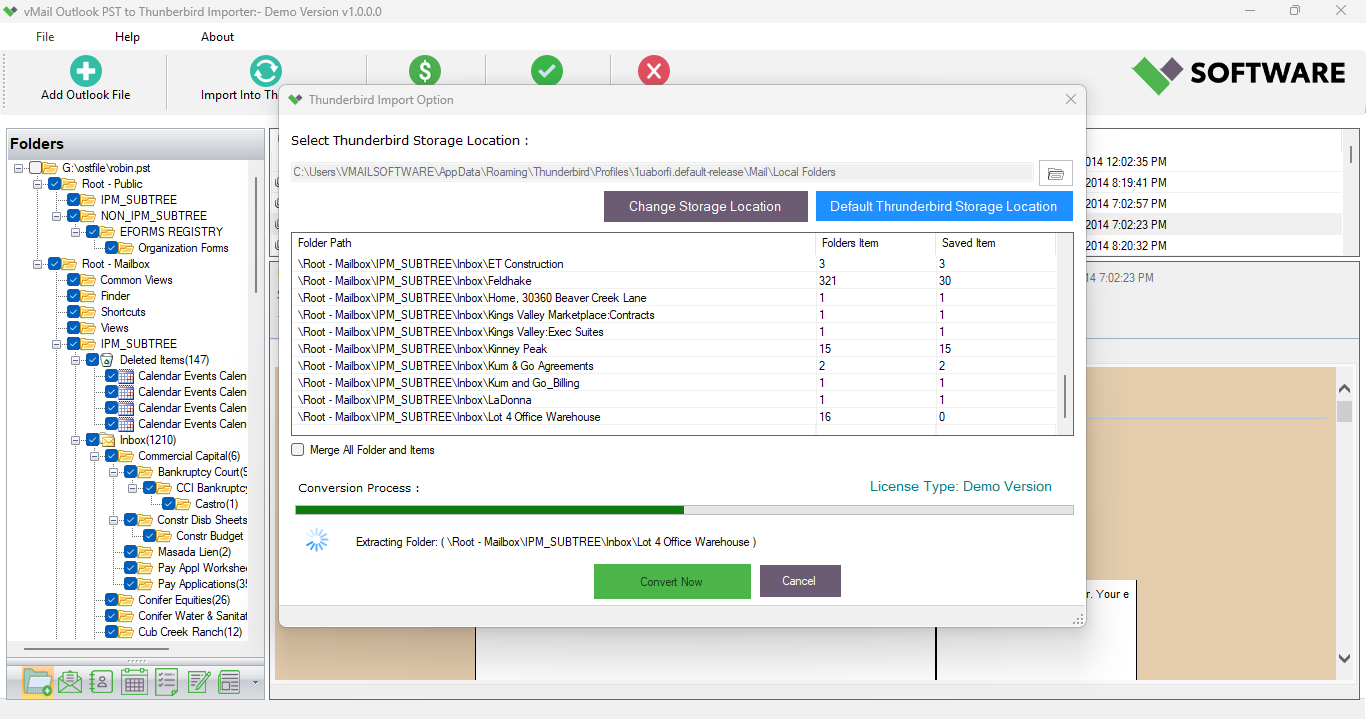
This conversion procedure can normally be completed through some easy-to-follow steps. Firstly, install the software and load the required PST file or folder to it. The program scans the PST data and presents the mailbox folders along with email data.
Secondly, preview the mailbox data and choose the folders or emails to convert PST to MBOX. Select the desired output format MBOX and choose the destination place where the output files should be saved. Launch the process of conversion and let the program convert the PST data.
Finally, use the obtained MBOX files to transfer them to Thunderbird.
Conclusion
Shifting of data from Outlook mailbox to Thunderbird involves the conversion of Outlook PST file format to MBOX format since both of these email clients have their own mailbox formats. There is an availability of a professional tool for converting PST to MBOX format, which makes the task easy for the user.
Some of the main features of the vMail PST to MBOX Converter Software include conversion of single and multiple PST files, previewing of the mailbox, selective conversion, retention of attachments and email properties, and maintenance of folder structure.

Comments