
Microsoft Outlook maintains offline mailbox data in OST files in case it is synchronized with Exchange Server, Microsoft 365, or IMAP mail accounts. The OST files may include emails, contacts, calendar, task list, notes, deleted items, attachments, and other mailbox data. In case of accidental deletion of emails and inaccessibility of the OST file, retrieving the required data might become tough. Before converting Outlook OST to PST, it is advised to determine whether it would be possible to recover the emails and other mailbox data from the OST file.
In such cases, the OST recovery procedure can help users gain access to all recoverable mailbox data before converting it to any other file format. Using a trustworthy vMail OST to PST converter, users can scan the OST file and view all the recoverable mailbox data before carrying out the OST to PST conversion procedure.
Why Recover Deleted Emails from an OST File?
Important communications, attachments, business papers, invoices, customers' correspondence, or other data can be found in the deleted emails. In case an Outlook account is not accessible or the OST file is orphaned, users cannot see the above information via the original Outlook account.
In that case, doing OST recovery prior to the conversion allows one to discover which information from the mailbox is accessible. Instead of instantly converting the entire OST file, one can first scan the OST file and analyze the content. It will be especially helpful if the OST file has years of email communications stored and a user needs to find certain deleted emails.
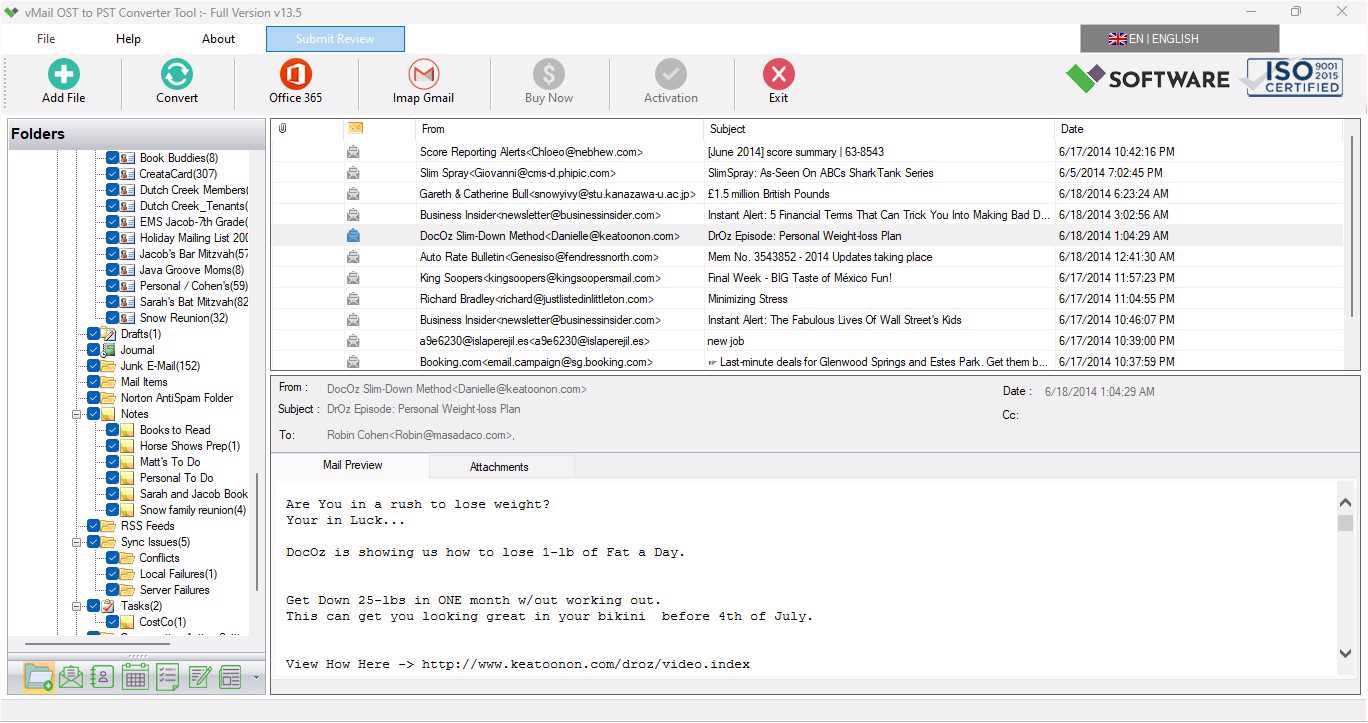
Professional OST recovery software will analyze the OST file and show available mailbox folders such as Inbox, Sent Items, Drafts, Deleted Items, and others. Once users have analyzed the recovered information, they can easily export OST to PST and view the mailbox in Microsoft Outlook.
Common Reasons for Deleted or Inaccessible OST Emails
Some of the reasons that can lead to deletion of emails in OST files are due to deletion. Data access issues may arise due to various factors such as synchronization issues, issues with the Outlook profile, Exchange Server issues, hardware issues, software crashes, and unintentional closure of Outlook.
An OST file may get corrupt due to certain issues with the system or synchronization issues. In certain cases, the initial Exchange account may get corrupted, resulting in the creation of an orphaned OST file. In such circumstances, users require a means to retrieve their mailbox content.
In such situations, the vMail OST to PST converter tool can come in handy, as it is used to recover mailbox content from OST files and save it in an accessible format.
Scan the OST File Before Conversion
The very first step in retrieving deleted emails involves scanning the OST file. With the help of an efficient OST recovery tool, the user can scan the entire mailbox and recognize the available data. After completion of the scanning process, users can take a preview of the folders and email items that need to be exported.
The preview function becomes particularly helpful in case of large-sized OST files. Rather than converting all emails blindly without even seeing the content of the mailbox, the user can take a look at the mailbox to recognize the folders and emails needed. Users can see the preview of recovered emails before starting the OST to PST conversion process.
Preview Deleted and Recovered Mailbox Items
Previewing mailbox contents is a crucial step during the recovery process. The recovery tool gives you the option to preview recovered emails as well as other elements of the mailbox before saving. You may preview the email contents, attachments, sender/receiver information, subject line, dates, and other properties.
It makes it possible for you to distinguish important emails that have been deleted or lost access through Outlook. After verifying the required information, you will be able to move on to the conversion process.
Recover More Than Just Emails
The OST file contains a lot of things that go beyond just email messages. The Outlook mailbox can consist of contacts, calendars, tasks, notes, journals, the inbox, sent items, deleted items, as well as other folders. There is a professional tool for OST recovery that will recover all the mentioned parts of the mailbox from the OST file.
It is helpful when a person needs to restore all mailbox information, not only emails. Once the mailbox has been recovered, the chosen information will be saved to PST and other needed formats.
Preserve Attachments and Email Properties
For the task of restoring lost emails, retaining all the original properties of the emails becomes an important aspect. Emails may consist of attachments, sender and receiver information, CC & BCC information, subject, date, links, pictures, formatting, and many more properties.
A professional vMail OST to PST converter has the ability to retain all these properties while restoring and migrating the data. The attachments will still be attached to their respective emails, and the important mailbox properties will be retained as well while saving them in PST format.
Recover Data from Corrupt or Damaged OST Files
In addition to deleted emails, there could be another case where users will require OST recovery. Corruption of the OST file could render it unusable and hinder Outlook from loading or syncing mailbox data successfully. Factors such as hardware failures, sync issues, virus infections, and forced Outlook closure could cause the corruption of the OST file.
This professional recovery software would analyze the damaged OST file and recover whatever information is available within the mailbox.
Maintaining Original Folder Hierarchy
Organizing mailboxes plays a significant role in the recovery process. Every user organizes his or her emails into various folders like projects, clients, departmental work, personal messages, and many more.
While performing OST to PST conversion, keeping the same hierarchy of folders in the recovered mailbox makes using it easy. The software can keep all types of folders like Inbox, Sent Items, Drafts, Deleted Items, Archive, and customized folders with recovered mailbox data.
It saves users’ time for organizing the mailbox again after importing the converted PST file in Outlook.
Selective Recovery and Conversion
Not every user is interested in recovering the complete OST file. There could be some instances where selective recovery of folders and mailbox objects alone is needed by the user. Selective conversion lets the user concentrate on data that they require.
For instance, a user would like to recover their deleted OST emails from the Deleted Items folder and leave the other archive folders untouched. In organizations, there could be some instances where recovery of specific data from an employee’s OST file would be needed.
Selective conversion can save time and help reduce the size of the resultant PST file.
Support for Large OST Files
Large OST files consist of many years' worth of emails, several attachments, and many mailbox items. Manual processing of such files is not easy and may take a long time.
A professional vMail OST to PST converter tool can process OST files without any Exchange OST file size restriction and allows recovery of large amounts of mailbox contents. Preview the recovered contents and save them as PST and other formats.
The application supports different versions of Outlook, like Microsoft 365, Outlook 2021, 2019, 2016, 2013, 2010, and 2007.
Save Recovered OST Data in Multiple Formats
PST is not the only possible file type to export the recovered emails into. One could also export their OST emails into file types like EML, MSG, MBOX, HTML, PDF, vCard, and vCal. Also, there are possible options for migrating the data from one’s mailbox to Office 365, Exchange Server, Gmail, Yahoo Mail, etc.
The advantage of this feature is that one can choose a suitable file type for his/her future needs.
How to Recover Deleted Emails Before OST to PST Conversion
The recovery process is quite simple. First, install the OST recovery tool and select the OST file. The program scans the file and shows the list of available mailbox folders and data. It enables users to preview the recovered emails and locate the required deleted email messages or other mailbox data.
After selecting the required data, choose PST as the export format and then select the target location. Click on the convert option to create the PST file from the selected mailbox data. This PST file is easily accessible for opening or importing into MS Outlook.
Conclusion
The retrieval of the deleted emails before converting can be a significant process where there are useful emails or mailbox contents in the OST file. Rather than going for the immediate conversion of the whole OST file, the user can start scanning and reviewing the contents in the OST file to locate the necessary emails and mailbox items.
Using a vMail OST to PST converter tool helps in performing various functions like OST recovery, email preview, support for corrupt or damaged OST files, maintaining the folder structure and properties of the emails, selective conversion, using various output formats, and handling of large OST files. Thus, making the process of converting an OST file to a PST file a feasible process.
If there is any need for recovery of deleted OST emails, converting Outlook OST to PST, or exporting OST to PST, then the process of recovery and review of the mailbox before the conversion can assist the user in saving important email data

Comments