
Thunderbird is one of the most popular free email clients which are used by individuals as well as organizations for email communications. Individual emails can be saved in the EML format by Thunderbird, and the EML format is supported by many email software applications. When people choose to migrate from Thunderbird to Microsoft Outlook, then they need to convert Thunderbird EML to Outlook MSG files because Outlook performs effectively with MSG files. As MSG is a native file format of Outlook, conversion of EML to MSG helps users to get better compatibility, email management, and access to the mailbox.
A Professional EML to MSG Converter Software is the best way to Covert EML to MSG and Outlook MSG files without changing the email properties.
Why Convert Thunderbird EML to Outlook MSG?
Many companies switch from Mozilla Thunderbird to Microsoft Outlook due to the advanced features offered by the latter in terms of email management, calendar management, contact management, scheduling tasks, and collaborative business solutions. While Thunderbird saves emails in EML file format, Outlook works very well when emails are saved as MSG files.
The manual methods for EML to MSG conversion are highly tedious and inappropriate when bulk email conversions have to be done. It might require opening and saving each email manually, which is simply not possible in case of huge numbers of emails.
What Makes EML and MSG Different?
The .eml file extension is used to save email messages and can be accessed using programs such as Thunderbird, Windows Mail, Apple Mail, and many more email clients. The .msg file extension is a Microsoft Outlook proprietary email file that contains Outlook formatting and Outlook mailbox characteristics.
By converting the .eml to .msg format, users are provided with good compatibility with Microsoft Outlook.
Benefits of Professional EML to MSG Converter Software
Professional EML to MSG Converter Software comes with many advanced options that make email transfer easy and safe for business data.
Bulk EML to MSG Conversion
Perhaps the main advantage of using professional software is its bulk conversion capabilities. Rather than converting emails individually, users can choose hundreds and even thousands of emails to convert in one go.
Bulk EML to MSG conversion helps save lots of time and does away with the need for any manual processing. The software will handle all the emails selected without making a mistake.
Convert Thunderbird Emails with Complete Accuracy
Attachments, hyperlinks, images, formatting, metadata, sender data, receiver details, CC, BCC, dates, and internet headers are commonly found in Thunderbird emails.
During the process of converting Thunderbird EML files into Outlook MSG files, all the attributes of the emails are retained in the way that they are present in the original emails.
Preserve Folder Structure
The organization of the mailbox is very significant in migration. The professional software keeps the structure of the original folders intact as in Thunderbird.
Inbox, Sent Items, Drafts, Deleted Items, Archive folders, and custom folders retain their structure even after users Covert EML to MSG by the software.
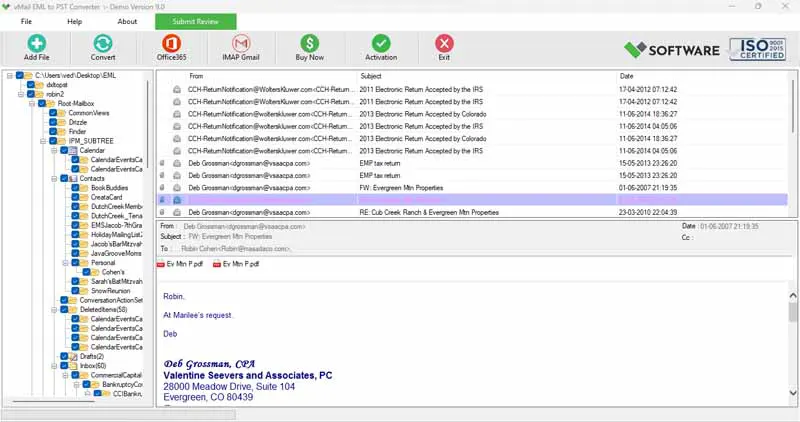
Preview Emails Before Conversion
Before converting the EML files, users can view them within the application itself.
This preview screen shows various details such as subject, sender, recipient, attachments, email body, dates, etc. This allows users to check the mailbox data before initiating the EML to MSG migration process.
Supports Single and Multiple EML Files
Regardless of whether a user needs to convert one email or even thousands of emails from Thunderbird, the software does it effectively.
A user may import either single EML files or whole directories that contain several EML files. All emails are automatically scanned and ready for conversion.
Maintain Original Email Properties
Features saved by professional email converting software include:
- Email formatting
- Email subject
- Sender information
- Recipient information
- CC and BCC entries
- Attachments
- Hyperlinks
- Embedded pictures
- Internet header
- Email date and time information
- Email read or unread status
All these features will not be altered during the export EML to MSG process.
No File Size Restrictions
In today’s world, most companies keep their email communications for years. Such mailboxes might have very huge EML files.
A dependable EML to MSG Converter Software converts both small and large EML files without having any size restrictions. There is no limit of converting unlimited emails.
Export Emails Efficiently
Besides converting emails in Outlook MSG format, most advanced email converters can also convert emails to many other file formats as well.
These factors make the software suitable for IT professionals, companies, legal firms, schools, and individual users.
Step-by-Step Process to Convert Thunderbird EML to Outlook MSG
The whole conversion process is quite easy and consists of the following simple steps:
- Install the EML to MSG Converter Software.
- With tool, you can choose one or many EML files from the Thunderbird mailbox.
- You can preview the contents of the selected email items before conversion.
- Now, the software will allow you to select the MSG file format for saving.
- You can specify the destination directory where Outlook MSG files will be saved.
- Convert EML to MSG and save your emails.
In no time at all, all the selected emails are converted to the MSG format.
Why Manual Methods Are Not Recommended
While manual approaches are available, they do not make sense when one needs to migrate EML to MSG for hundreds or thousands of e-mails.
Manual conversion normally involves opening each e-mail file separately, saving it as a separate file, and doing so repetitively. This procedure takes lots of time and increases the chances of data loss.
A professional application ensures automatic and full EML to MSG migration of the EML file into MSG file format.
Ideal for Business Email Migration
Migration from Thunderbird to Outlook is common for organizations when they upgrade their infrastructure or deploy Microsoft 365 solutions.
Professional software used to migrate EML to MSG will allow IT specialists to perform email migration in no time and guarantee that all mailboxes are safe. The migration will ensure protection of business communication, legal documents, financial emails, and client correspondence.
Compatible with All Windows Versions
The application is compatible with all leading Windows operating systems such as Windows 11, Windows 10, Windows 8.1, Windows 8, Windows 7, Windows Vista, Windows XP, and Windows Servers.
Moreover, it creates MSG files which are compatible with Outlook 2021, Outlook 2019, Outlook 2016, Outlook 2013, Outlook 2010, Outlook 2007, and previous versions.
Simple Interface for Every User
The EML to MSG Converter Software boasts a user-friendly interface that does not need any technical skills. Even novice users can Covert EML to MSG with a few easy steps.
It caters to end users, companies, IT administrators, educational institutions, and enterprises.
Conclusion
Migration of emails from Thunderbird to Microsoft Outlook is made easy by using EML to MSG Converter Software. Rather than opting for a tedious manual process, individuals can carry out the process of converting EML files to MSG format without any compromise to email attributes.
Whether it is required to Covert EML to MSG, perform EML to MSG migration, migrate EML to MSG, or export EML to MSG for use in Outlook, the conversion software ensures accuracy in the entire process. The software offers options like bulk conversion, preview, folder structure maintenance, and compatibility with all versions of Outlook and Windows.

Comments