
An untidy Outlook mailbox is an issue that almost everyone using the software will face at some point after several months of usage. With new emails coming each day and the mailbox information increasing continuously, it does not take long before the appearance of duplicate emails and other similar items in the folder becomes inevitable. While these duplicate emails may not be a problem initially, they end up occupying precious space, increasing the size of PST files, and slowing down the performance of Outlook. Additionally, many people find it difficult to access emails because of their repetition.
A clean Outlook mailbox is equally important as an organized set of files on your computer. Maintaining your Outlook mailbox helps enhance Outlook's performance while making your daily work simpler. No matter how you utilize Outlook, whether for personal or business needs, cleaning your mailbox of duplicate emails is extremely helpful in saving time. The use of vMail outlook duplicate remover is a much faster way of cleaning your mailbox.
Duplicates of emails can be caused by a variety of different factors. One of the most frequent cases relates to the double importing of the same PST file. It usually takes place when the user upgrades the system, migrates from Outlook, or restores the backup of the mailbox. Synchronization errors with Exchange Server, Office 365, and IMAP accounts can also lead to duplicates. When the synchronization fails and is started again, Outlook can download the same emails several times. Moreover, creating multiple Outlook profiles or setting up incorrect accounts can also cause duplicates of mailbox items.
There are several types of data that are stored in Outlook apart from emails, such as contacts, calendars, notes, journals, and tasks. However, even such data can be duplicated. Think about how it is going to be when you open your calendar and see that the same meeting is duplicated two or three times, or see the same contact duplicated while sending an email.
The first approach for most people who face this issue would be the manual solution. Opening folder after folder in the mailbox and deleting duplicate email messages manually seems like a good way to do this. Though it is feasible if you have just a small number of duplicated messages, for thousands of messages in the Outlook mailbox, it will be extremely hard to delete all duplicates. It takes much time to compare senders' names, subjects, dates, attachments, and the content of messages. Besides, there is always a risk of accidentally deleting important messages while removing duplicates. Once these emails are deleted, retrieving business emails may appear to be another challenging task.
Here comes into play the program vMail Outlook Duplicate Remover. Instead of wasting your time looking for duplicate messages manually, this program will scan your Outlook mailbox and find all duplicates for you. This product is suitable for any user, regardless of their skills in working with Outlook and the mailbox. This way, the whole process of deleting duplicate emails becomes simple and easy for everyone.
The first great benefit of using this professional Outlook PST file duplicate email remover is its intelligent duplication detection system. Unlike the previous versions of such programs that checked email subjects only, this advanced software compares several properties of email messages before declaring any of them duplicated. It looks into sender data, recipient data, email subject, message body, attachments, sending and receiving dates and several more email properties. The comparison helps to eliminate all duplicate emails and save original emails untouched.
Another good point about this Outlook PST file duplicate email remover is its compatibility with PST and OST files. Many users have several mailbox files created for various purposes. Some people create PST files to archive old emails and there are those who have OST files connected to Exchange Server or Office 365 accounts. The program can handle both file types, which makes it perfect for every Outlook user.
Contrary to many other common duplicate elimination programs, the program addresses not only emails. It detects duplicates for contacts, calendars, notes, journals, and tasks. In this way, users can fully organize their Outlook mailbox instead of just eliminating duplicate emails from it. The Outlook mailbox gets cleaned and well organized and thus becomes easier to handle.
One more problem faced by many Outlook users is large sizes of mailbox files. Many businesses have PST files that include a couple of years of email correspondence. Cleaning such files manually takes days. Luckily, the program supports both ANSI and Unicode PST files and effectively processes even the largest mailbox files without any loss of performance. No need to divide PST files into parts before the elimination process starts.
Another helpful feature is the ability to search for duplicates in the same folder or several different folders at once. Sometimes there can be duplicates only in one folder, while in other cases, the duplicates may be distributed between several folders such as the Inbox folder, the Sent Items folder, and others. You have full control and can define the way you would like to perform searching of duplicates in your mailbox.
Another great feature is that the software does not change the mailbox hierarchy during the duplication removal process. The folder hierarchy, email format, metadata, attachments, and all other mailbox characteristics remain untouched. As a result, after cleaning, your mailbox looks just like before, except for unnecessary duplicates which have been cleaned from your mailbox. This is especially significant for business people.
Using a professional PST duplicate emails remover tool will also increase Outlook performance. Small-sized mailbox files will load faster, emails will be found quicker, the synchronization process will be easier, and Outlook will respond faster when performing any regular operations. A reduced size of mailbox files means fewer chances for PST corruption, which usually happens when having large-sized Outlook data files.
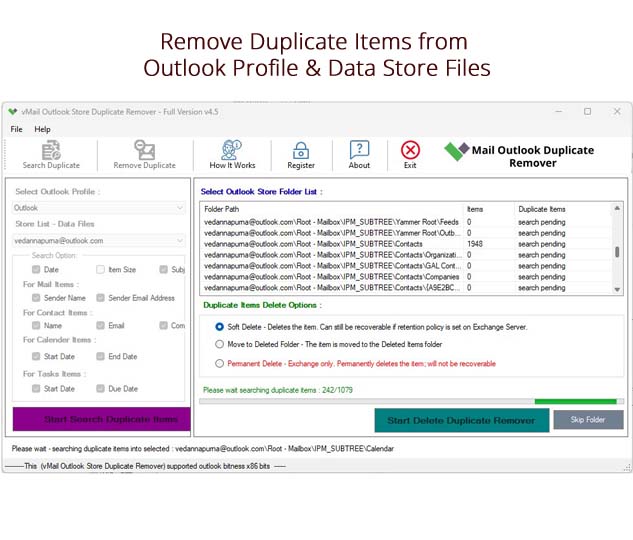
The software employs a very simple workflow scheme. Once you launch the program, the user needs only to specify the necessary Outlook PST/OST file. Then the program analyzes the mailbox and shows all folders that are there. You can select the specific folders or even the whole mailbox according to your needs. Once the analysis starts, duplicate messages will be found by the software automatically, and after that, it will remove duplicate items from PST data while preserving the original mailbox structure.
The utility can be used by a diverse user base. Individual users can sort out their own Outlook mailboxes, which have become cluttered with junk over the years. Business people can sort out their email communications, thereby improving their productivity. IT managers can use the utility when working with multiple Outlook accounts. Schools, government departments, and corporations dealing with Outlook mailboxes can also enjoy the fast and effective management of these.
Those who work on importing PST files, restoring their mailbox backups, migrating their Outlook profiles, and synchronizing multiple email accounts will definitely find the utility extremely helpful. They won’t have to search for duplicated emails anymore; they just need to remove duplicate items from PST data automatically.
Today, a well-organized mailbox has great importance for efficiency in the workplace, which is highly digitalized. Duplicates not only consume much of the space, but they are also confusing when dealing with correspondence. Regular cleaning of your mailbox is essential both for its effective functioning and convenience.
If you seek to simplify the process of managing the mailbox, vMail Outlook duplicate remover is just what you need. This efficient tool is known as a proven PST duplicate emails remover that is able to detect and eliminate duplicates and other Outlook items effectively, quickly scanning the mailbox without any influence on your data. Whatever your goals, be it saving storage space, improving Outlook performance, or using an Outlook PST file duplicate email remover, vMail Outlook duplicate remover can definitely help you.

Comments