
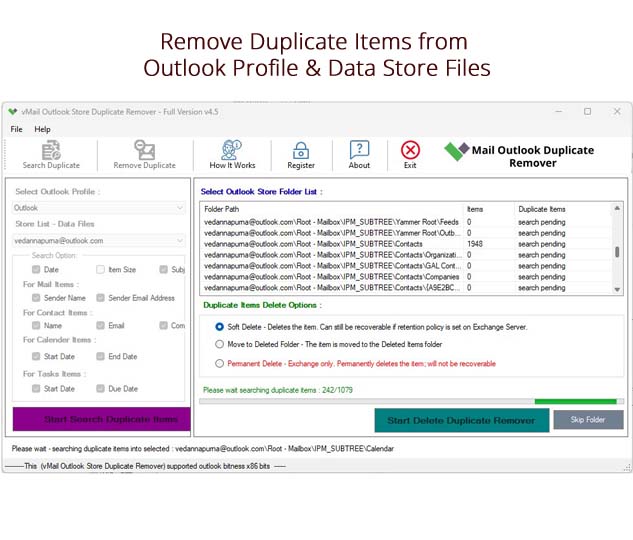
Microsoft Outlook is one of the most trusted email software programs used for both personal and business communications. This software allows the user to organize emails, contacts, calendars, notes, journals, and tasks all together in a single software. But after using the software for a longer period of time, people come across the problem of duplicates in emails and other items of the mailbox.
If duplicates are not cleaned in time, then they may reduce the speed of Outlook and create a problem while looking for important messages as they use up the storage space. That is why using vMail Outlook duplicate remover is one of the simplest and safest methods to organize the Outlook mailbox. Using a professional solution for removing duplicates will help you organize your mailbox.
What Causes Duplicate Items in Outlook?
There are several reasons why there might be duplicates in emails and mailbox items. It could happen as a result of Outlook synchronization or as a result of PST import or mailbox restoration from backup. Even a wrong email account setup may cause duplications to appear.
The most common reasons are:
- PST import of the same file several times.
- Synchronization problems with Exchange or IMAP accounts.
- Restoration of Outlook data from backup files.
- During Outlook upgrade or migration.
- Frequent copying of mailbox folders.
Regardless of the reason, duplicated items will complicate mailbox management and slow down Outlook operations.
Problems Caused by Duplicate Emails
Initially, the issue of duplicates may appear to be minor; however, this situation may lead to multiple issues that arise gradually.
As the number of duplicates keeps growing in emails, more storage capacity is needed by Outlook. Slow performance or even corruption may result from large PST files.
In addition to this, duplicates may cause some complications in the process of working with emails: users will make mistakes in replying to emails or deleting the incorrect ones.
Duplicates in other forms such as contacts, calendar, tasks, and notes also add up to unnecessary clutter.
Why Choose a Professional Duplicate Removal Tool?
Although Outlook does provide some mailbox management options, eliminating duplicates through these options will take too much time, especially when working with large PST files. Scanning and comparing hundreds or even thousands of emails will take much time and may cause you to lose valuable information.
Using a dedicated tool such as vMail Outlook Duplicate Remover, all duplicates will be automatically detected and deleted. This program analyzes email attributes and eliminates duplicate data, making it an effective Outlook PST file duplicate email remover.
Key Features of vMail Outlook Duplicate Remover
Removes Duplicate Emails Quickly
The tool searches through Outlook PST files and finds duplicate emails in a matter of minutes. The repeated emails are deleted, while the original email is kept safe and sound.
Supports Complete PST Mailbox
It should be noted that the tool does not focus only on emails. The contacts, calendars, journals, notes, tasks, and any other Outlook mailbox items are processed by the program as well, making it a reliable Outlook PST file duplicate email remover.
Maintains Original Folder Structure
One of the best things about using the software is that it retains the original folder structure. After eliminating any duplicate information from the inbox, the folders will be well arranged.
Safe Duplicate Detection
It compares various email attributes including subject, sender, recipient, date, attachments, and message body before deleting any duplicates. It guarantees that only the duplicate emails are deleted while the originals remain safe.
Works with Large PST Files
Most users have Outlook PST files containing thousands of emails. It can manage both small and large PST files without any effect on performance.
User-Friendly Interface
The vMail Outlook duplicate remover software is user-friendly to both technical and non-technical users. Even beginners can delete duplicate e-mails through a few easy steps.
Benefits of Using a Duplicate Removal Solution
There are many benefits of using the professional duplicate remover. To start with, it cuts down the total size of your Outlook mailbox, allowing Outlook to work faster.
In addition, it helps organize your mailbox by removing duplicates from your emails. As a result, finding necessary information becomes much simpler with the help of a PST duplicate emails remover.
Finally, there is a very important aspect of better managing the storage space since deleting duplicate data frees up hard drive space and minimizes the risk of PST file corruption.
How Does the Software Work?
vMail Outlook duplicate remover is a very easy software to use, with just a few clicks.
First, open the software and select the Outlook PST file containing duplicates. The software will scan your mailbox and will show you all the available folders. Then, you need to choose the folders that have to be processed and start the duplication process.
This program compares your mailbox items using different properties and will remove duplicate items from PST data without damaging the original mailbox structure.
Who Should Use This Software?
The application can be useful for individual users, professional people, IT managers, schools, or other organizations dealing with Outlook PST files on a regular basis.
This particular software can be particularly helpful for those who often import PST files, migrate emails using Outlook, restore their backup, or synchronize various email accounts. This tool enables anyone to remove duplicate items from PST data without any technical knowledge whatsoever.
Conclusion
Though duplication of emails does not pose any danger at first, over time, it can affect the speed of Outlook, cause your PST file to grow in size, and make your mailbox management a headache. Rather than spend countless hours eliminating duplicate emails manually, vMail Outlook duplicate remover will help you achieve a fast, precise, and safe process.
As a trusted Outlook PST file duplicate email remover, the tool scans your whole mailbox and detects duplicate emails as well as other Outlook items, eliminating them without harming your original data. In case you have any problems with the removal of duplicate emails or other duplicate items from your PST data, this PST duplicate emails remover is exactly what you need.

Comments