
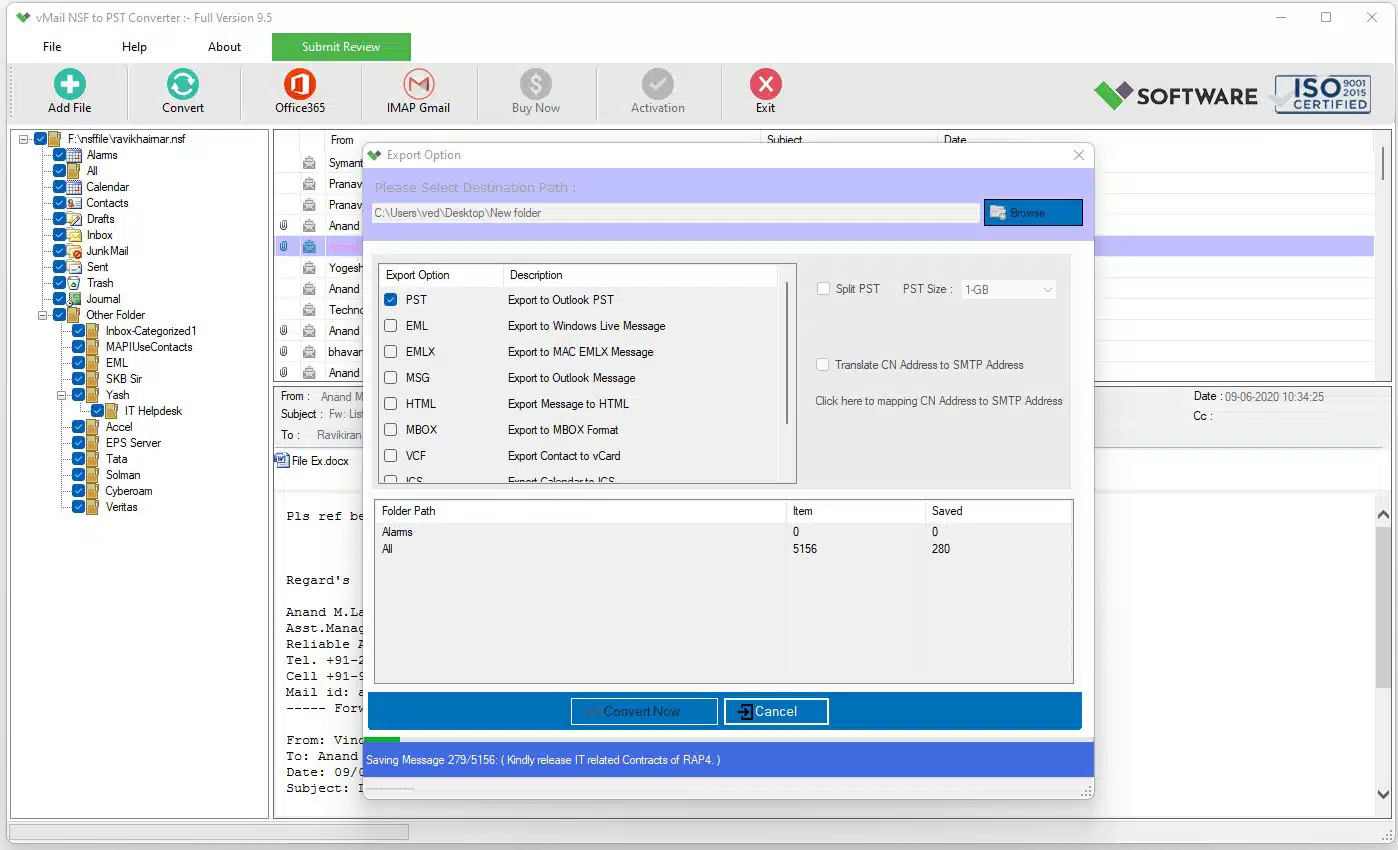
Handling large Lotus Notes NSF files becomes a daunting task when there arises a need to migrate these files to the Microsoft Outlook application. An NSF file can have thousands of emails, attachments, contacts, calendars, and other mailbox items, thus making it hard and tedious to migrate such a file. An NSF to PST file conversion tool becomes handy as it facilitates the migration of NSF files to PST files by retaining valuable data.
As far as large mailboxes are concerned, size becomes a crucial factor to consider. A single PST file with a large amount of data becomes cumbersome to handle and impacts the performance of the Outlook application. That is why using an NSF to PST file conversion tool that supports large files becomes essential.
Why Large NSF Files Need Careful Conversion
Large NSF files usually have a lot of information regarding business communication. During the migration process, users will have to ensure that emails, attachments, folders, contacts, and others are transferred successfully. The basic file conversion process might not work well when dealing with large files as it would take more time and create oversized PST files.
Professional NSF converter Software will have the ability to deal with large NSF files effectively. The program will have the ability to scan the source file and show all the mailbox data. Afterward, users will be able to choose the required folders or items for the conversion.
The most important benefit of the professional converter is the possibility to preserve the existing folder structure. During the process of migration from NSF to PST format, users usually want to have Inbox, Sent Items, Drafts, custom folders, and other folders of the mailbox preserved.
Handling Big Files During NSF to PST Conversion
It is recommended that the appropriate steps be taken when dealing with NSF files that have a high amount of information in them. Before conversion, users can first see the size of the NSF file and know which folders from the mailboxes must be converted. If all the mailboxes need to be converted, the process can be done efficiently rather than individually exporting them.
The competent converter will be able to deal with a lot of NSF files and convert them to PST format. The tool will provide a preview of the mailbox items before the actual conversion, allowing the user to confirm whether the right information is being used. This is particularly beneficial when there are many folders and emails within the mailbox.
Users can choose certain folders for the conversion instead of converting the NSF file. This is helpful in cases where certain parts of the department, project, dates, or folders need to be transferred.
Splitting PST Files for Better Management
PST file splitting becomes quite necessary when the mailbox that has been converted is very large and cannot be accommodated in one single PST file. PST files can be created based on the converted mailbox data, which will consist of smaller PST files.
Using an efficient NSF file to PST conversion tool allows users to split the PST files into smaller files based on various parameters. The converted PST files can be divided by using the size parameter or any other parameter that is available to the user.
The process of splitting helps in separating the old data of the mailbox from the latest communication of the users. This is because users can create various PST files based on year, project or department.
Maintain Mailbox Data and Folder Structure
Data preservation is one of the key aspects of any email migration. Users are supposed to have the same mailbox information available in the converted files after converting from NSF to PST. Key email properties, attachments, folders, and other supported mailbox items should be available after converting.
Using NSF to PST converter Software will allow maintaining the folder structure in the course of conversion. Instead of having a bunch of unstructured emails, users will be able to work with their converted information following the folder structure of the original mailbox. It will be easier to use the historical emails in Outlook.
The preview feature is going to be useful for large conversions. The users will be able to view their emails and folders in order to identify the information that needs to be converted.
Benefits of Using a Dedicated NSF Conversion Tool
Use of a special program may simplify the migration process. Without using complex manual procedures, it will be possible to perform migration by following the wizard interface. It can be especially convenient when the user deals with many large NSF files.
Batch processing functionality can be implemented in the software to allow working with multiple NSF files if the function is supported. It will be beneficial for an administrator who needs to migrate data from different users and departments.
One more advantage of using such tools is that it is not necessary to create a new mail folder manually during migration. The program migrates NSF files while keeping their structure, so it is convenient to use PST files in Microsoft Outlook.
Conclusion
There are certain things that one needs apart from just the change in the format while converting large Lotus Notes mailboxes. There is a need for a secure conversion mechanism that will take care of the large mailbox files along with ensuring that emails, attachments, folders, and others are properly maintained during the conversion process. NSF to PST converter tools that provide selective conversion, previews, folder maintenance, and large file support come in handy in such situations.
PST splitting is yet another useful function that one may find useful while dealing with oversized mailboxes. Splitting a large converted mailbox into multiple PST files not only makes the task easy, but it also becomes convenient when it comes to storage, transfer, and backing up of the mailboxes. There are tools available that will help to convert NSF to PST.

Comments