
It becomes challenging to work with a huge Outlook PST file if it includes emails, attachments, contacts, calendars, tasks, notes, and all other mailbox details for several years. With the increasing amount of details, the PST file will become more complicated to manage, back up, migrate, and take care of. In such situations, splitting the mailbox into small and structured PST files will be much easier to work with.
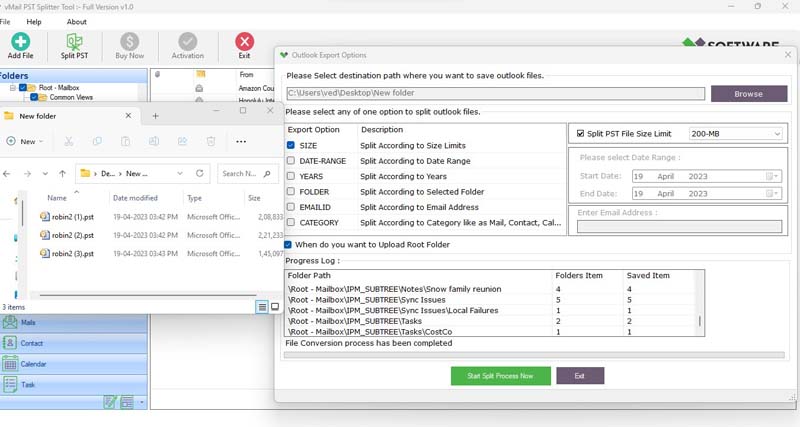
vMail PST split tool is developed to let users split their big PST and OST files in several smaller PST files depending on various needs. The program offers many splitting options, including by size, by date, by year, by folder, by email ID, and by category. It works with both one and several Outlook data files at once.
Why Split a Large Outlook PST File?
PST file may become very big during years of using Outlook. Large attachments, archived messages, business documents, images, and other items of the mailbox may continue to enlarge the file size. Working with an overly large PST file may be inconvenient for managing the mailbox and the backup and migration process as well.
Rather than storing all information in one file, you can divide your mailbox into several PST files. The PST File Splitter Software gives you an opportunity to sort the data according to certain requirements. So, the old emails may be divided by years, some particular folders can be exported into separate PST files, or the mailbox may be split by certain size.
Software allows dividing Outlook PST files with unlimited size or even up to 50 GB and more as indicated on the website.
Split PST by Size
One such solution may prove very practical in terms of breaking down PST files by size. Large mailboxes can be broken down into several PST files according to the size chosen by the user.
This option may prove quite handy for those who want to maintain their PST files in reasonable sizes. Rather than having one gigantic mailbox, users can have several smaller mailboxes.
With the PST splitter software, users can easily select this option to split their mailboxes.
Split PST by Date or Year
Generally, email archives can be arranged based on time. The use of Outlook PST file splitter software can make this process easy due to the ability to split based on dates and years.
The user may choose to arrange based on a specific period of time, and then split the emails accordingly. Similarly, splitting based on years may be helpful in arranging PST files based on years. Old business emails may be put in one PST file, whereas new ones will go into a different PST file.
Split PST by Folder
The Outlook mailbox normally comprises a number of folders such as Inbox, Sent Items, Drafts, Deleted Items, Archive, as well as other custom folders made for various projects, clients or departments. In cases where a mailbox is packed with too many folders, it would be convenient for users to split selected folders into PST files separately.
There is an opportunity to split the folders individually through the use of software by selecting the folders one wishes to split into PST files.
Split PST by Email ID
At times, users may wish to sort their emails based on certain email addresses of the sender or receiver and not by the folder or date criterion. This is when email ID splitting proves to be helpful, allowing users to split their PST file according to a certain email address.
This feature can be very helpful for professionals looking to split their emails according to a certain customer, employee, vendor or any other business contact.
Split PST by Category
The Outlook Mailbox contains various types of items such as emails, contacts, calendars, tasks, etc. The choice of the category-based splitting feature provides users with the opportunity to separate PST files based on certain categories of mailbox items.
It offers users an additional degree of freedom in the case of managing large Outlook mailboxes. In addition to the choice between size and date, users now have an additional option to select from.
Split Single or Multiple PST Files
Having several large PST files is often tedious work to deal with. The vMail PST Splitting utility enables splitting not only individual but also multiple PST files of Outlook. One can load the needed files and proceed with splitting them in accordance with one’s chosen criteria.
The batch processing functionality is especially helpful for those organizations or system administrators that need to manage PST files of various users or departments.
Split Password-Protected and Corrupted PST Files
The program also offers the ability to work with password-protected PST files. Such an option might be useful for users who have to handle this type of Outlook archive without altering the configuration of their current mailbox.
According to the product specification, this utility allows users to split corrupted PST files and split healthy and corrupted large PST files, keeping all the accessible data from their mailboxes.
Maintain PST Structure and Email Formatting
Splitting PST file does not have to affect the structure of the original mailbox. The application is created to split Outlook data while keeping the file structure of the original file intact. It also allows preserving folder structure and email properties.
The application works with ANSI and Unicode PST file formats and supports both 32-bit and 64-bit PST data files. It also supports various versions of Outlook such as 2021, 2019, 2016, 2013, 2010, 2007, and 2003.
Split PST Without Outlook Installation
The other useful point is that it is not necessary to have Microsoft Outlook installed on your computer in order to split a file. This would provide convenience to those who do not need to configure their Outlook profiles but only split PST files.
The whole process includes steps such as adding the PST or OST file, scanning the selected data, selecting the necessary way of splitting, selecting the destination folder, and proceeding with the process.
Conclusion
It is not necessary to delete some important emails or move each message separately while handling your oversized Outlook mailbox. You should consider using a good PST file split tool that will help you to split large PST files into several small and organized files, keeping important mailbox data intact.
The vMail PST splitter tool allows you to split PST files according to several parameters such as size, date, year, folder, email ID, and category. It works with single and multiple PST files, password-protected PST files, damaged PST files, ANSI/Unicode formatted files, and multiple versions of Outlook software. It can even work without the presence of Outlook installed on your system.
Splitting large Outlook PST files, organizing years of email archives, separating certain folders, or splitting mailbox data by email ID can all be achieved easily with the help of a versatile Outlook PST Splitter tool.

Comments