
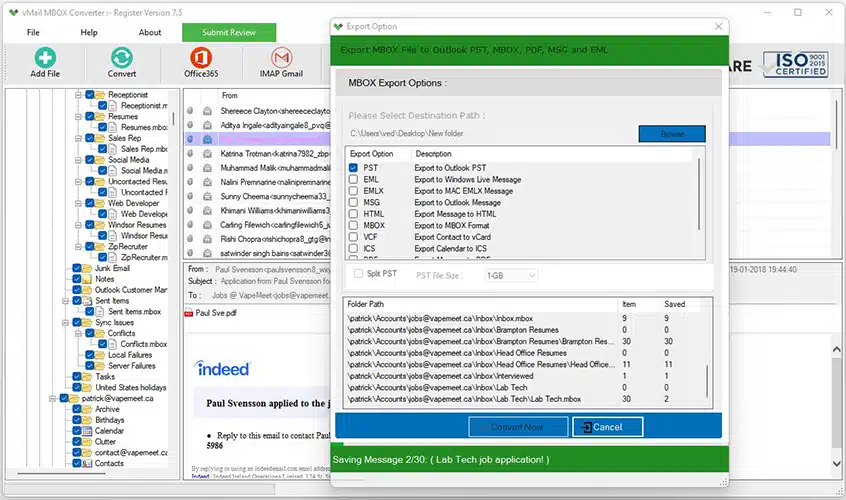
A majority of Mac users work on email programs that save mailbox information in the MBOX format. If it is necessary to transfer this information from the MBOX file format to Microsoft Outlook, the difference in mailbox file formats can lead to confusion. Usually, Outlook uses PST files, while Apple Mail and Thunderbird use the MBOX format. It means that the user should have a good strategy for the conversion of mailbox information into the required email program.
Before the conversion starts, the direction of the process must be known. The software that was provided to us converts Outlook PST files into MBOX format for email programs like Apple Mail, Thunderbird, Eudora, SeaMonkey, Spicebird, and Netscape. This means that the software will be handy in case it is necessary to transfer Outlook files to MBOX format.
Understanding MBOX and PST Email Formats
MBOX is the mailbox file format for some email programs, whereas PST is the mailbox data format for Microsoft Outlook. Since these mailbox file formats are different, one cannot copy any MBOX file and paste it into Outlook, hoping that all mailbox data will be displayed correctly.
In the case of migrating MBOX files to PST files, an MBOX to PST converter is needed. However, in the case where data migration is being done in the reverse direction, i.e., migration from Outlook to Mac, a PST to MBOX converter needs to be selected.
Why Use a Professional Conversion Tool?
Moving several hundred or thousands of emails manually can be quite challenging. Emails might have attachments, sender and recipient data, date, subject, and other properties that a user wishes to preserve.
Professional software is able to automate the process and save time. The software which is provided at the given website will be able to migrate emails from Outlook PST to MBOX format, preserving email properties like To, CC, BCC, date-time, subject, and attachments.
Such an Outlook to MBOX converter will be helpful to those who want to migrate emails from their Outlook mailbox to some MBOX-based email client.
Convert Outlook PST Data to MBOX
The primary use of the software is to convert PST into MBOX format. This application is capable of converting PST file formats for Outlook 2021, 2019, 2016, 2013, 2010, 2007, and even older Outlook editions.
Once converted into MBOX file format, these can then be accessed using compatible programs like Apple Mail, Thunderbird, Spicebird, SeaMonkey, and Netscape.
It may prove useful if the Outlook mailbox data has to be utilized elsewhere.
Preserve Emails and Attachments
However, email migration is not solely confined to copying of the email text. Other important elements that may constitute the email include the email attachment, addresses of the sender and recipient, CC and BCC information, subject line, date, etc.
This program facilitates the preservation of all these attributes when converting the emails. The application converts emails from different mail clients such as Outlook, in addition to contacts and calendars.
These preserved details would make the converted email folder easier to manage once opened in an MBOX email client.
Preview Emails Before Conversion
PST files with lots of data could have years of information in the mailbox. Without first verifying the information from the original data source, it may sometimes be difficult to convert everything. A preview capability enables users to view their retrieved emails before doing the actual conversion.
An email preview capability has been incorporated into the software to allow users to see the retrieved PST file data before exporting it as MBOX.
Convert Password-Protected PST Files
Password protection of PST files is another helpful attribute. As stated in the product, this application will help convert password-protected PST files of Outlook into MBOX format.
This will be helpful to users who have their Outlook PST file protected and want to access their MBOX-authorized mailbox data.
No PST File Size Limitation
PST files may store quite a few emails and attachments. Manual processing of such files takes up a lot of time, especially if the user needs to transfer an entire mailbox.
According to the website, the software does not have any restrictions on the size of PST files to convert. This feature makes it appropriate for users who work with large Outlook mailboxes.
How Does the Conversion Process Work?
Conversion is made easy through this process. Initially, users need to launch the software on any compatible Windows OS and then choose the required Outlook PST file. The program performs scanning of the chosen database and presents the mailboxes' details that are available.
It is now time for users to preview their emails and choose the MBOX format as the export format. They can choose their preferred destination for the files and proceed with the conversion process. The MBOX files are created by the software and will now be accessible using MBOX email clients.
It is also possible to select more than one Outlook PST file for conversion at the same time.
What If You Need to Move MBOX to Outlook?
In case the real need is that of migrating MBOX to Outlook, then the direction of the conversion process is completely opposite to what has been illustrated here. In this regard, you will require an MBOX to PST Converter since the PST file format is used by Outlook.
But if you wish to migrate Outlook to MBOX, the PST to MBOX solution provided here is what you really need.
Conclusion
Moving emails from MBOX applications to Microsoft Outlook involves a careful understanding of the mailbox formats. Since MBOX and PST are not the same mailbox formats, it is advised that users select a converter based on the direction of mailbox migration.
In case you wish to move your mailbox from Outlook to MBOX, you may use a PST to MBOX converter that can organize the conversion of the PST files into a format readable by the MBOX application. Features like conversion of different versions of Outlook, email preview facility, password-protected PST conversion, PST conversion for big PST files, and retention of email properties and attachments will help to ease the process.
For a user who wishes to convert Outlook to MBOX or to export Outlook to MBOX, it is advisable to choose a converter that is capable of converting their source PST files into MBOX format. On the other hand, in the case of moving MBOX to Outlook, an MBOX to PST converter is what you need.

Comments