
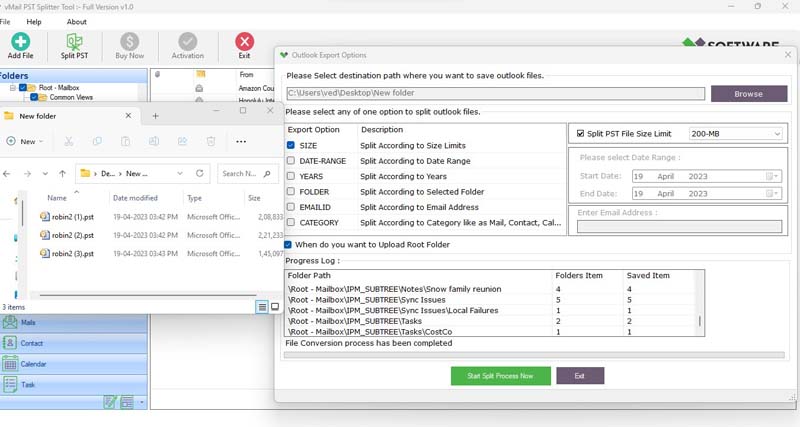
Microsoft Outlook uses PST files for storing emails, attachments, contacts, calendar entries, tasks, notes, and other information regarding the mailbox. Over time, frequent exchange of emails makes the PST file too large. Managing such a big file becomes complicated, especially if there are issues in loading, searching, or accessing any of the mailbox folders. Breaking down such a big PST file into smaller files gives a better option for managing Outlook data.
The vMail PST split tool enables users to achieve this through a convenient process of splitting the big Outlook PST file into smaller PST files using various criteria chosen by the user. The tool allows splitting of PST files by size, date, year, folder, email ID, or category. The software can handle multiple PST or OST files and works without Outlook installation.
Why Should You Split a Large Outlook PST File?
The user can have an Outlook mailbox that contains emails and attachments accumulated for several years. With the growth of the volume of data, management of a single large PST file becomes difficult. Searching through the huge mailbox, making backups, moving the file, or archiving may take more time and space.
There is an option to split all the information in the mailbox into separate smaller PST files rather than storing everything in one bulky file. There is a tool for Outlook PST file splitting that will help to do this automatically without changing the structure of the mailbox.
Moreover, this method allows easily distinguish old emails from recent correspondence or organize the mailbox information by certain folders and addresses.
What Is a PST Splitter Tool?
PST splitter software refers to software that helps in splitting the big Outlook PST file into several smaller PST files. In place of manually splitting the PST file, the user only needs to choose an appropriate method, and then the software will perform the whole procedure.
This software allows splitting of PST files according to size, date, year, folders, e-mail ID, and category. It is also possible to split single or multiple Outlook data files.
Such flexibility in the software makes it a good choice for users having different requirements for organizing their Outlook mailbox.
Split PST Files by Size
One of the simplest solutions to handle the problem of an excessively large mailbox is the ability to split the mailbox according to file sizes. Users of the software are allowed to set their own size limits for creating several small PST files.
This method will work well when the mailbox has become extremely large, and users wish to split it into smaller parts. Small PST files are also easier to store, back up, transport, and manipulate.
The software allows you to split big PST files
(over 50 GB) into several small ones without changing the original structure of the file.
Split PST by Date or Year
Splitting based on date is another effective method of organizing Outlook data historically. This method involves choosing a period and splitting the mailbox accordingly. For instance, it becomes easier to split old emails from new ones.
Another type of splitting available is by year. Splitting by year helps users to create PST files for each particular year. This method is particularly useful for people who keep their emails for a long time.
Split PST by Folder
These folders can be found within Outlook mailboxes for projects, customers, departments, personal use, or any other reasons. Organizing such folders after splitting will help manage the generated PST files.
Using the PST splitter utility, it is possible to select particular folders and split them into individual PST files. Hence, the user can organize the Inbox folder, Sent Items folder, custom folders, and other selected folders in the Outlook mailbox as per his/her needs.
Split PST by Email ID
At times, there may be a need for users to segregate the emails belonging to a particular recipient or sender. The application gives users an option to segregate emails belonging to the Outlook PST file based on email IDs.
This will allow the user to sort emails according to the contact used.
Split PST by Category
The Outlook data is also structured on the basis of categories, including mail, contacts, calendars, and tasks. The category-wise splitting feature is provided by the application that allows the separation of mailbox data according to the chosen category.
It is helpful for users who want to manage their Outlook data on the basis of categories rather than keeping all the data in one data file.
Split Multiple PST or OST Files
It may take a lot of time to manage many Outlook data files. There is an option for splitting many PST and OST files at once using this utility.
This function can be beneficial for companies or individuals who have many Outlook archives that have to be split into smaller files.
Preserve the Original PST Structure
In the case of splitting the mailbox data, it is necessary to preserve its initial structure. Usually, people desire to have access to emails, folders, attachments, and formatting after splitting the mailbox.
The application is created for splitting Outlook mail data without any changes to the structure of the initial files. The application can also preserve the formatting of the HTML/RTF email messages.
It allows people to work with the split mailbox without manually reorganizing the whole email archive manually.
Split Password-Protected and Corrupt PST Files
One more useful feature is password protection for PST files. The utility can divide the password-protected Outlook PST files as per user-defined splitting rules. In addition to this, it allows users to divide both healthy and corrupted PST files.
This will be very useful in case the users have to deal with tough and large Outlook PST files that cannot be managed manually.
Split PST Without Outlook Installation
An important benefit associated with using PST splitting software is the fact that Microsoft Outlook does not have to be installed on the computer system in order to perform the split operation. The software application will open the desired PST/OST file, analyze its contents, and offer the possible ways to split it.
How to Split a Large PST File
The entire process has been made very simple. Firstly, one needs to open the Outlook PST Splitter program and then add the PST or OST file that needs to be split. This application will check your file and provide you with the relevant mailbox details.
Secondly, one needs to choose the splitting criteria, which could be size, date, year, folder, email ID, or category. Also, one needs to specify where these new PST files will be stored, and the process starts.
Conclusion
A large PST file of Outlook becomes a difficult task to handle when there is a collection of years of emails and other information within the mailbox. Rather than transferring the data from one file to another manually, one can use a specific vMail PST split tool to get the job done.
The PST file split tool can help users to split the data as per their requirements. Users can split the PST/OST files based on size, date, year, folder, email ID, and category. The tool works on password-protected, multiple PST/OST files, large files, and without installing Microsoft Outlook.
For users who are looking for an Outlook PST Splitter Tool, splitting oversized mailboxes into smaller PST files becomes easy

Comments