
It can be quite difficult to deal with a big Outlook mailbox when one has to obtain email addresses from hundreds or thousands of emails. A PST file created with Outlook might contain years of communications that will consist of sender and recipient names, attachments, contact data, and other information about a mailbox. Manual browsing of emails in order to get address data will take much time and will also result in mistakes.
The vMail PST Email Address Extractor Software can help you quickly and easily obtain email addresses from your Outlook or PST files. The software enables you to select your PST files or folders, browse the data, preview the extracted data, use filters, and export your results to different file formats. The software is meant for people who require quick and convenient extraction of Outlook emails from PST files.
Why Extract Email Addresses from Outlook PST Files?
Outlook mailboxes tend to store useful contact details spread throughout numerous emails. When people want to create a list of contacts for their business purposes such as marketing, business communication, or client management, the process of gathering all the addresses manually takes a lot of time.
The Outlook email address extractor offers an alternative solution since the tool scans PST files and extracts email addresses. This way, people will not open their emails one by one and will get the needed information automatically by processing the needed PST file.
This is especially helpful for big companies that have huge mailboxes. The employees' emails may contain correspondence with customers, suppliers, partners, clients, etc. for many years.
Extract Email Addresses from Outlook PST Files
The main function of the program is to extract email addresses from the Outlook PST files without users having to browse all emails manually. Users can load any PST file or folder into the program, and they will be able to browse the mailbox contents for viewing.
The program allows rapid extraction of data and works with both ANSI and UNICODE PST files. The program also supports PST files that are protected by a password; hence, users are able to extract data safely.
Preview Extracted Outlook Data
Prior to saving the extracted information, there is an option for users to preview the outcome. It allows users to check the email addresses and the extracted mailbox information and decide on the output format after that.
The preview is especially helpful when processing large PST files. In such cases, users do not have to save all of the information right away without looking at it first.
There is also the possibility of previewing the information extracted from the Outlook mailbox before converting and saving it.
Smart Filtering for Targeted Extraction
PST files can have thousands of email addresses within them; however, not all these addresses may necessarily be needed. The use of filtering will help users filter out only certain email addresses depending upon certain criteria.
The intelligent filtering function is meant to ensure that the right results are provided. This means that the users will be able to eliminate unnecessary data and concentrate only on the addresses which are required for them.
For instance, if the users want to get information regarding a certain email communication, the filtering process will help them in narrowing down the list.
Save Extracted Data in Multiple Formats
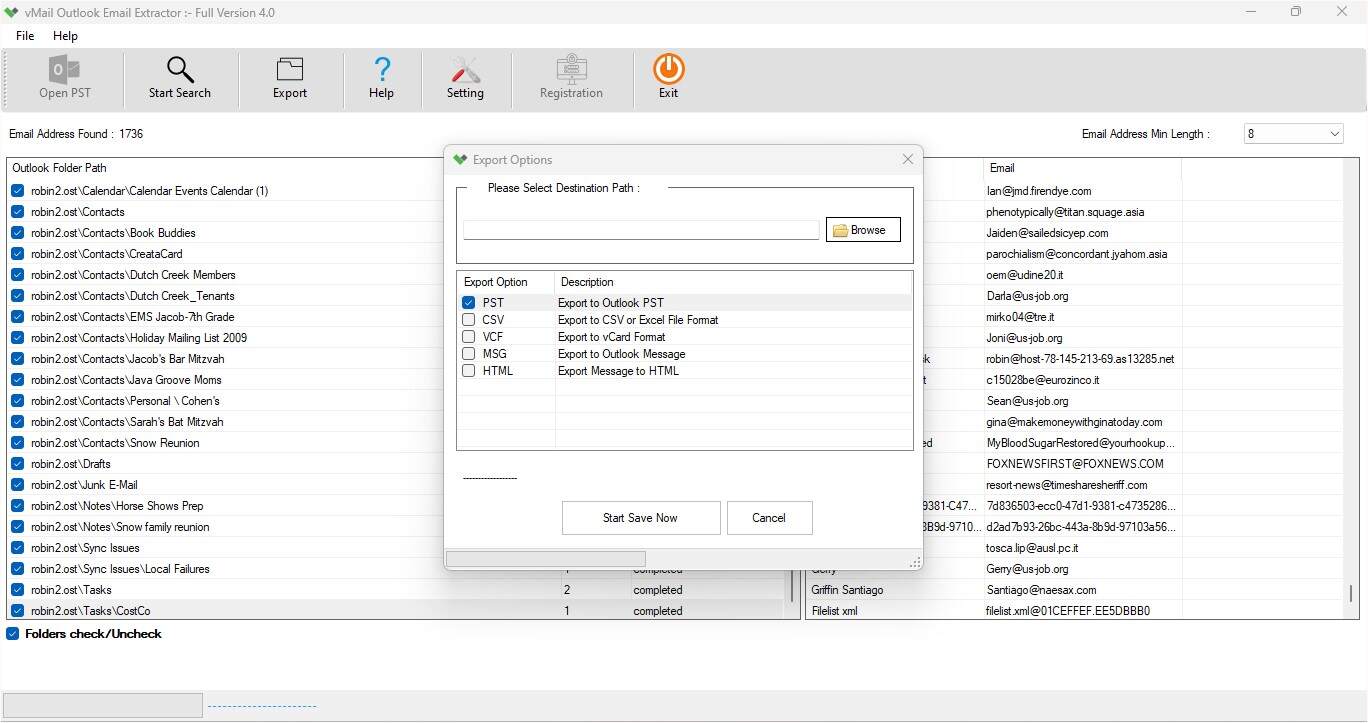
A further useful feature is that the extracted email data can be saved in various file formats. The file formats include PST, CSV, VCF, MSG, and HTML as per the website’s product description.
This helps the user choose the file format based on the intended use of the extracted data. For instance, CSV may be used where the extracted email data is in the form of tabular contact data, while VCF may be used in contact-related tasks.
In addition to this, PST, MSG, and HTML file formats give further choices in this regard.
Extract Addresses from Password-Protected PST Files
Sometimes, PST files are encrypted using passwords. It becomes very tough to extract data from such types of PST files when you use a tool that is not capable enough to handle password-protected PST files.
vMail PST Email Address Extractor Software is capable enough to extract emails from password-protected PST files of Microsoft Outlook.
Preserve Email Properties and Attachments
Email address extraction might in some cases be required together with the necessity to keep the necessary mailbox info. This software is engineered in such a way that it allows the preservation of email properties and attachments during data extraction from PST files.
It is advantageous in cases when the mailbox contains essential correspondence, and it is necessary to keep the sender and recipient information, attachments, and other email properties intact.
Simple and User-Friendly Interface
Any email extractor tool must have user-friendly features, especially where many PST files have to be processed. This tool comes with an easy-to-use interface, which is meant for all types of users, including beginners and experts.
The main procedure consists of adding the PST file/folder, scanning the mailbox, viewing the available content, using the filters where necessary, and saving the extracted data in the desired format.
This eliminates the complicated manual processes involved in the extraction process.
Support for Different Outlook Environments
Compatibility is yet another crucial aspect while dealing with PST files. The application is capable of handling both ANSI and Unicode PST files and is compatible with different Microsoft Outlook editions. Some of the supported Microsoft Outlook editions are 2021, 2019, 2016, 2013, 2010, and 2007, as listed in the product FAQ.
Some of the system requirements are Windows 11, Windows 10, Windows 8.1, and Windows 8, with the minimum system requirement being 4 GB RAM and 500 MB disk space.
How to Extract Email Addresses from Outlook PST
The extraction procedure may be performed using a simple step-by-step process. Start by opening the Outlook email address extractor and loading the necessary PST file or folder into the software. The program then performs a scan of the chosen mailbox information and extracts the email addresses.
The user is next prompted to preview the extracted information and filter out only the needed addresses if smart filtering is employed. The user can then choose to save the extracted information in the format of his/her choice—PST, CSV, VCF, MSG, or HTML.
Conclusion
Email address extraction from a huge Outlook mailbox does not necessarily have to be a lengthy process done manually. There are tools that can do the extraction, preview of emails, and other tasks automatically.
Among the features of the vMail PST Email Address Extractor Software are fast extraction, password-protected PST file support, intelligent filters, preview, multiple output format support, as well as ANSI and UNICODE PST file support.
For people who have the need to extract email addresses from Outlook PST files, this software offers a useful way of doing the process. For both a smaller PST archive and a huge Outlook mailbox, an Outlook email address extractor can be of great help.

Comments