
Outlook PST files may have a lot of valuable communication information, such as emails, sender data, recipient data, attachments, and other mailbox attributes. If users have to retrieve email addresses from the large Outlook mailbox manually, they would have to spend time performing this task repeatedly. An automation tool can help users perform it more efficiently and conveniently.
The vMail PST Email Address Extractor Software is an application that is aimed at retrieving email addresses from Outlook and PST files fast and easily. This tool allows its users to preview retrieved mailbox information, filter required email addresses, work with password-protected PST files, and save retrieved data in various formats. Thus, this software product is helpful to users in organizing their Outlook mailboxes.
Why Extract Email Addresses from Outlook?
Users' Outlook mailboxes have a lot of emails in them, which have been accumulating over the years. During this time frame, there is a possibility that messages from clients, customers, vendors, staff members, business partners, and so on might be received. To be able to use the email addresses in the future, one would need to copy them out of each email manually, which would take a lot of time.
Rather than opening each message, using an Outlook email address extractor tool could allow one to obtain email addresses from the PST data. This method would save the user's time from being occupied with repetitive tasks.
There are multiple reasons why email address extraction is needed. It can be useful for organizing customer contact information or collecting email addresses from old correspondence.
Extract Email Addresses from Outlook PST Files
The main idea of using this program is that the program can extract email addresses from Outlook PST files without manual search through all the emails by users. PST files and folders can be added to this program and then scanned for email addresses.
The program is very efficient and allows for rapid extraction of emails without any additional delays. The program also supports PST files of ANSI and UNICODE formats.
This could be really useful for working with big PST files where there are many messages. Instead of spending hours checking each email, the user can use automatic email extraction.
Preview Extracted Outlook Data
Prior to saving the extracted information, it may be desired for the user to check the extracted information. The software comes up with a preview function through which the user can preview the Outlook mailbox information prior to saving or conversion.
Preview is beneficial in case of huge PST files because the users get to know what information they have before extracting it. Preview gives better control of the process and gives the users an understanding of the information extracted by the software.
This is particularly helpful in case there are numerous folders and many emails in the PST file.
Smart Filtering for Specific Email Addresses
Not all of the users need each email address saved in a PST file. In the case of large mailboxes, the extraction of all possible email addresses can lead to the extraction of more data than necessary. The possibility of smart filtering makes it easier for the users to concentrate on certain email addresses.
According to the description on the website of the product, the filter makes it possible to get certain email addresses using certain criteria. Thus, the user will be able to work only with needed data.
For instance, users dealing with large mailboxes might want to locate certain contacts instead of processing the whole list.
Support for Password-Protected PST Files
There are certain Outlook PST files that contain passwords. In the case when important contact details are stored within these files, there is a need for an extraction utility that will be able to work with protected PST files.
vMail PST Email Address Extractor Software allows for email address extraction from password-protected Outlook PST files. This function gives an opportunity for users to extract important contact details while working with protected mailbox files.
Save Extracted Data in Multiple Formats
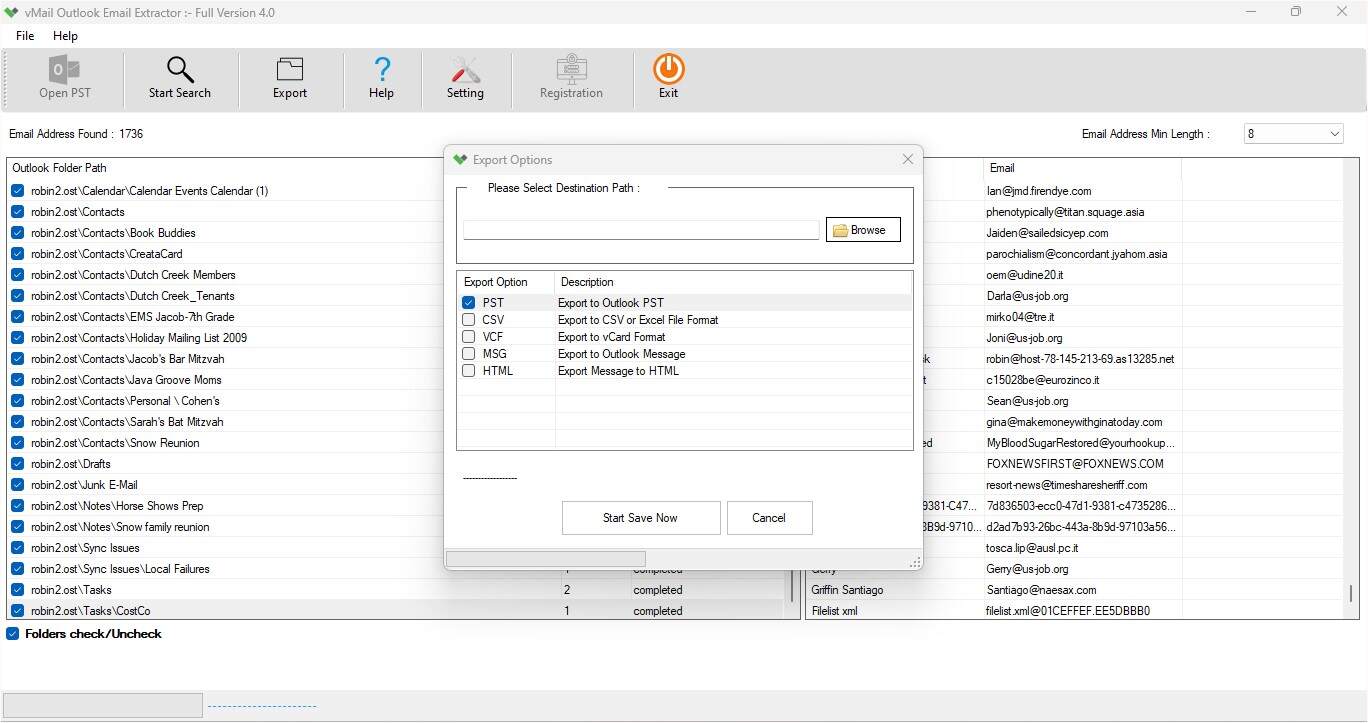
Once the information from emails is extracted, there could be a need to save the extracted information in some form that could suit further processing. Various output forms are available, and these include PST, CSV, VCF, MSG, and HTML.
The availability of various output forms gives users the flexibility to choose one that suits their needs. The CSV file format would suit when structured data handling is needed. The VCF file format could suit contact-related needs.
MSG, HTML, and PST are some other output formats available.
Preserve Email Properties and Attachments
Email extraction might not only mean pulling addresses. An email sent via Outlook might have valuable properties as well as attachments, which would be required for future reference.
As per the product description, the software allows you to extract email addresses while keeping the properties and attachments of the email intact. This would allow users to work on the mailbox information while preserving all necessary data from the original PST file.
User-Friendly Interface
The extraction utility must be easy to use even by people without any sophisticated technical skills. The utility comes with an easy-to-use interface that is meant for both novice and experienced users.
The basic steps include the addition of the required PST file or folder, scanning the mailbox, previewing the extracted data, filtering the data (if needed), and saving the data in the desired format.
This will make the entire extraction process less complicated and easier.
Compatibility with Outlook Versions
Compatibility can be considered another important aspect to take into account while working with PST files generated in various Outlook versions. The program supports two kinds of PST files—ANSI and UNICODE—and is compatible with several Microsoft Outlook versions.
On the product page, the following versions of Outlook are mentioned: 2021, 2019, 2016, 2013, 2010, and 2007. The mentioned system requirements include Windows 11, Windows 10, Windows 8.1, and Windows 8, with the minimum required RAM being 4 GB and 500 MB of free disk space.
How to Extract Outlook Contacts and Email Addresses
Extraction can take place via an easy-to-follow procedure. First, start the Outlook email address extractor program and then select the PST file or folder that needs to be scanned. The tool will scan the data entered and extract email addresses from it.
After that, users can choose to view the extracted data and use the smart filter tool to get some email addresses. After completing the entire process, users can choose the required output format, such as PST, CSV, VCF, MSG, or HTML, and store the data at the specified location.
With this process, there will be no need to manually check hundreds or thousands of emails.
Conclusion
It may take time for users to extract contacts and email addresses from the PST file using manual means. This problem can be solved using an automated contact extraction utility that will help to analyze the PST files, get email addresses, provide the user with a preview function, offer a filtering option, and several output formats.
The vMail PST Email Address Extractor Software offers several options like quick extraction, encryption of PST, smart filtering, mailbox preview, various output formats and works with both ANSI and Unicode PSTs.
For those users who want to extract email addresses from PST files of Microsoft Outlook, all these options can help to extract contacts in a more systematic and efficient way. Rather than wasting time on analyzing every email manually, users can utilize an Outlook email address extractor.

Comments