
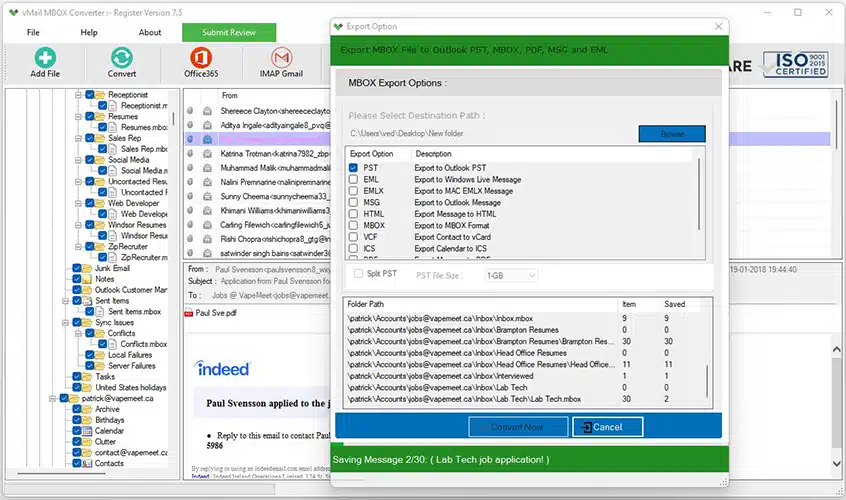
Email management has now become a must for everyone. As far as people are concerned who use Mozilla Thunderbird, at some point in time, there comes the need to transfer emails to Microsoft Outlook because of the requirements of the office or other reasons. Though Mozilla Thunderbird allows exporting emails in MBOX format, it does not offer any feature through which users can convert their emails into PST format directly. That’s where vMail MBOX to PST Converter comes into play.
In this comprehensive article, we will be comparing Thunderbird Export with MBOX to PST conversion software and also highlighting the pros and cons of both tools.
Understanding Thunderbird Export
The Mozilla Thunderbird program keeps the mailbox contents in MBOX format. One can easily export their mailbox folder through the built-in facilities or add-ons. However, the problem starts when one tries to open these emails in Microsoft Outlook. The issue is that the Outlook software does not recognize MBOX files, which makes importing the Thunderbird mailboxes impossible.
That is why a lot of professionals look for solutions to MBOX to PST migration.
Why Users Move from Thunderbird to Outlook
Some of the many reasons for using Outlook instead of Thunderbird include:
- Integration with Microsoft Office programs
- Professional management of emails
- Availability on Exchange Server
- High-level security
- Shared calendars and contacts
- Organization of emails
- Business collaboration capabilities
As Outlook saves mailbox information in PST format, it is necessary to convert MBOX to PST format in order to read Thunderbird emails using Outlook.
Limitations of Thunderbird Export
While Thunderbird Export performs great while creating MBOX backup files, there are certain disadvantages in this program.
PST Format Not Supported
There is no way to export emails into PST format using Thunderbird.
Manual Migration of Email Files
In order to operate, users will have to use third-party software and follow complicated steps.
Time-Consuming Process
It will take hours, if not days, to migrate the emails.
Risk of Data Loss
The manually performed process of email file conversion can lead to data loss.
Technical Challenges
Conversion may be too difficult for non-technical users.
What is vMail MBOX to PST Converter Software?
vMail MBOX to PST Converter Software is an advanced email migration tool that allows conversion of Thunderbird, Apple Mail, Eudora, Opera Mail, Entourage, and many other email clients using MBOX format into Outlook PST format.
vMail MBOX to PST Converter Software assures security, accuracy, and ease of conversion of mailboxes without any risk of damaging the original content.
It does not matter how many emails you want to convert; the software is efficient and fast.
Why Choose Professional Software Instead of Thunderbird Export?
The use of special software brings many benefits compared to manual export options.
Direct Conversion
The software can perform direct MBOX to PST conversion without the need to install Outlook and perform any other actions.
Folder Structure Preserving
All folders, subfolders, email messages, and their attachments shall be preserved in the course of conversion.
Preservation of Email Contents
The MBOX to PST Converter Software effortlessly converts MBOX to PST while preserving all HTML tags, image contents, font styles, hyperlinks, and metadata.
Batch Conversion
Users have the opportunity to convert several MBOX files at once by using this wonderful vMail MBOX to PST Conversion Tool.
Faster Processing
Special algorithms allow for fast processing regardless of the number of emails.
No Size Limitation
Be it several hundred emails or millions of them, the MBOX to PST software copes with them easily.
Thunderbird Export vs Professional MBOX to PST Converter
|
Feature |
Thunderbird Export |
Professional Converter |
|
Export MBOX Files |
Yes |
Yes |
|
Convert to PST |
No |
Yes |
|
Batch Conversion |
Limited |
Yes |
|
Preserves Folder Structure |
Partial |
Yes |
|
Maintains Attachments |
Manual |
Yes |
|
Supports Large Files |
Limited |
Yes |
|
Easy to Use |
Moderate |
Very Easy |
|
Data Integrity |
Not Guaranteed |
100% Maintained |
From the above comparison, it can be seen that the professional software offers a full migration experience.
Features of vMail MBOX to PST Converter Software
Friendly User Interface
The MBOX to PST Converter software features a friendly interface that works well for both beginners and experts.
Bulk Migration
Migrate unlimited MBOX files at once without slowing down the process.
Preserves Data Integrity
All properties of the email, which include:
- Subject
- From
- To
- Date
- Attachments
- HTML Format
- Marked Read
Will be preserved during migration.
Preview Email
It is possible to preview email data before conversion.
Selective Conversion
Select only certain folders or emails, and not the whole mailbox.
Speed
The high-speed conversion engine greatly increases efficiency.
Compatibility
The software supports PST files compatible with:
- Outlook 2021
- Outlook 2019
- Outlook 2016
- Outlook 2013
- Outlook 2010
- Outlook 2007
- Older Outlook Versions
Benefits of Converting MBOX to Outlook PST
Most companies convert to Outlook due to the high-end productivity tools offered by Outlook.
Some advantages are:
- Simple management of emails
- Greater collaboration
- Greater security
- Centralized storage of mailboxes
- Compatibility with enterprises
- Exchange Server compatibility
- Office 365 compatible
- Greater search capabilities
Conversion from MBOX to Outlook PST format makes email management easy for the user.
Why Manual Approaches Do Not Always Work
There is a lot of advice on the internet about how to perform migration manually using Thunderbird, Outlook, and other email clients.
Yet, there are many problems with manual migration, such as:
- It takes many hours
- The user should be knowledgeable in technology
- The risk of missing emails exists
- Mailbox damage occurs
A professional converter will help you avoid all these problems.
Data Security and Precision
One of the key benefits of using the software is its emphasis on data security.
The software does not change anything about the MBOX files while converting them into PST files. It generates new PST files while preserving all data.
Each and every email is migrated without any issues of data loss.
Why Do Businesses Use Professional Services?
There are many emails that businesses send and receive every day. It is impossible to migrate emails manually.
Professional tools are used by businesses because:
- They migrate emails faster
- Minimizing downtime
- Provide secure migration
- Results are accurate
- Migrate multiple emails at once
Final Verdict
Thunderbird Export proves to be useful in making MBOX backup; however, the tool fails in case there is a need for Outlook compatibility because Outlook is not able to support the reading of MBOX files. In this regard, manual transfer becomes cumbersome, time-consuming, and error-prone.
In order to perform safe and reliable conversion of MBOX to PST, professional software such as the converter is needed. The software makes it possible to make the conversion with ease and efficiency while ensuring that each and every email message, along with other elements, including folders, is converted.
Should one be in search of a reputable free MBOX converter, the trial version of the software will prove to be a great option. It is also an excellent solution for MBOX to Outlook PST migration and serves as a reliable free MBOX converter for evaluating its features before purchasing.

Comments