
In the modern-day world, emails have become one of the most important means of business communication. Companies communicate using emails for contracts, bills, project developments, client queries, finances, and other types of sensitive documents. With the increase in email volume, managing mailbox contents may turn out to be quite complicated. Large-sized mailboxes may cause slower performance of email clients, may occupy disk space, and finding emails would become impossible. Therefore, developing a proper email archiving method is crucial for organizations and individuals as well.
Microsoft Outlook saves mailbox content in PST (Personal Storage Table) files, while many other popular email clients such as Mozilla Thunderbird, Apple Mail, Eudora, and Opera Mail work with MBOX files. During migration from Outlook to other programs, companies may require converting PST to MBOX, keeping all the emails intact, their attachments, and the entire folder structure. Thus, the selection of the best PST to MBOX converter will ensure easy, fast, and safe migration. vMail PST to MBOX Converter Software is an efficient solution for exporting Outlook emails, keeping their integrity.
Overview of Email Archiving
Email archiving refers to saving emails for future access, but decreasing the size of your active mailboxes in a safe way. In comparison with standard backups, archived emails stay organized and easily accessible, so you can always find any email you need. Companies use this approach to meet some legal needs, to recover from disasters, and to manage their mailboxes effectively.
There are many advantages to implementing email archiving. The first one is improved Outlook functionality because it decreases the size of mailboxes, reduces the chances of PST corruption, preserves past communication, and helps businesses continue working after a problem. Instead of storing your years of emails in Outlook, you can save your archived mailboxes in MBOX format.
The Reason Behind PST to MBOX Conversion for Businesses
While Microsoft Outlook is one of the most commonly employed solutions among organizations, its users ultimately switch to alternative email clients owing to budget considerations, compatibility issues, or changes in business needs. Since Microsoft Outlook saves the mailbox in PST format, it is impossible to open these files with MBOX-based clients directly.
Therefore, it becomes necessary to convert PST to MBOX format while ensuring that all mailbox items are intact and no information is lost during the conversion process.
Challenges of Manual Email Archiving
Initially, most people opt for manual approaches when it comes to migrating their Outlook emails. These methods usually involve lengthy and complicated procedures. The larger the PST file is – with numerous emails stored in it, the longer the process of manual archiving takes, which makes mistakes possible. Some files become corrupted in terms of accessibility of attachments, folders become different, and important data like the details about the sender and timestamps can get altered.
Another big challenge is dealing with PST files that are large in size. The more data there is in the mailbox, the slower Outlook works, and the more likely it is for the PST file to be damaged. Manual approaches usually fail to help with processing large PST files.
vMail PST to MBOX Converter Software – A Smart Email Archiving Solution
While planning an email archiving system that is safe, the most important part is choosing the right conversion tool. vMail PST to MBOX Converter Software has been developed to assist users who wish to convert their Outlook mailbox into the MBOX file without missing any important details. This software has been created using sophisticated conversion techniques that ensure proper transfer of all the mailbox items.
Users that may have just one Outlook PST file or many archived files can convert them into the MBOX file in a short time without any hassle.
Batch Conversion for Faster Email Migration
Organizations usually have numerous Outlook archives that have been created over many years. Processing these archives one by one will definitely take much of time and effort. The software is capable of batch processing, meaning that users can process a number of PST files at once and get them converted to MBOX format in one single move.
Maintains Original Folder Hierarchy
One of the key needs during migration is the maintenance of the mailbox structure. The users of Outlook generally have created many folders and sub-folders for managing business correspondence. While converting the files, vMail PST to MBOX Converter Software maintains all the structure of folders in their original form without doing anything with them. Post migration, all emails will be easily accessible from their original place.
Converts Emails Along with Attachments
Attachments play an essential role in business emails and include invoices, agreements, presentation files, reports, and spreadsheets. The loss of attachments during migration will cause difficulties for the business. The software converts each of the Outlook emails, including all the related attachments, without affecting the format of the files. The documents will be converted completely and without any issues.
Advanced Preview Before Conversion
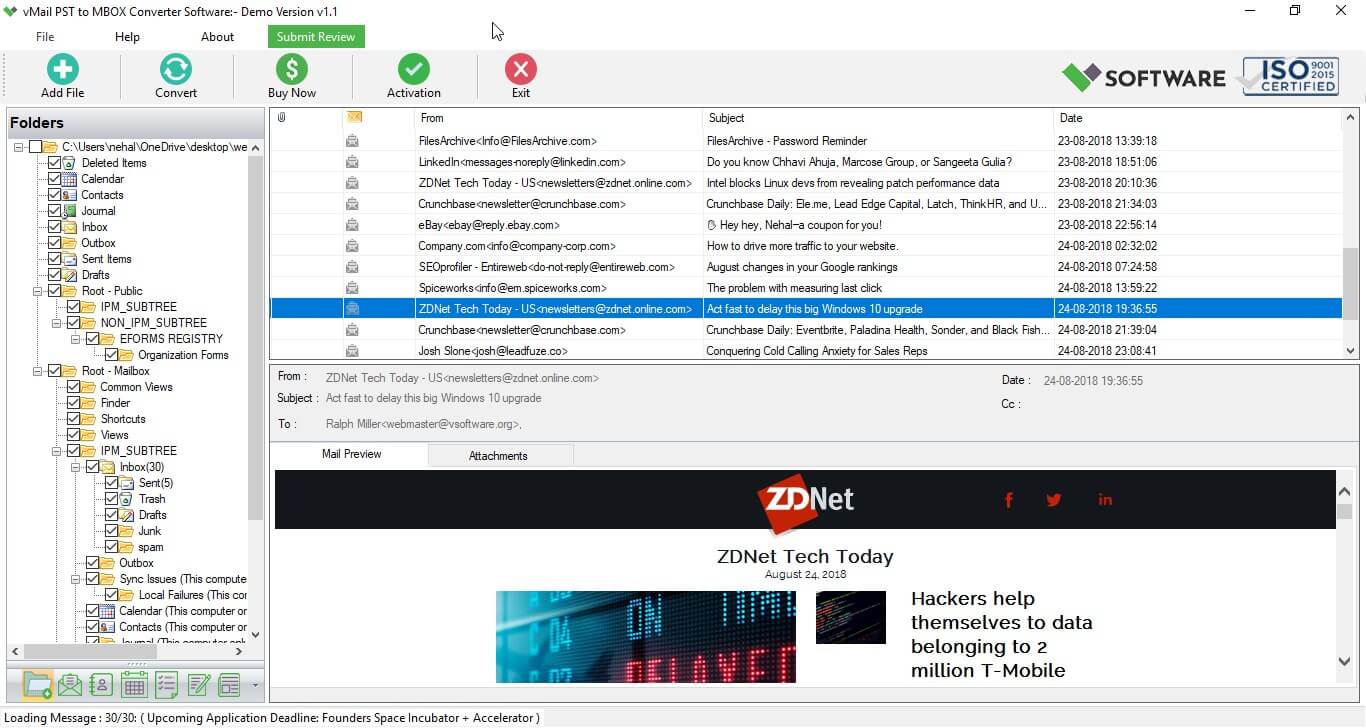
Users have the option of viewing their entire Outlook mailbox prior to carrying out the conversion. All emails, contacts, calendars, folders, and attachments appear in a well-organized hierarchical tree view format. Through this feature, users get the chance to view their mailbox content and choose the needed data to convert. This will make it possible for users to leave out unnecessary files during the process.
Supports Large PST Files Without Limitations
There are many companies that store their years of email communication in their Outlook archive files. Such huge PST files pose challenges to be processed manually at times. This software has the capability of processing large Outlook PST files without having any negative effect on the speed and data accuracy during the conversion process.
Selective Mailbox Conversion
Every migration process comes with varied demands. Some users may need to migrate selected folders rather than performing the migration of the entire mailbox. The software allows users to perform selected conversions by enabling them to select the required folder or items from the mailbox. This will ensure that there will be less need for storage space.
Retention of All Properties of the E-Mail
The retention of all properties of the original e-mail message is very important, especially from the legal, regulatory, and business perspective. While converting an email, the program keeps all the properties of the email intact, which include senders' details, recipients, subject lines, times of sending, CC and BCC, internet headers, formatting, and attachments.
Easy-to-Use Interface
Technical expertise should never be an obstacle during email migration. The program comes with a clean, intuitive graphical interface and makes it easy to migrate your email in just a few simple steps. Right from loading PST files to choosing the output location and running the conversion process, everything is kept simple so that even a novice can use it with ease alongside the technical experts.
Broad Compatibility with Email Clients
MBOX is the file format that is compatible with many of the email programs out there, making it ideal for archiving purposes. The vMail PST to MBOX Converter Software will convert your PST files into standard MBOX files that you can then import into your favorite MBOX-compatible email client, such as Thunderbird, Apple Mail, Opera Mail, Eudora, SeaMonkey, Entourage, and much more.
Best Practices for Email Archiving
There are several measures that one needs to undertake for an effective email archiving process. For instance, there is a need to plan and maintain email archiving properly. Firms should undertake periodic email archiving rather than wait for their Outlook mailboxes to be very large. Having many backup copies of archived documents will further increase the level of security against possible data loss. There is a need to arrange the mailboxes according to departments, clients or projects in order to facilitate easy retrieval of emails later.
Why Choose vMail PST to MBOX Converter Software?
vMail PST to MBOX Converter Software is the favorite of businesses and professionals over other software tools because it offers them a safe, accurate, and fast email migration tool. The advanced conversion process ensures that the integrity of the mailbox remains protected while offering fast performance capabilities. The ability to perform batch conversion, view mailboxes, selectively convert files, preserve attachments, maintain folder structure, and work with large PST files makes it one of the most reliable PST to MBOX converter software for Outlook.
Conclusion
Email archiving is one of the most important things for the security of valuable business communication, as well as organizing the mailbox data. Given the increasing number of emails that companies generate, it is important to select the proper archiving approach. Conversion of Outlook PST files to the MBOX format lets people work with their mailbox data on different mail services and be less dependent on Outlook.
In case you need to convert PST to MBOX in a safe and efficient way, the vMail PST to MBOX Converter Software is one of the best solutions for this purpose. This tool lets users Export Outlook emails along with attachments, folder structure, metadata, and other mailbox properties. With the help of the advanced functions of this software, people can implement a good email archiving strategy.

Comments