
By the term “PST Migration,” we understand the process of moving the mailbox information from one application to another application. Microsoft Outlook stores the mailbox information using PST file formats, while there are various email applications or platforms that make use of the EML file format for storing individual emails. In those cases where users wish to move the emails from Outlook to some other application such as Thunderbird, Windows Mail, Apple Mail, Outlook Express, or other EML-supporting email client applications, then they can do so.
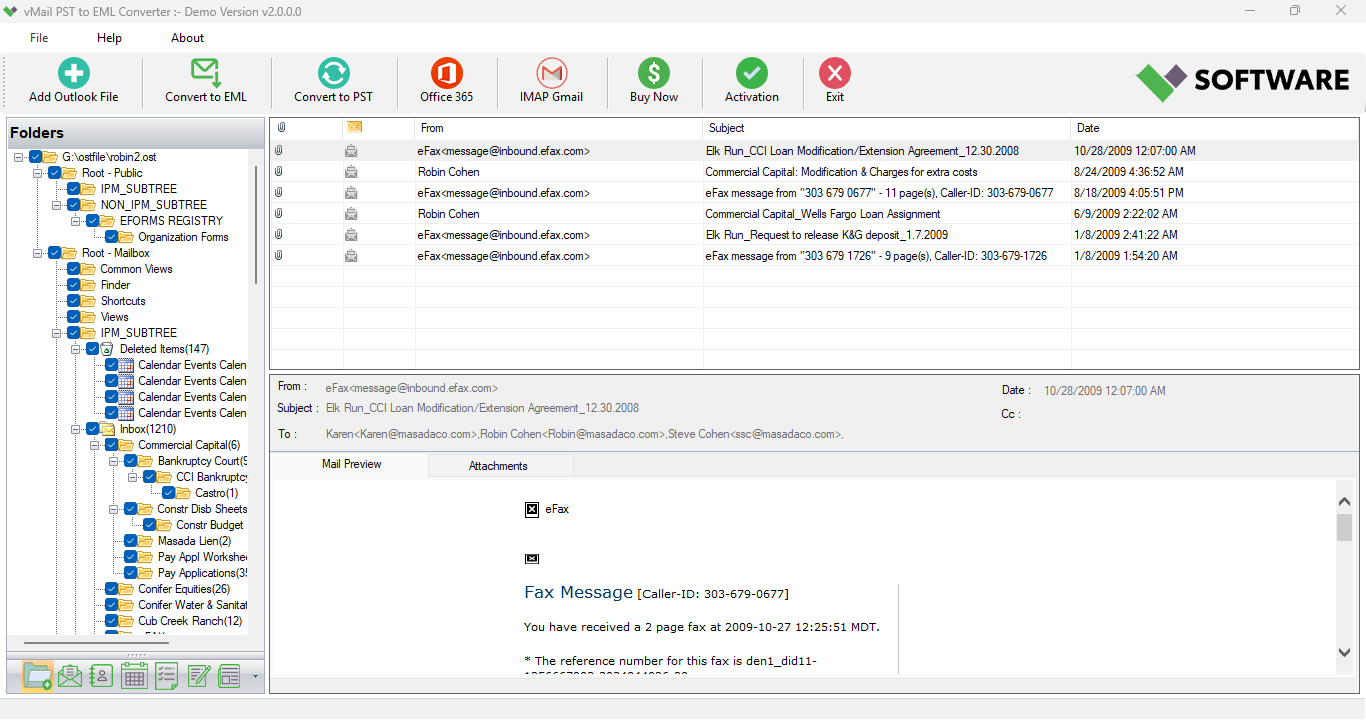
vMail PST to EML Converter is an application that converts PST files into EML file format while keeping all emails and attachments along with the folder hierarchy and other mailbox data.
Why Convert PST to EML?
However, the PST format is used mostly for Outlook, while EML works with a range of different email clients. In such a case, people who switch from Outlook will have to convert PST to EML files in order to work with their mailbox data in some other program.
As a result, the use of a PST to EML converter may be very helpful for people who want to have access to particular emails of Outlook in some other email client that supports EML files. It means that there is no need to open all emails and save them separately since there is some special software that can work with mailbox data better.
It can be especially helpful when there are a lot of emails and attachments saved in a PST file.
Convert Single or Multiple PST Files
Some of the important features of this software are its ability to convert single PST files and several PST files together. This is possible by selecting individual files or folders containing several PST files.
Batch conversion proves to be very useful when it comes to converting several Outlook mailboxes at once, especially for institutions and even individual users. This means that instead of doing the conversion of each individual PST file separately, users can convert several files at once.PST files that vary in size can also be converted by this particular software. Also, the program works with PST files of various sizes.
Preserve Emails, Attachments, and Folder Structure
Email migration is not just about migrating the message body itself, but some crucial information like email attachments, formatting, and mailbox folder structure might also require being preserved.
The PST to EML conversion tool enables email attachment and mailbox folder structure preservation. The tool preserves original folders and subfolders while converting, thus assisting the user to navigate through their mailbox data after migration.
Attachments are converted in conjunction with their respective emails. It becomes helpful when the Outlook messages have invoices, documents, pictures, reports, presentations, or other important files attached to them.
Preview PST Data Before Conversion
PST files can have many thousands of emails, which makes it tough to know which data needs to be transferred. Having a preview functionality is very useful because it allows users to check their mailbox prior to converting the data.
The preview functionality lets the user preview the contents of the PST email along with its attachments before converting the PST to EML. The users will be able to look at their mailbox data and know what needs to be converted.
Selective Email Migration with Date Filter
The date filtering tool is also very helpful. Not all the emails that are stored in the PST file need to be converted, since you can choose certain dates when the emails will be exported.
For instance, if a person wants to extract only those emails which were sent within the period of a certain project, necessary dates can be selected.
This helps to perform PST to EML export more selectively and saves resources. Such selective migration may also prove useful for companies where only certain parts of an employee’s mailbox are to be transferred.
No Outlook Installation Required
One of the biggest advantages of this software is that there is no need to install Microsoft Outlook on the system for carrying out the operation of converting. This helps users convert PST files even when the Outlook application is not installed.
This feature proves useful in those cases where the Outlook application is not present on the computer.
Support for Different Outlook Versions
PST files can come from various versions of Microsoft Outlook. The converter is capable of working with PST files that have been generated using versions of Outlook, such as 2024, 2021, 2019, 2016, 2013, 2010, and older versions. It supports ANSI and Unicode PST files.
Such versatility of the converter helps to use it with archives of both old and new versions of Outlook.
Convert PST Data to Other Formats
While EML is the main file type that the program produces, it also gives users the ability to export the files to other types as well. It has been reported by the program description that PST data can be exported in file types like PDF, DOC, DOCX, HTML, MHTML, PNG, GIF, TIFF, CSV, and EMLX.
This program also enables importing PST data to different platforms like Gmail, Office 365, iCloud, Outlook Web App, Thunderbird, and AOL.
Thus, the utility of the program goes far beyond the need to just convert Outlook to EML.
How to Convert PST to EML?
The entire process is made as simple as possible. To begin with, choose the necessary PST file or folder of PST files. Then, the program analyses the selected data and shows available mailbox data.
Afterwards, preview the emails and attachments and apply the date filter if the conversion of certain emails is needed. Choose the necessary data and select the EML format for the output. Finally, specify the destination folder and start the conversion.
As a result, the obtained EML files will be accessible via EML-supported programs.
Conclusion
An email converter that converts PST to EML is useful where users require migrating the Outlook mailbox data into an EML-supported format due to features like batch conversion, previewing of the mailbox, date-based filtering, attachment retention, folder preservation, and support for various versions of Outlook.
The vMail PST to EML Converter is the solution in situations where users have to do PST to EML conversion, PST to EML conversion, convert Outlook to EML, and even export PST to EML.

Comments