
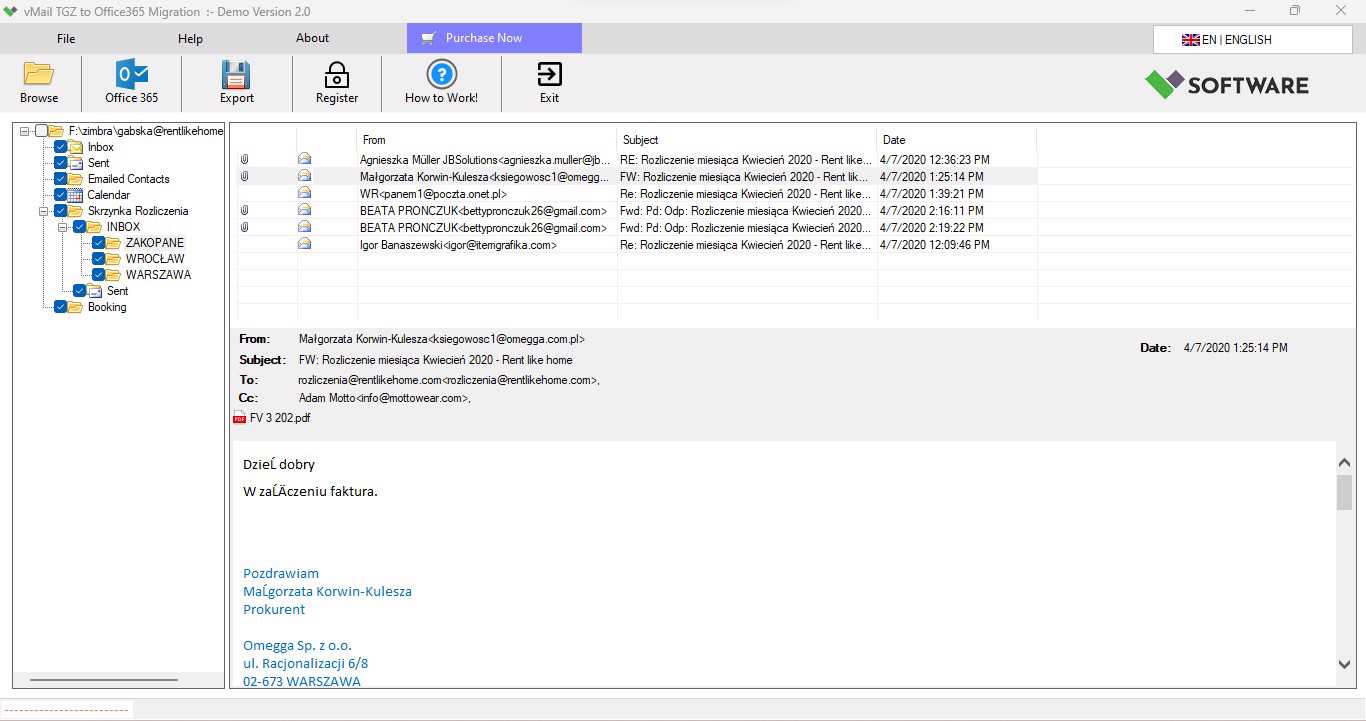
Email migration is crucial for organizations looking to replace their existing email system with a new one that meets their modern needs. Zimbra users might need to migrate mailbox data to Microsoft Outlook, Office 365, or Gmail for various reasons, including improved accessibility, cloud-based communication, or compatibility with additional services. However, migration of mailbox data becomes rather complicated when it comes to transferring only individual emails from one mailbox to another. Zimbra TGZ and TAR files should be converted to work properly with another email service.
This process can become easier if you use vMail Zimbra File Converter, which allows you to handle Zimbra TGZ and TAR files and export mailbox data according to your migration needs. You can migrate mailbox data to Outlook, Office 365, and Gmail with several features including mailbox preview, folder structure preservation, support of multiple mailboxes, date filter, and full reports on the conversion process. The vMail Zimbra file converter provides a convenient approach for users who need to work with Zimbra mailbox data.
Why Is Zimbra Email Migration Required?
A Zimbra mailbox contains lots of communications and business correspondence collected throughout several years. There might be a need to transfer emails, attachments, contacts, calendars, tasks, and many other mailbox items during migration. Users who attempt to do this manually will spend much time, and the risk of losing some valuable data might grow.
In such situations, a special Zimbra Converter will be helpful. Rather than transferring each email individually, users will load the exported data of their Zimbra mailbox, view the list of available items, select the needed one, and begin the conversion or migration process. It will be helpful especially for companies that have several Zimbra mailboxes or a large number of emails.
Besides that, there is also the possibility to organize everything properly. Preserving the original structure of the mailbox folder allows users to open their old emails easily even on the new platform. A reliable Zimbra Converter can help maintain the organization of mailbox data during the migration process.
Moving Zimbra Mailbox Data to Outlook
Outlook is extensively used by individuals and businesses in order to manage professional emails, contacts, calendars, and other information. PST is one of the most frequently used Outlook data formats; therefore, people switching from Zimbra to Outlook may need to convert their mailbox information into PST.
The Convert Zimbra file to Outlook utility allows preparing Zimbra mailbox information for Outlook. In addition to manually moving individual messages, users will be able to process Zimbra TGZ files and generate PST files with the necessary mailbox information. This makes converting Zimbra files to Outlook a useful approach for users who want to access their Zimbra mailbox data in Outlook.
The application supports various Outlook versions such as Outlook 2021, 2019, 2016, 2013, 2010, 2007, as well as older versions. In addition, users will have the opportunity to perform Zimbra TGZ-to-PST conversion without installing Microsoft Outlook to the system. This approach will be helpful when the conversion must be conducted on a dedicated migration computer.
Also, the maintenance of the original folder hierarchy will help people to simplify this procedure. People will still be able to find messages according to the original mailbox hierarchy without creating it anew.
Zimbra Migration to Office 365
Many organizations are shifting their email systems to the cloud. Microsoft 365, formerly Office 365, offers cloud-based email and collaboration for enterprises. In a migration from Zimbra to Office 365, migrating historical mailbox contents while keeping the migration organized is necessary.
The use of the Zimbra Migration tool can help address this requirement. Zimbra Migration to Office 365 tool allows the migration of multiple mailboxes, with support for folder hierarchy and email property preservation. It also offers Microsoft Azure MFA via App Approval and EWS Full Access for the migration process.
It may be helpful for companies that have many Zimbra users. With the Zimbra Migration tool, migration of different mailboxes can be done using a dedicated workflow instead of doing the migrations separately. Before the full migration, testing of one small mailbox may be performed to ensure that the right data has been migrated.
Zimbra to Gmail Migration
Migration of email content to Gmail is also a popular option for those who use the Zimbra application and would like to store their data in the cloud. The migration of Zimbra to Gmail will be beneficial for people and companies that need access to historical emails on various devices.
The Zimbra to Gmail migration solution works with multiple mailboxes and supports both Zimbra TGZ and TAR files. The solution retains folder structure and all email attributes during migration. At the same time, users can review source files to get familiar with mailbox data before the process of migration starts.
To simplify the migration of many accounts, a special migration solution can be used. Administrators can manage source files, choose necessary destination accounts, and migrate mailboxes according to their migration strategy. A Zimbra Migration tool can help make this process more organized.
Handling Zimbra TGZ and TAR Files
TGZ and TAR files will be helpful in the process of migrating from a Zimbra mailbox. The files may comprise emails, attachments, contacts, calendars, tasks, and other information related to the mailbox. But the user may find it troublesome to extract and arrange these files before migration.
TGZ File Converter will make this step easier because this program will allow you to work directly with Zimbra export files. From the provided information about the software, it is obvious that there is no need to unpack the TGZ file before adding it to the software. The application will work with the TGZ file, but adding an extracted folder will increase the speed of file processing. A TGZ File converter can therefore simplify the handling of Zimbra exported data.
The software supports Zimbra TGZ and TAR files without any file size restriction for conversion.
Features That Make Zimbra Migration Easier
A good migration tool should not limit itself to the basics of converting. Some functionalities might come in handy in controlling the process and making it appropriate for various types of migrations.
Mailbox Preview: The ability to preview helps to look into the contents of the Zimbra mailbox before starting the conversion or migration. This will help to determine necessary folders or mailbox contents.
Folder Hierarchy Conservation: Users usually arrange their emails within specific folders by projects, clients, departments, or any other categories. It is always easy to locate past emails if you conserve the hierarchy during migration.
Multiple Mailboxes Support: Businesses have many Zimbra mailboxes to migrate at once. Processing of multiple mailboxes will make the process faster.
Date Filtering: This filter is useful when you want to migrate emails in a specific time period. You will not be forced to migrate all the emails but only those from the desired date range.
Preservation of Email Properties: Certain properties, including the sender, recipient, CC, BCC, date, formatting, and read/unread status, may prove significant during the transfer of business communication. The Zimbra-to-PST conversion is intended to preserve email properties that are deemed important.
Generation of Detailed Reports: The reports of conversion could assist administrators in monitoring the process and determining whether any mailbox needs special care.
Migrating Attachments, Contacts, Calendars, and Tasks
The total mailbox migration process must look into much more than just email itself. The business user might rely on attachments, contacts, calendar and tasks that are part of their Zimbra mailbox.
This program is created specifically for exporting or importing emails, attachments, contacts, calendars, and tasks. It can be helpful for users to keep necessary information from the mailbox during migration.
Attachments are especially important for companies since old emails can contain invoices, documents, contracts, reports and other important data. Contacts and calendar can be important as well in order to continue normal business activity.
How to Prepare for Zimbra Migration
Correct preparation may help avoid difficulties during email migration. First of all, it is necessary to make a backup of the original Zimbra mailbox files. Storing the source information will offer another chance for recovery in case the need to perform migration once again.
Secondly, it is required to determine where the mailbox data should be transferred. Outlook users can choose PST conversion, and Office 365 and Gmail users can choose the proper cloud migration process.
It is required to perform a test migration before processing all mailboxes. It is possible to select a smaller mailbox, perform the migration, and verify emails, attachments, folders, contacts, calendar, and other information. When the result is satisfactory, it is possible to start the full migration process.
For big companies, it will also be useful to keep the migration record. It will be possible to monitor which mailboxes have already been processed, and which of them require being migrated again.
Conclusion
Converting and migrating Zimbra email accounts to Outlook, Office 365, and Gmail can be done effectively through a dedicated tool for conversion and migration of Zimbra data. A vMail Zimbra file converter enables conversion of Zimbra TGZ and TAR files and preparation of mailbox data for transfer to various destinations.
People who wish to convert Zimbra files to Outlook can convert Zimbra mailbox data into PST, whereas companies wishing to migrate to Office 365 or Gmail can do so using a Zimbra Migration tool. Users can use a TGZ File Converter to simplify handling of Zimbra export files.
The features include mailbox preview, preservation of folder structure, ability to process multiple mailboxes, date filtering, preservation of email properties, handling of large TGZ files, and generation of a conversion report. With the creation of backups, testing of the process, choosing the right destination, and validation of the transferred data, people can easily migrate from Zimbra to Outlook, Office 365, and Gmail while retaining all the important mailbox data.

Comments