
Microsoft Outlook is among the most popular email clients that enable you to manage both personal and business correspondence. As you use Outlook over time, the program stores emails, contacts, calendars, journals, notes, attachments, and other information in the PST file. The more you send and receive emails daily, the larger your PST file becomes. In addition to performance problems, a large Outlook data file can cause the slowing down of your Outlook startup, constant freezes, risks of corruption, and challenges of mailbox data management. For this reason, many IT experts suggest using a vMail PST split tool to arrange a large Outlook data file properly.
An efficient pst file split tool enables you to break up the large PST file into smaller files without losing any of your mailbox data or the file structure. In order not to let Outlook work slowly or become corruptible, it is better to split the PST file beforehand. In case you still have only one oversized Outlook data file, there are at least eight reasons to use a good pst file splitter tool.
1. Improve Outlook PerformanceA popular reason why many users prefer to divide large Outlook PST files is because they want to enhance the performance of Outlook. As the PST file gets bigger in size, Outlook will take longer time to open, to find emails, to sync folders, or even to react to any user’s action. Oversized mailbox files will consume more computer resources and usually lead to delays when opening folders or even attaching files.
With the help of an Outlook PST file splitting tool, you can split a single oversized mailbox into several smaller PST files. After splitting the oversized file, Outlook will work more effectively and quicker.
2. Reduce the Risk of PST File CorruptionOversized PST files are susceptible to corruption, particularly during unexpected instances such as power outages or problems related to system crashes. The process of restoring data stored in a corrupt PST file is difficult and even impossible in some cases.
Using the right vMail PST splitting utility reduces this danger through breaking down the mailbox into many small Outlook files. These files are not only easy to handle but also safe to store over time.
3. Simplify Email ManagementThe management of hundreds or thousands of emails in an Outlook mailbox could be too difficult to handle. It would be time-consuming to search for messages within years of correspondence contained in one large PST file.
It is possible to effectively use a reliable PST splitting tool that would help sort out mailbox data into various PSTs according to year, folder, date, or size. For instance, old emails would be placed in one PST file while business emails would be placed in another PST file.
4. Create Smaller Backup FilesCreating a backup for the large Outlook PST file takes more disk space and much more time. In case any kind of disruption happens during the process of backing up, it is possible that the whole procedure will have to be restarted.
The use of a PST file splitter utility allows you to create several small PST files, which are easy to back up, to move around, and to restore. Smaller backups take less disk space and are more reliable.
5. Make Outlook Migration EasierOutlook mailbox migration is made easier in cases where the size of PST files is relatively small.
In other words, instead of moving one very large mailbox file, users will move different smaller PST files independently. This is achieved through the use of the Outlook PST Splitter Tool that makes it easy to prepare the Outlook data for migration without changing the mailbox contents.
6. Preserve Complete Mailbox StructureMany users have concerns that breaking the PST file will impact the structure of their mailbox and formatting of emails. Professional Outlook PST file splitter software makes sure that all elements of the mailbox stay intact during the whole process of splitting the file.
This includes emails, attachments, contacts, calendars, notes, journals, tasks, folder structure, metadata, information about the sender and recipient of an email, as well as its timestamp.
7. Split PST Files Using Multiple CriteriaThe methods for PST splitting available today have far more flexibility compared to merely splitting the PST files based on size. Specialized software provides people with the freedom of deciding how they would like to organize their Outlook data.
The vMail PST split utility gives a number of options to split your Outlook PST file in accordance with the following:
- • Your desired PST size;
- • Specific dates;
- • Year;
- • Your chosen folders;
- • Email ID.
This kind of flexibility enables users to create customized Outlook PST archives based on their business or personal needs. You may split your PST data annually or per department.
8. Save Time with Fast and Secure ProcessingManual ways of organizing huge Outlook mailboxes could take many hours and sometimes even days, when you have to sort through thousands of emails. Manual sorting also poses a threat of accidental deletion of data.
PST splitter software takes only several minutes to do that and guarantees complete data safety at the same time. The user selects the source PST file, specifies the way of splitting, defines the destination folder, and begins the process; the rest will be done automatically without any change made to your Outlook data file.
The possibility of fast PST splitting makes this software perfect for use by IT professionals, corporations, law firms, universities, and any other people who have huge Outlook mailboxes.
Additional Features That Make PST Splitting EasierIn addition to effectively partitioning Outlook data files, modern PST splitting tools have a number of additional functions that provide better user experience. Most professional solutions provide support for both ANSI and Unicode PST files, thus being suitable for older and new Outlook releases. With such a PST Splitter tool, users can preview mailbox folders prior to partitioning, keep Unicode characters, keep attachments intact, and handle very large PST files without any file size limitations.
The program operates independently without any complex settings and works with Outlook 2021, Outlook 2019, Outlook 2016, Outlook 2013, Outlook 2010, Outlook 2007, and older Outlook versions. Moreover, it is compatible with Windows 11, Windows 10, Windows 8.1, Windows 8, Windows 7, and Windows Server operating systems.
Whatever your goal—archiving old emails, improving the performance of Outlook, or preparing mailbox files for migration—the professional Outlook PST Splitter Tool will definitely help you.
ConclusionLarge Outlook PST files may cause poor performance, increase corruption risk, complicate mailbox management, and make backups and migrations more challenging. Instead of waiting for such problems to arise, it would be much more intelligent to organize Outlook data proactively.
With the help of the good vMail PST Split tool, one may easily split large PST files and create well-organized Outlook data files that will have all emails, attachments, folders, and mailbox attributes intact. The advantages of splitting Outlook PST files include better performance and fewer corruption risks, along with easier backups and migrations, which is highly useful for personal and corporate users.
As the size of Outlook mailboxes usually grows significantly over time, it is high time to use a professional PST split tool. With the help of the pst splitter software, it will be easy to split large Outlook PST files and keep their integrity intact. It is a great opportunity to stay protected from future Outlook problems.
How to Use Outlook PST File Splitter SoftwareUsing a professional Outlook PST file splitter software like vMail’s tool is straightforward. Here’s a general step-by-step overview:
STEP 1 : Open vMail PST Splitter Tool
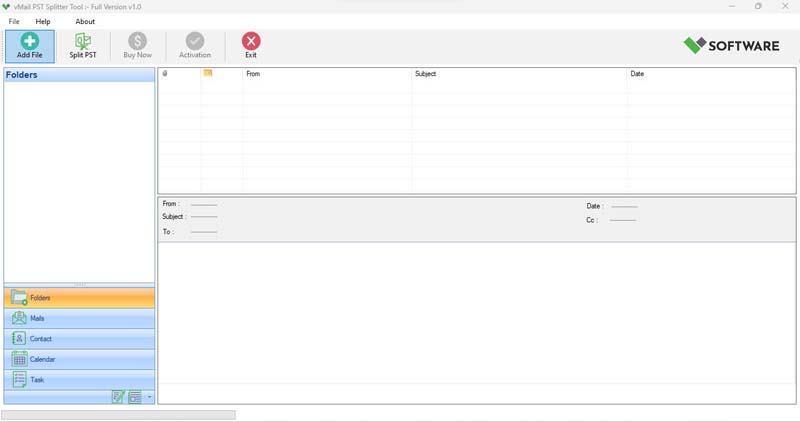
STEP 2 : Browse & Select (*.pst,*.ost) Outlook PST file
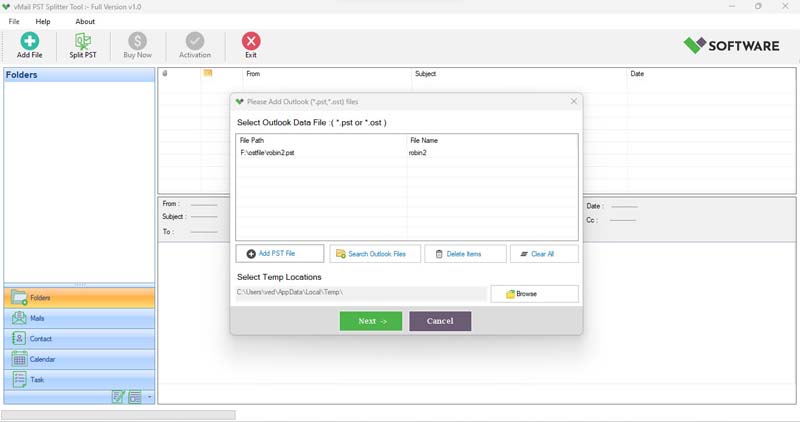
STEP 3 : Scanning and preview Outlook PST & OST File
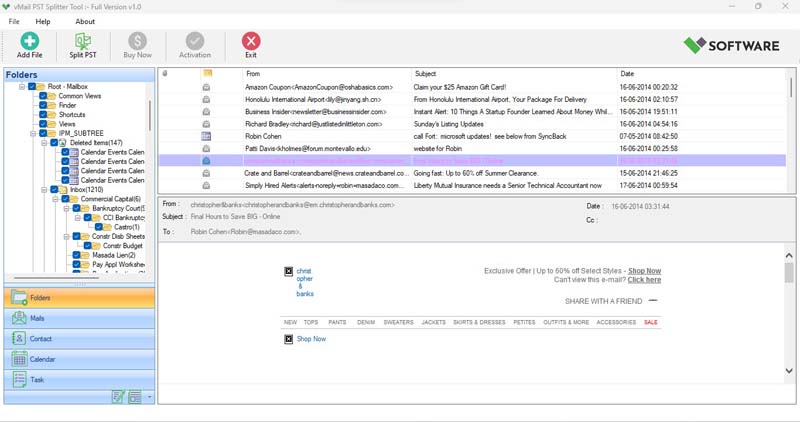
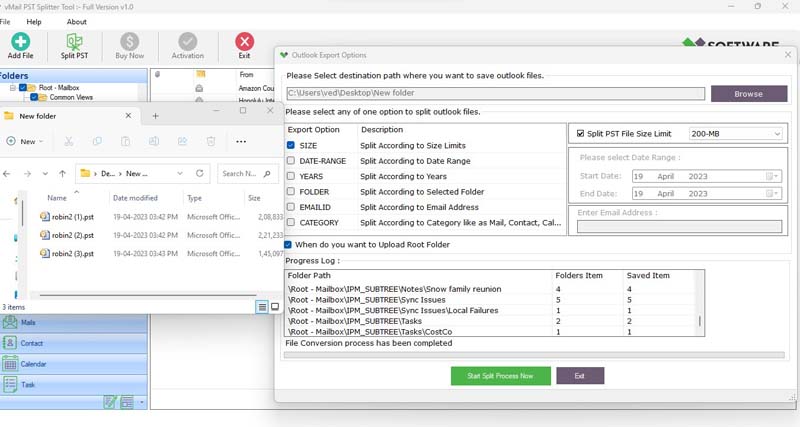
STEP 4 : Split Option for PST File

STEP 5 : PST Split Conversion Process

Comments