
Email management on different email platforms becomes difficult at times when switching from one platform to another. Several email clients like Windows Live Mail, Thunderbird, Apple Mail, Windows Mail, and other desktop email clients use the EML format to store their emails. Although the EML files are compatible with many applications, Microsoft Outlook uses the MSG format for individual emails. Due to the above reason, it becomes necessary to convert Outlook EML to MSG in order to import the emails into Outlook.
For any user or organization having thousands of emails to move to Outlook, it is necessary to make the right choice. The manual methods might be helpful for just a few emails but are not effective for a large number of emails. A professional vMail EML to MSG Converter Software helps you do the job of EML to MSG conversion by converting the EML files into MSG.
Why Import EML Files into Outlook?
Outlook is one of the most common email management software programs used in companies and by individuals. Some of the functionalities included in the Outlook application include email management, schedule management, contact management, task management, note management, and integration with Microsoft 365 and Exchange Server.
Most people who use Thunderbird, Windows Live Mail, Apple Mail, and other email programs often opt to migrate EML to MSG by moving their emails to Outlook for better performance. However, Outlook cannot support management of EML files just like it supports MSG files. As a result, users have to covert EML to MSG before importing emails into Outlook.
The use of a reliable converter ensures that all the emails are moved without altering the data in the original mailbox.
Problems with Manual EML to MSG Conversion
Many manual techniques can be found on the Internet, but they tend to work well only with a limited number of emails. In cases when people require converting hundreds or even thousands of EML files, manual methods become ineffective.
Manual conversion involves opening individual emails and exporting them again into Outlook format. The procedure takes considerable time, thus there is a risk of losing emails and their formatting or attachments.
Business organizations working with archived emails for several years choose software tools due to their high efficiency for EML to MSG migration.
Professional Software Makes Conversion Easy
Professional vMail EML to MSG Converter Software makes the whole process easy and convenient. The software converts all emails at once without the need to convert an individual email, but all files or folders are loaded by the user at once.
The program goes through all selected EML files and converts them to MSG format compatible with Outlook.
In contrast to manual procedures, this program does not alter any part of the source files.
Convert Single or Multiple EML Files
One of the major strengths of professional software is that it can easily process single as well as multiple EML files together.
The user can either choose one file or choose a folder consisting of thousands of EML files. The software will be able to automatically detect all items in the mailbox and convert EML to MSG files without repeating any process. This software comes in handy for IT administrators who need to migrate employee mailboxes.
Preserve Original Email Properties
Preservation of email integrity is key during migration. Professional software ensures all relevant email details are maintained during the migration process, and these include:
- The sender and receiver details
- The subject line
- The CC and BCC lines
- The date and time
- The internet headers
- Attachments
- Embedded images
- Hyperlinks
- HTML formatting
- The read/unread status of emails
- Email metadata
During EML to MSG conversion, all emails become exactly the way they were in the original mailbox in Microsoft Outlook.
Preview Emails Before Conversion
The inclusion of previewing capability is another added dimension for the user before initiating the conversion process.
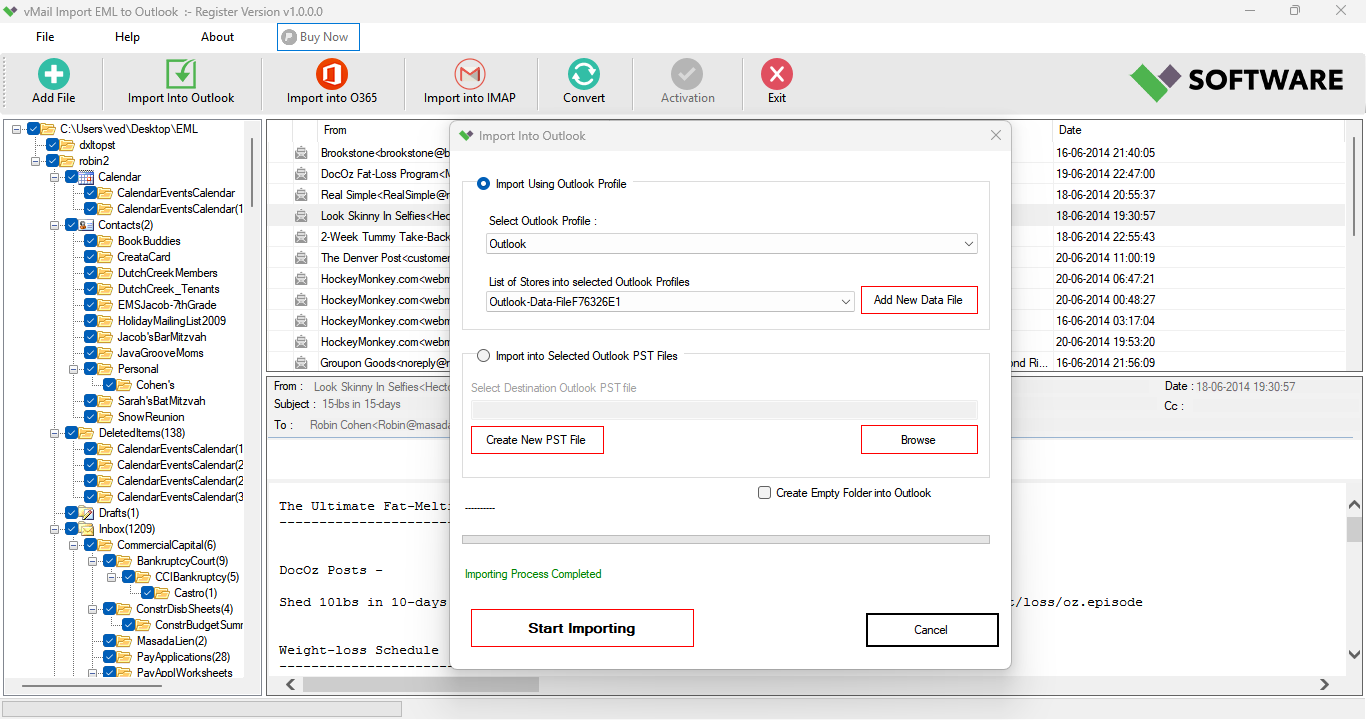
The vMail EML to MSG Converter Software enables users to view selected EML files within the application itself. Users can review the email content, attachments, sender details, recipients, and folder hierarchy before initiating the conversion process. This reduces any chances of errors during the process.
Maintain Original Folder Structure
It’s crucial to keep the folders organized when migrating emails. All folders are preserved by professional software while emails are being migrated. All folders—including Inbox, Sent Items, Drafts, Deleted Items, Archive, and custom folders—stay just like they were before migration.
When users convert Outlook EML to MSG, Outlook will show the migrated mailbox in the same structure that it had before.
Support for Large Email Collections
Many companies keep email archives that span several years of correspondence. EML archives may include many thousands of emails and lots of attachments. Regular converters might have difficulty with such volumes of data. Conversion software designed for professionals will be able to process both small and big email archives without limitations on file size, irrespective of whether the archive consists of several hundred or thousands of emails.
Export Emails with Complete Accuracy
A skilled converter ensures total accuracy during the entire process of migration.
Each selected email is converted while maintaining its formatting and content. The attachments will be associated with the respective emails, and the metadata will be kept intact.
This level of accuracy renders this software a suitable choice for corporate entities, law offices, schools, hospitals, and government agencies that need to export EML to MSG securely.
Saving Choices Available
Apart from assisting users in exporting EML to MSG, there are certain advanced software tools that can help users export files in diverse file formats.
The users have the freedom to save the extracted mailbox in PST, PDF, EML, HTML, MBOX, or other popular file formats. The users also have the option of migrating their data to Microsoft 365, Exchange Server, Gmail, IMAP, and several other online platforms. This will help users manage their future migrations without needing to download any more software.
Batch Conversion Saves Valuable Time
Organizations often need to handle numerous employee mailboxes. Conversion of each mailbox takes many days if performed manually. The professional application offers batch processing capabilities, which allow handling several EML folders at once. This greatly speeds up the migration process and increases productivity. Batch processing is an extremely useful feature for companies preparing for large-scale EML to MSG migration projects.
Easy-to-Use Interface
Even though it has high-level capabilities, the software comes with a simple interface.
Users will just need to do the following things:
- Choose their EML files/folders.
- View their mailbox information.
- Choose Outlook MSG as the desired output format.
- Choose the target folder.
- Begin the migration process.
Compatible with Outlook and Windows
The aspect of compatibility is highly essential when migrating emails.
Professional tools ensure the creation of MSG files that are compatible with Microsoft Outlook 2021, 2019, 2016, 2013, 2010, 2007, and even older versions.
Furthermore, it is also fully compatible with Windows 11, Windows 10, Windows 8.1, Windows 8, Windows 7, Windows Vista, Windows XP, and Windows Server.
Users can easily migrate EML to MSG regardless of the Outlook version or Windows version.
Why Choose Professional Software Over Manual Methods?
Although manual conversion seems easy at first glance, this is not the case in large migration projects.
Professional software handles all stages of conversion automatically, reduces human error, retains email integrity, allows batch conversion, maintains folder structure, and even allows you to preview your mailbox prior to conversion.
All of these make professional software a far more reliable option for email management.
Conclusion
It is easy to import EML files to Microsoft Outlook once the emails are converted to MSG files. Without wasting time through inefficient manual processes, the user can now make use of vMail EML to MSG Converter Software to conduct EML to MSG conversion safely with all the properties of the email intact.
When it comes to converting EML to MSG, converting Outlook EML to MSG, EML to MSG migration, migrating EML to MSG, or exporting EML to MSG, professional software is always a reliable solution. When it comes to batch conversion, mailbox preview, multiple export formats, handling a huge number of emails, and total Outlook compatibility, nothing but professional software can provide everything.

Comments