
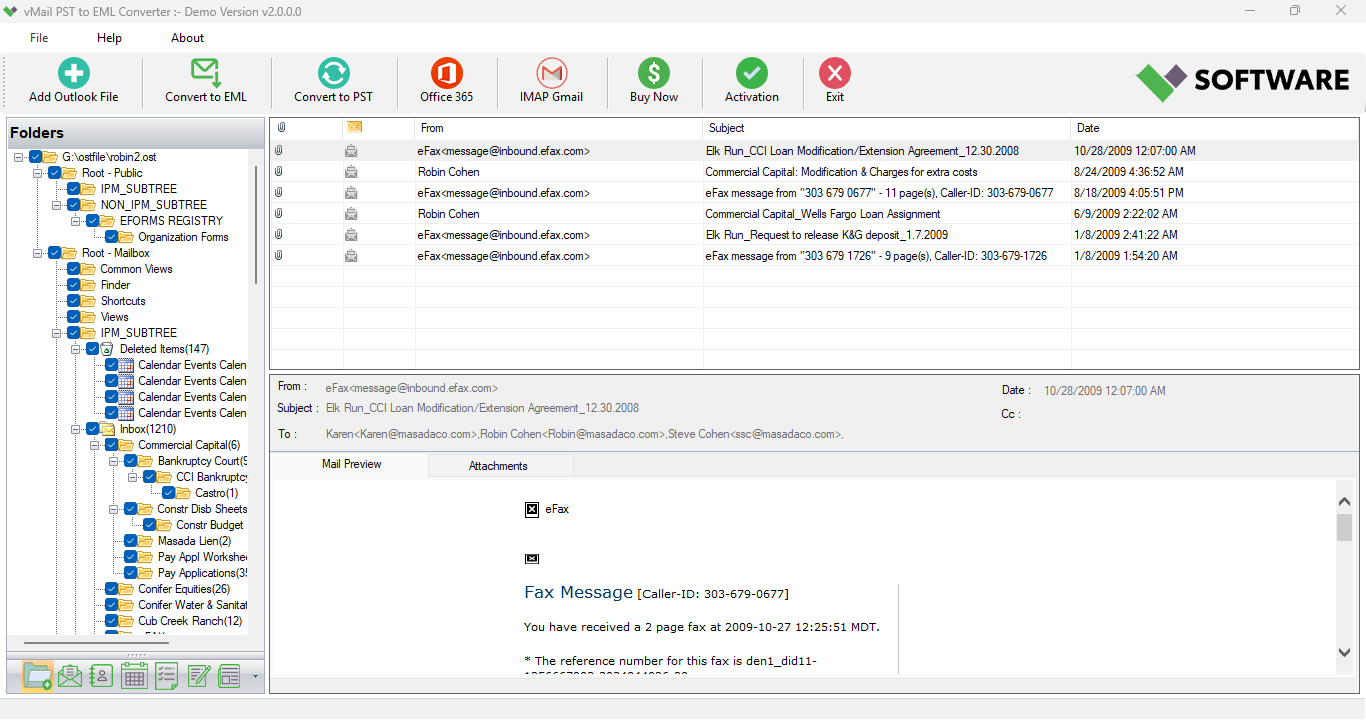
PST to EML file management turns out to be tough for people who require accessing their mailbox in another email client program. Outlook saves the emails in PST file format, whereas there are plenty of email clients like Windows Live Mail, Thunderbird, Apple Mail, eM Client, Windows Mail, and others, which support EML format. Thus, due to this issue of compatibility, people search for a trusted tool that can help them transfer PST to EML without compromising on their valuable emails. A well-developed tool makes the entire job easy and convenient for the user as it enables people to migrate their Outlook PST to EML in bulk and retain all properties of the mailbox. The vMail PST to EML Converter application is aimed at offering a hassle-free migration process for individuals as well as organizations.
It is imperative for one to choose the correct software, whether you have the need to back up Outlook emails, change to a new email program, or make sure that each and every email is converted to EML format. Manual ways of performing such tasks are usually very time consuming. They might even fail to maintain proper folders and email formats. An Outlook to EML converter will ensure that you avoid all such problems, as it offers an easy-to-use interface, filtering facility, and fast conversion process.
Why Users Need PST to EML ConversionThere are many organizations and individuals who switch from Microsoft Outlook to other mail clients owing to licensing fees, platform constraints, or due to certain business needs. As Outlook stores all information regarding the mailbox in the PST file format, these emails cannot be viewed by the applications, which only support EML files. Here, the vMail PST to EML Converter can prove to be quite helpful.
The software provides safe conversion of PST to EML through a process where each of the emails is converted to an individual EML file, keeping the folder hierarchy intact. Thus, it becomes easier for the user to view the emails of Microsoft Outlook in various mail clients without facing any compatibility problems.
A Reliable Solution for Bulk Outlook Email MigrationAmong other advantages of vMail PST to EML Converter, the following should be mentioned: the capability of bulk processing. This means that there is no need to convert emails one by one; several Outlook PST files can be loaded at once and converted in a considerably shorter period of time. This will help save precious time, especially for companies dealing with thousands of emails belonging to different users.
vMail PST to EML Converter has been designed with a highly efficient conversion engine capable of reading ANSI and Unicode PST files without causing any harm to them. All the necessary features such as email formatting, attachments, sender, recipients, subjects, timestamps, and internet headers are preserved. Thus, you may be sure that no information will be lost during the conversion process.
Maintains Complete Folder Structure Throughout ConversionMaintenance of mailbox structure is one of the most critical factors during any email migration process. Many large-sized Outlook mailboxes may comprise hundreds of folders and subfolders created over the course of several years. The loss of this structure can result in confusion after the migration.
It guarantees that each folder stays in the same way as it exists in Outlook. During the PST to EML conversion process, the folder structure of the mailbox gets transferred automatically. Each resulting EML file will be saved within the appropriate folder, thus making it easier for you to find your emails after the migration process. It is particularly helpful when using emails for business communication.
Supports Healthy as Well as Corrupt PST FilesThe users usually find it hard to work with the Outlook PST files, which are not available to them due to corruption or other errors. The software will be able to open both healthy and corrupt PST files and extract mailbox data from them for conversion. The user will have better chances of recovering important business correspondence.
As opposed to relying on Outlook, the software will scan the PST file by itself and prepare it for conversion. As a result, the user will be able to convert Outlook to EML even if the Outlook application does not work properly.
Preview Emails Before Starting the ConversionPrior to the actual migration, it is possible for users to view the contents of the mailbox directly from the program itself. These include emails, attachments, folders, contact entries, and other Outlook files.
This allows the user to double-check whether the right mailbox has been chosen to be converted. It also helps in avoiding the conversion of unnecessary folders. After double-checking everything, the user can proceed with exporting PST to EML files.
Selective Conversion Using Advanced FiltersIt is not necessary that all Outlook mailboxes be completely converted in all cases. In some cases, users need emails from a certain period of time or from a specific folder or category only. The software provides various filters that will help users convert emails selectively.
The users can use filters based on dates to convert their emails of a particular time period. Users can even convert particular folders of emails rather than converting the complete mailbox.
No Outlook Installation RequiredOne of the advantages of the software is the fact that Microsoft Outlook does not have to be installed on the machine. The tool opens PST files directly and converts them without the use of other applications.
Such approach greatly decreases the dependency of the system and enables the administrators to convert PST files into EML on any Windows machine without having to configure Outlook profiles.
Preserves Email Properties and MetadataEmail migration performed by professionals must not affect email integrity. All essential properties are preserved during conversion, including the sender’s name, recipient’s address, CC, BCC, subject, date, attachments, links, formatting, embedded images, and internet headers.
Preservation of metadata guarantees that EML emails will be completely identical to the original emails in Outlook. Companies that use emails for audits or regulatory requirements can safely convert PST to EML without losing any data.
Supports Large PST Files Without LimitationsQuite a number of Outlook users have mailbox files, which can easily go past several gigabytes in size. The main problem associated with such big PST files is that they make it quite difficult to manually migrate them due to time wastage and interruption that will be experienced.
This program effectively supports migration of both small and large PST files without any file size limitation whatsoever. The efficient conversion engine enables its effective operation even when working with large mailboxes, which may contain thousands of email files.
User-Friendly Interface for Every UserTechnical know-how must not become a hindrance when migrating emails. The tool comes with an easy-to-use interface where all features are arranged in a neat manner. It is very easy for even novice users to perform email migration using just a few clicks.
Users, after choosing the PST file, will be able to see a preview of mailbox contents, select the target folder, set a filter if any, and begin the conversion process.
Wide Windows CompatibilityAll versions of Microsoft Windows OS are supported by the software. These include Windows 11, Windows 10, Windows 8.1, Windows 8, Windows 7, Windows Vista, Windows XP, and different Windows Server OS. The software also works on PST files from different Outlook versions, enabling migration of both old and new Outlook mailboxes with no compatibility issues.
This high level of compatibility guarantees an easy process in any operating environment.
Why Choose vMail PST to EML Converter?A wide variety of email migration utilities can be found in the market; however, very few can provide accurate and fast email migration along with being user-friendly and powerful. vMail PST to EML Converter is one of them, as this tool emphasizes on the integrity of data along with having professional performance capabilities. Some of its features include bulk migration capability, maintaining the folder structure, support for large PST files, previewing the mailbox, keeping attachments intact, selecting only required emails for migration, migrating without installing Outlook, and support for various versions of Outlook.
These features make it the perfect utility for Outlook email migration.
ConclusionEmail migration to EML format in Outlook becomes easy with the help of professional tools, especially when the tool is developed for the specific task. Rather than wasting time with manual processes and risking losing valuable data, you may opt for vMail PST to EML Converter to do a safe and correct email migration process. This tool will keep the entire folder structure, ensure email properties, provide bulk conversion options, allow previewing mailbox data, and support large PST files and PST to EML conversion in a reliable manner without Microsoft Outlook.
Whatever your goal may be, whether it is to convert PST to EML for another mail client, convert outlook to EML for archiving purposes, or export PST to EML along with all mailbox information, the above tool will give you professional service with maximum efficiency

Comments