
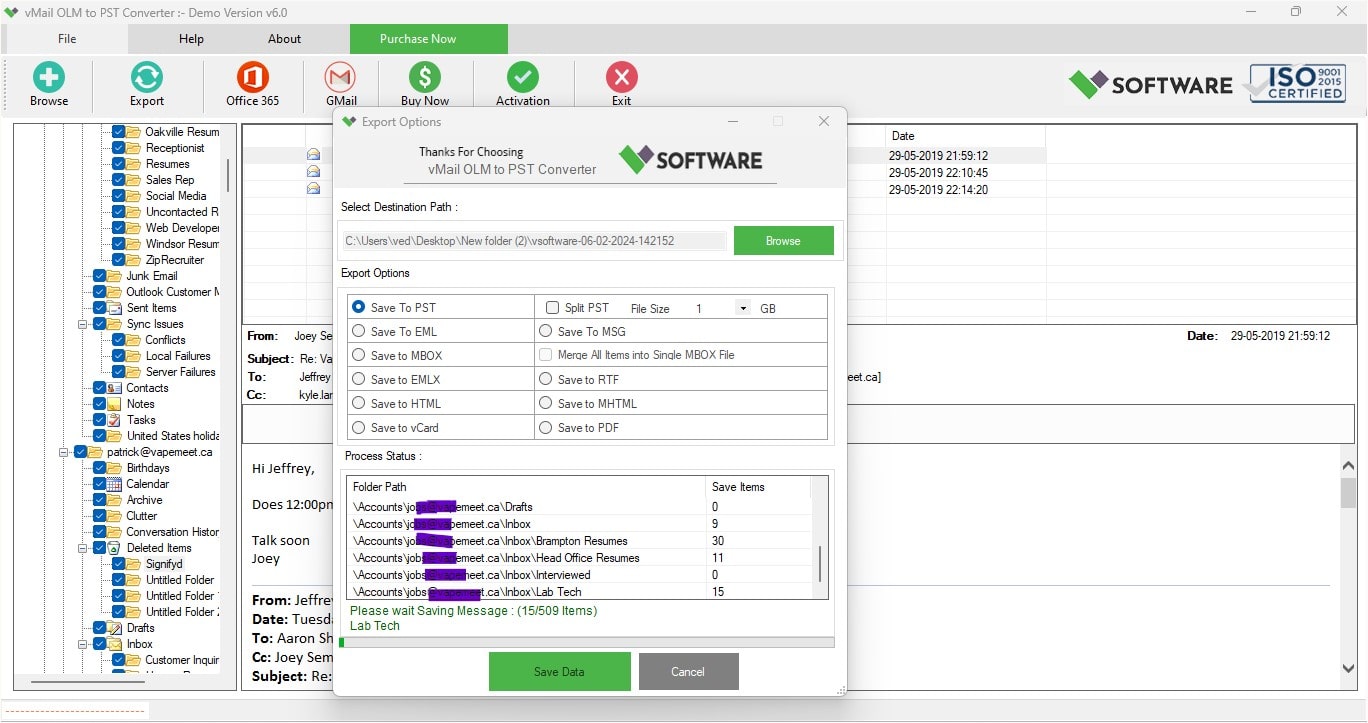
Email migration has become a common requirement for businesses and people switching from Mac Outlook to Windows Outlook. Microsoft Outlook for Mac holds mailbox information in OLM file format, whereas Outlook for Windows keeps mailbox data in PST file format. Since these file formats are not compatible, there is a great need to migrate OLM file data into PST file format.
Several free tools on the Internet can help you migrate OLM file data into PST file format. But not all of them have the necessary capabilities to ensure safe and effective OLM to PST migration.
It is always good to choose the right software to get a secure and hassle-free migration process. vMail Free OLM to PST converter for Mac is a great software application that makes your mailbox migration a simple process with its accurate and user-friendly conversion capability.
In this article, we will discuss the top ten features of an OLM to PST converter that you should look for when you select any tool for the same.
Why Do You Need an OLM to PST Converter?The Microsoft Outlook version for Mac keeps the mailbox information in OLM files, which are not compatible with the Outlook version of Windows. If you are moving from macOS to Windows, then you will have to convert OLM to PST in order to open your mailbox on the new system.
A good converter will transfer all the emails, contacts, calendars, journals, and notes without any corruption.
1. Accurate Data ConversionThe most significant part of OLM to PST converter software is the conversion accuracy of the data. All elements of each mailbox should be preserved during the migration process: the formatting of emails, attachment files, images, hyperlinks, contacts, tasks, and calendar events.
Professional software is obliged to provide users with conversion from OLM to PST without data loss or corruption. It is extremely important for business users because it helps to preserve all data integrity.
2. Batch OLM File ConversionProcessing several OLM files separately takes much of the user’s time. The right kind of converter must be able to process multiple OLM files at once.
This option is especially useful for companies that have to migrate mailboxes of many employees. There would be no need to convert individual files multiple times.
3. Preserve Folder HierarchyPreservation of the original mailbox hierarchy is an equally essential element. Email messages are normally categorized into folders, subfolders, and categories that allow for easy navigation through the important data.
The OLM to PST conversion tool allows for the full preservation of all folders while performing the migration process. The converted mailbox will remain the same as the one in Outlook for Mac.
4. Support for Large OLM FilesOLM files from modern Outlook mailboxes consist of many years’ worth of email communications, which makes them extremely large in size. There are some free converters that find it difficult to process such files or have restrictions on their size.
vMail Free OLM to PST converter for Mac is specially developed to work fast with large OLM files. No matter how many emails and attachments you have in your OLM file, the program will convert it easily.
5. Preview Before ConversionThe preview option allows one to inspect the mailbox items prior to the conversion procedure being initiated. The preview window generally shows emails, contacts, calendar items, and other information within the mailbox.
6. Selective Mailbox ConversionNot always do users have to transfer the whole mailbox. In fact, the user may want some selective data in the form of folders, emails, or contacts.
The conversion software must provide options for selective conversion whereby the user chooses specific items from the OLM mailbox rather than the entire OLM file.
7. User-Friendly InterfaceNot every user may possess technological knowledge. An ideal Outlook OLM to PST converter must have a user-friendly interface that makes the procedure simple.
The program must ensure that a user gets step-by-step assistance for the whole process, right from choosing the OLM file to storing the PST file after the conversion is done. Even beginners can easily migrate the files with a few mouse clicks.
8. Maintain Data IntegrityData loss is one of the major problems that occur during the email migration process. In order to ensure integrity of the data transferred, the converter should be able to retain all the properties of the mailbox, including formatting, metadata, attachments, sender, receiver, time stamps, and folder structure.
vMail Free OLM to PST Converter for Mac is the converter that retains the integrity of the data transferred during the process of migration.
9. Wide CompatibilityCompatibility is another important criterion that needs to be considered in choosing software for conversion. The software must work across different versions of Microsoft Outlook and Windows OS.
A good converter will allow the user to export OLM files to PST format irrespective of the Outlook version on his/her computer.
10. Fast & Multiple Format ConversionRapidity and safety are both significant factors for an Outlook OLM to PST Conversion process. The optimal converter would work quickly with large OLM files without affecting the original mailbox and convert OLM to PST, MBOX, MSG, EML, vCard, HTML, PDF, RTF, Office 365, Exchange Server, and Gmail/G Suite.
An ideal converter would convert OLM files into PST without any changes in the original OLM file. An optimal converter would ensure that the conversion process is secure.
Benefits of Using vMail Free OLM to PST Converter for Mac
vMail Free OLM to PST converter for Mac helps ensure that the migration process is smooth and error-free. It helps in easily migrating the mailboxes of Outlook for Mac to the PST file format without losing any mailbox structure. The program supports proper conversion of emails, contacts, calendar, notes, tasks, and attachments. Users can perform the OLM to PST conversion quickly without any issues related to data loss or damage. With its batch conversion feature, it becomes very easy for users to handle several mailbox files at once, thanks to its user-friendly interface.
Moreover, the software retains the formatting of emails, hierarchy of folders, metadata, and attachment integrity during OLM to PST conversion.
Tips for a Successful OLM to PST MigrationAlways make a backup copy of your original OLM file before embarking on the migration process. This will add another security measure in case of any interruption in the course of the process. It’s important to check that your Outlook version can support the PST file that has been created and that enough storage space has been allocated.
It’s important to arrange your OLM files in advance if you’re migrating more than one mailbox. After the migration is done, verify the PST file for confirmation that all emails, contacts, calendars, and attachments have been migrated successfully.
Why Choosing the Right Converter Matters? Using the incorrect tool for the task may lead to partial mailbox migration, corrupt PST files, lost attachments, or bad formatting of emails. All these problems could disrupt the company’s operations and prevent access to important communications. However, using a reliable OLM to PST converter will help avoid all these problems since it guarantees quality conversion, the safety of the mailbox, and excellent performance. It takes some time to choose the appropriate tool, but it is worth it in the end. ConclusionThere must be an approach that will provide precision and speed while migrating from Outlook for Mac to Outlook for Windows. Although there are numerous free tools on the Internet, the choice of those that will have the required features is crucial to a smooth migration process. The batch processing of emails, folders, file size handling, selective conversion, previews, and data integrity are all necessary for a reliable converter.
The vMail Free OLM to PST Converter for Mac is one such tool, as it offers all the above-mentioned essential features. When you require exporting OLM to PST either for personal or professional purposes, you can safely go for the converter that will provide reliability and ensure data safety at the same time.

Comments