
Microsoft Outlook is among the top email clients available in today's world. Data stored in the mailbox is saved in either OST (Offline Storage Table) or PST (Personal Storage Table) file formats. Despite the fact that OST files give the ability to use email offline when working with Exchange Server, Microsoft 365, or IMAP accounts, sometimes the situation arises when these files cannot be used anymore owing to different reasons. In cases like that, it becomes necessary to convert OST to PST so that the mailbox becomes accessible and independent of the original Exchange Server.
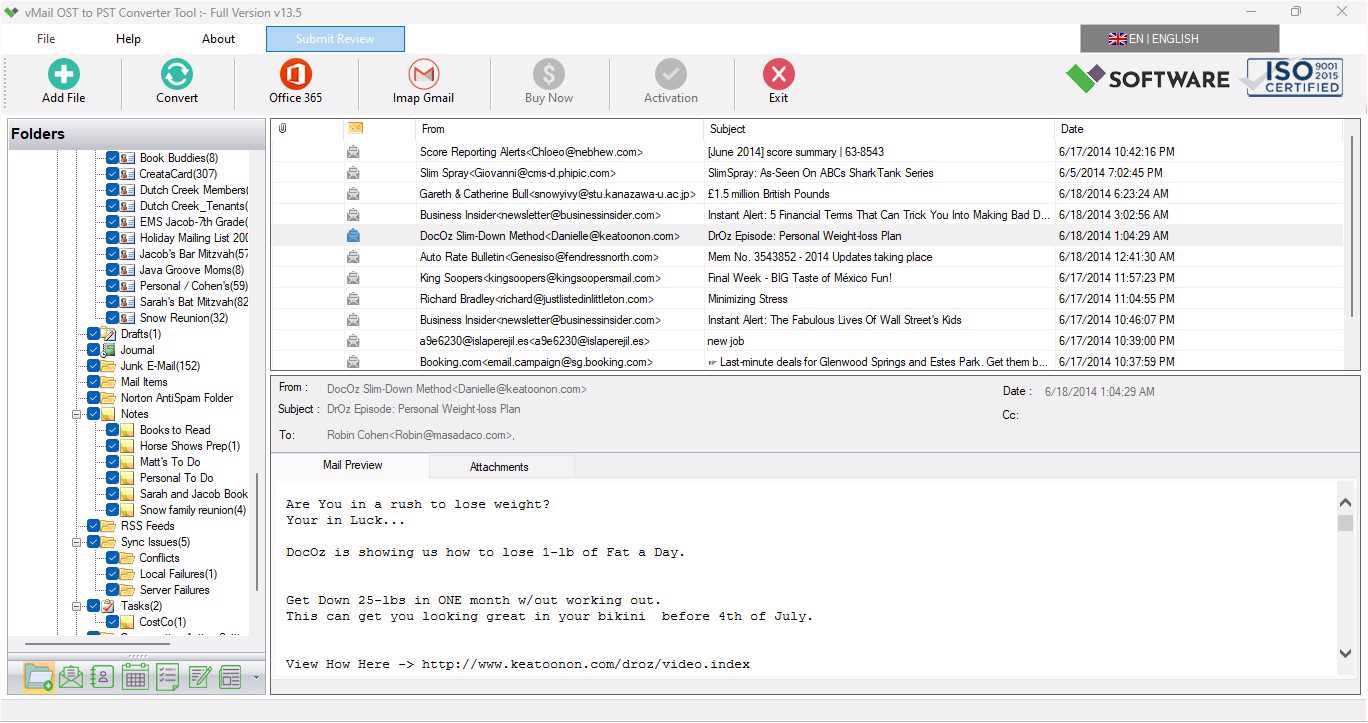
Here, the vMail OST to PST Converter Tool proves very useful. The utility is able to retrieve lost, orphaned, corrupt, or even encrypted OST files and convert them to PST format without harming the emails, contacts, calendar, tasks, notes, journal, attachments, and folder structure. No matter whether you are an end user, system administrator, or any other kind of business organization, you can make use of this software for effortless conversion of an OST file to PST format. As per the official guide of the product, this utility also enables you to convert OST data to various formats such as PST, MBOX, EML, MSG, PDF, HTML, and Office 365.
What is an Outlook OST File?
An OST (Offline Storage Table) file is automatically generated whenever an email client, Outlook, is linked to Microsoft Exchange Server, Office 365, or an IMAP server. It contains a synced copy of the mailbox on the local computer system so that one can access, send, receive, and manage emails even without an internet connection.
On the other hand, an OST file is associated with the Outlook profile it was created for. In case the Exchange server stops working or an Outlook profile gets deleted, then the OST file cannot be accessed in any other Outlook profile. In this scenario, an OST Converter to PST software would be required.
Why Do Users Need OST to PST Conversion?
There are various scenarios when users have to do an OST to PST Conversion. These are some of the most common cases:
- Exchange Server crashes or fails to work
- Damaged Outlook profile
- Deletion of Outlook account
- Move to another computer
- Migration from Office 365
- Deletion of Exchange mailbox
- Outlook sync issues
- Need to backup mailbox
- Conversion of an orphan OST file
- Retrieval of inaccessible Outlook data
Rather than losing important emails, users can easily convert OST to PST and access their mailbox in Microsoft Outlook.
Common Uses of the vMail OST to PST Converter Tool
- Recovery of Corrupted OST Files
The first common function performed by the vMail OST to PST Converter Tool is the recovery of corrupted Outlook OST files. The corruption might have happened due to various factors such as unexpected shutdown of systems, malware attacks, failure of hard drives, crashes of Outlook, and sync issues.
The software scans corrupted OST files in depth and successfully recovers mailbox data without making any changes to the source file. It recovers emails, attachments, contacts, tasks, journals, notes, and calendar entries of the mailbox completely.
- Conversion of Orphaned OST Files
Orphaned OST files refer to the Outlook data files that do not have access to their original Exchange mailbox.
Generally, such files are created in cases like:
- Unavailable Exchange Server
- Deleted User Account
- Deleted Outlook Profile
- Organization switches mail servers
As orphaned OST files are not accessible by Outlook directly, the software carries out the process of Convert OST to PST reliably.
- Backup Outlook Mailboxes
Many corporations opt to employ PST files as an effective back-up solution for Outlook mailboxes.
With the help of vMail OST to PST Converter software, users will be able to convert their mailbox items into PST files to create a backup of all important emails before:
- System upgrade
- Server migration
- Outlook installation
- Windows formatting
- Exchange maintenance
- Exchange Server Migration
Organizations tend to switch from one Exchange server to another or to the Microsoft Office 365 platform.
OST to PST Conversion is normally done prior to migrating to ensure that the mailbox data will be imported into the new environment safely.
It enables organizations to reduce migration downtime without losing mailbox data.
- Office 365 Migration
Several companies have already started migrating their mailboxes from the on-premises Exchange servers to Microsoft 365.
Rather than manually recreating mailboxes, users can simply convert the OST files and migrate their mailboxes easily.
Moreover, this program provides support for exporting recovered mailbox items straight into the Office 365 and Exchange server environment.
- Recover Deleted Outlook OST Accounts
In some cases, users may naively delete their Outlook profile or Exchange account.
Though the OST file is still present on the computer, Outlook is unable to utilize it.
This utility converts the data from the orphaned OST file into PST format so that users can open it in Outlook.
- Convert Large OST Files
Managing large Outlook data files manually is not an easy task.
The tool provides the facility of converting large OST files regardless of their file sizes while retaining email formats, attachments, and hierarchy.
Splitting large PST files into small PST files is also possible.
- Export OST into Multiple Formats
Even though the PST format is the most used one, sometimes it is required to have mailboxes available in other formats.
Using this application, you can export an OST file into:
- PST
- MBOX
- MSG
- EML
- EMLX
- Office 365, IMAP, Gmail Accounts, etc
- HTML
- RTF
- vCard
- vCal
This ability makes the software good for migrations between different email clients.
- Email Forensic Investigation
For IT personnel and investigation officers, Outlook mailbox data is essential to perform various analyses.
The tool assists in recovering inaccessible OST files while saving metadata of emails, including:
- Sender
- Recipient
- Subject
- Date
- Time
- CC
- BCC
- Attachments
- Recover Password-Protected and Encrypted OST Files
In some cases, the OST files may be encrypted or have password protection.
This tool can help in restoring the emails from the encrypted OST files without corrupting the source database.
Major Features of vMail OST to PST Converter Tool
The vMail OST to PST Converter Tool comes with some advanced features that make recovery and migration easy.
- Allows recovery of damaged, inaccessible, and orphaned OST files
- Works with all versions of Outlook
- Saves the original folder structure
- Saves email formatting
- Batch processing of OST files
- View email before export
- Recovery of deleted emails
- Encrypted OST recovery is possible
- Exports data in many file formats
- Office 365 migration is supported
- Export emails from the Exchange server
- Gmail migration is supported
- Capable of splitting big PST files
- Unlimited file size
- User-friendly graphical user interface
This makes it suitable for both technical and non-technical people.
Benefits of Using Professional OST Converter to PST Software
Most manual ways usually need the presence of the original Exchange email account, and this may not always be the case.
Professional software has several benefits:
- Faster recovery of mailboxes
- There will be no loss of data
- Attachment preservation
- Damaged OST files support
- Converting mailboxes easily
- Outlook compatibility
- Variety of exports
- Time-saving for IT professionals
- Office 365 migration
- Finding Outlook mailbox
Conclusion
However, there are numerous occasions when Outlook users will find themselves in need of a trustworthy OST to PST Converter, as the case may be due to Exchange Server failure, Outlook corruption, mailbox transfer, accidental removal of the account, or the necessity of backing up their emails. The manual approaches are not always effective and are unable to retrieve inaccessible or orphaned OST files.
With the help of the vMail OST to PST Converter Tool, it is possible to fully recover all your Outlook mailbox information and move it into PST and numerous other file formats. This program helps protect emails, attachments, contacts, calendars, tasks, and folder structure, working even with corrupted, password-protected, and large OST files. In case of OST to PST conversion for personal or commercial purposes, this professional software will offer you an efficient way.

Comments