
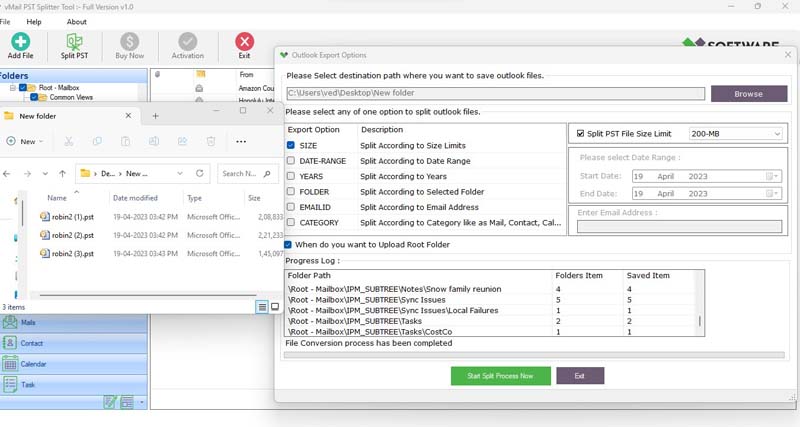
Outlook running slower than usual often indicates that your Mailbox has become too large to handle easily. When the Outlook data file exceeds its optimal size, it not only affects performance but also increases the risk of corruption. This is when the need for using the Outlook PST Splitter Tool becomes practical, ensuring both stability in daily email management and speed.
In this blog, we will explore why Outlook slows down, how oversized PST files lead to corruption, and how a reliable vMail Outlook PST Splitter Tool works to prevent long-term issues and corruption.
Why Outlook Slows Down Over Time
Outlook stores all emails, contacts, calendars, journals, attachments, and other data components in PST. Over months or years of constant use, these files gather data that can easily extend into several gigabytes. Once the file size surpasses Outlook's optimal limit, some common issues begin to arise:
- - Longer load and response times when switching folders or opening emails
- - Freezing during searches or when loading attachments
- - Difficulty in backing up or moving data
- - Higher chances of file corruption, risking partial or total data loss
This is a common problem for enterprises and professionals who rely heavily on Outlook for time-sensitive communication. A proactive solution is to split large Outlook PST files before performance begins to decline.
The Risks of Oversized PST Files
Large Outlook PST files carry a high risk of corruption, besideshttps://apps.microsoft.com/store/detail/9NPQZR1MHQLQ affecting performance. It takes time and often requires a professional tool or assistance when a PST file becomes corrupted, resulting in inaccessible emails and unrecoverable attachments for the user. Even Microsoft's built-in repair utility might not be able to fully restore data if corruption becomes severe.
Therefore, organizations are strongly encouraged to take preventive measures. They should use software such as the Outlook PST File Splitter to keep file sizes manageable rather than waiting for corruption to occur.
How Outlook PST Splitter Software Works
An Outlook PST File Splitter Tool analyzes the oversized PST file and splits it into multiple smaller files without disrupting the internal structure of metadata, folders, sub-folders, or attachments. Users can customize the splitting process based on various criteria such as:
- - Split by size: Dividing files into specific sizes (e.g., 2GB, 5GB, or 10GB)
- - Date-based splitting: Separating files by a date range, such as archiving older emails separately
- - Folder-based splitting: Extracting selected folders into independent PST files
- - Year or category-based splitting: Retaining archives year by year or topic by topic
- By offering such flexible options, professional tools like the vMail PST Split Tool make PST management an efficient and hassle-free task.
Benefits of Using a PST File Split Tool
Splitting Outlook PST files offers many long-term benefits beyond preventing Outlook from slowing down. Some notable advantages include:
- - Improved performance: Outlook responds faster when PST files are smaller.
- - Reduced risk of corruption: Smaller files lower the chance of losing all data at once.
- - Easier migration and backup: Moving files to a new system and backing up small files is quicker.
- - Organized storage: Businesses can manage data from different departments, years, or projects more effectively.
- - Enhanced data security: In case of corruption, only a subset of data is at risk, not the entire mailbox.
Choosing the Right PST Splitter Tool
Selecting reliable software is vital given the importance of PST file management. A professional PST splitter should include advanced customization, compatibility with all Outlook versions, and an intuitive interface.
One trusted option is the vMail Outlook PST Split Tool, known for its accuracy and performance. It ensures that no email, attachment, or folder structure is harmed during splitting. While other PST split tools exist, it's best to choose one that offers previews and multiple split criteria to meet diverse user needs.
Conclusion
When Outlook starts running slowly, it often indicates that PST files have grown too large to manage efficiently. Oversized files not only slow down the system but also increase the likelihood of corruption. Using an intelligent Outlook PST Splitter Tool, such as the vMail PST Split Tool, resolves this by breaking large files into smaller, safer, and manageable parts. This enhances Outlook speed, protects data, simplifies backups, and prevents costly downtime.
For both professional environments and personal use, adopting the right Outlook PST file splitter software is more than a performance boost — it is an investment in data security and long-term productivity.
How to Use Outlook PST File Splitter Software
Using a professional Outlook PST file splitter software, such as vMail’s tool, is straightforward. Here’s a general step-by-step overview:
STEP 1: Open vMail PST Splitter Tool
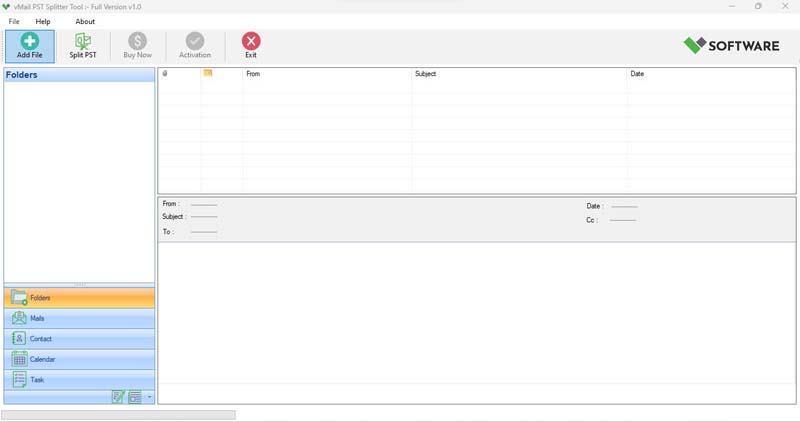
STEP 2 : Browse & Select (*.pst,*.ost) Outlook PST file
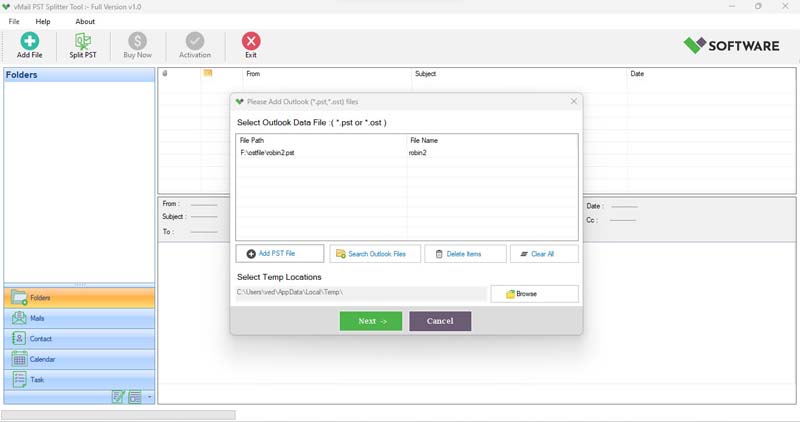
STEP 3: Scanning and previewing Outlook PST & OST files
STEP 4: Split Option for PST File
STEP 5: PST Split Conversion Process
Final Thoughts
Outlook is a powerful and best tool, but it is not immune to performance issues, especially when dealing with larger Outlook PST files. Using a trustworthy Outlook PST Splitter Tool can significantly enhance your email client efficiency, prevent data corruption, and improve your ability to manage and organize emails.
The vMail PST split tool is a dependable and feature-rich PST splitter tool that allows users to split large Outlook PST files effortlessly. Whether you're an individual professional or an IT admin managing multiple mailboxes, having the right PST file split tool is essential for long-term data health and application performance.
Don't wait until Outlook crashes or slows to a crawl — take control of your mailbox today with a smart solution like vMail PST split tool.

Comments