
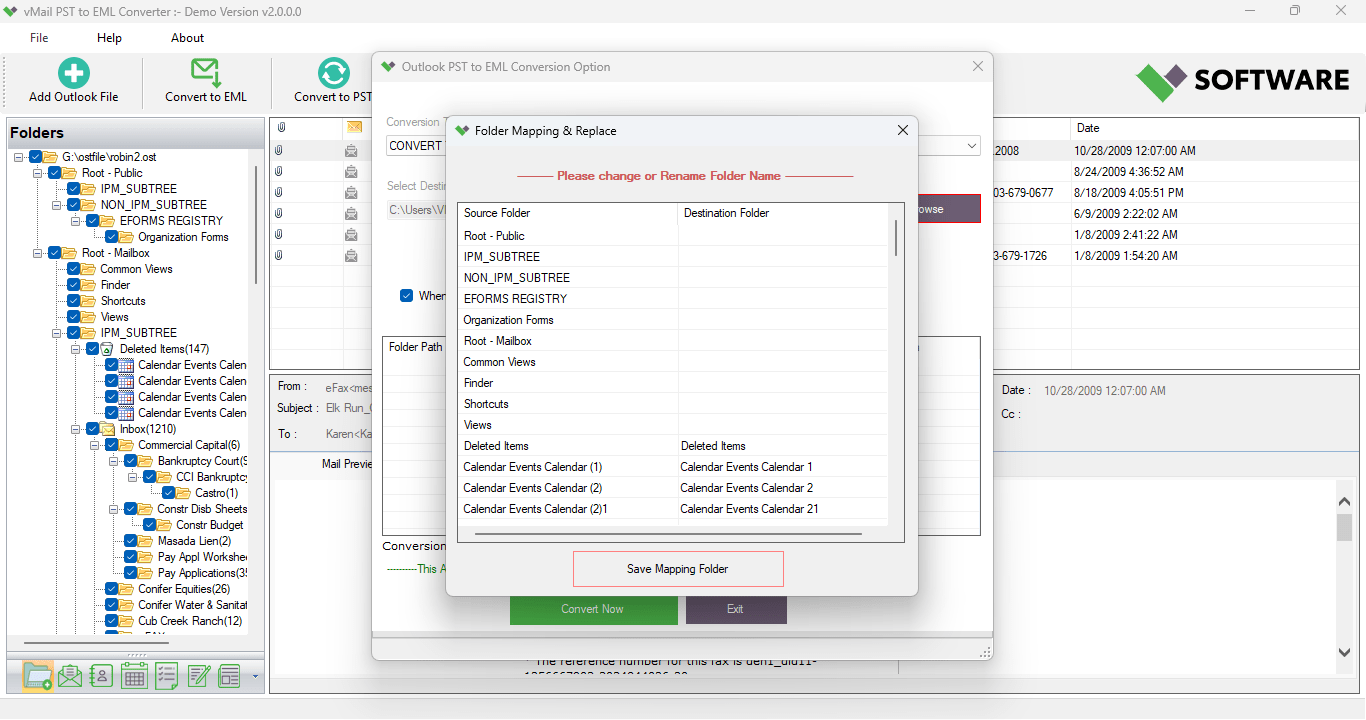
Conversion of email accounts has turned out to be quite a prevalent practice among both individuals and organizations. People have been opting to migrate their Outlook emails to various email client applications that support the EML format, like Windows Live Mail, Thunderbird, Apple Mail, and many others. While migrating, it is imperative to preserve all the emails along with their attachments and folders. This is when the PST to EML conversion comes into play.
Though there exist many ways to perform it manually, they are quite cumbersome and may result in loss of information or formatting problems. However, there exists a professional tool, vMail PST to EML Converter, that allows completing migration safely and effortlessly.
This article is going to tell about the most optimal way of converting PST to EML, about why the EML format is preferable for users, and how the professional outlook on an EML converter helps during the process.
Why is PST-to-EML Conversion Required?
All mailbox information in Microsoft Outlook is stored in PST (Personal Storage Table) files. The files consist of emails, contacts, calendars, notes, journals, and other mailbox objects. Even though PST files operate efficiently in Microsoft Outlook, they cannot be opened using many other email applications. Unlike PST, EML files can be accessed through several email applications, with each email being saved as a single file. Due to the high compatibility of the EML format, people usually move from Outlook to EML when changing their email service providers. Some common cases of PST to EML conversion are as follows:
- Changing Microsoft Outlook to another email application.
- Back up emails as individual files.
- Send emails without
- using Microsoft Outlook.
- Maintain professional correspondence in a portable form.
- Viewing Microsoft Outlook emails on various platforms.
- Saving emails separately in EML files.
Challenges of Manual PST to EML Conversion
Most people try manual conversions due to the perception that it does not cost them anything. However, manual conversion comes with various constraints.
Time-Consuming Process
Converting emails manually requires the extraction of emails individually. It will be difficult to convert numerous emails in the case of manual conversion.
Dependency on Outlook
The majority of manual conversions are possible if there is an already existing Outlook.
Risk of Data Loss
There may arise chances of losing data such as email formats, attachments, or metadata during the manual conversion process.
No Batch Conversion
Manual conversion processes do not entail bulk conversions, hence repeating the process over again.
Due to all these constraints, professionals advise the use of a dedicated Outlook to EML converter.
The Best Method to Convert PST to EML
Of all the solutions that have been developed in this respect, vMail PST to EML Converter stands out among the most effective tools for migrating emails. It is made particularly for simplifying the process of PST to EML conversion while guaranteeing the accuracy of the process.
Whether you are a simple user or an IT administrator managing many Outlook mailboxes, the tool will provide you with the easiest and safest conversion process.
Why Select vMail PST to EML Converter?
What makes vMail PST to EML Converter unique is that the whole process of email migration is made automatic. The user selects the PST file, sets up the destination folder, and starts the conversion process.
In comparison to manual processes, the tool saves all the properties of the email, which include:
- Email formatting
- Attachments
- The sender and recipient
- The subject
- Date and time stamps
- Folder structure
- Images
- Internet headers
This way, the resulting EML file becomes identical to the original Outlook email.
Powerful Features of vMail PST to EML Converter
Conversion of Batch PST Files to EML Files
An organization normally has more than one PST file in its Outlook application.
Instead of converting files one at a time, vMail PST to EML Converter software enables users to convert multiple PST files at once.
This greatly saves time on migration while being productive.
Preserves Original Folder Hierarchy
Folder hierarchy is one of the most crucial aspects of email management.
When performing PST to EML conversion, the software maintains all folders just as they were before.
Users can be able to find emails after migration without having to organize their mailbox.
Export PST to EML with Attachments
Email attachments play a major role in any business.
The software assists the user in exporting PST to EML format along with all attachments like PDFs, Word, Excel documents, presentations, images, etc.
Preserves Email Formatting
Emails in professional format have a style that must not be changed at any cost.
vMail PST to EML Converter offers:
- HTML styling
- Rich Text styling
- Fonts
- Hyperlinks
- Images
- Colors
- Attachments
All this ensures professional emails even after conversion.
Compatibility With ANSI and Unicode PST Files
Earlier versions of Outlook produced ANSI PST files, but later versions produce Unicode PST files.
This software is able to support both types of PST files, thus making it compatible with all versions of Outlook.
Preview Before Conversion
Before starting the conversion, one can preview the folders and emails of the mailbox.
This tool proves helpful in checking whether the mailbox contains the desired information, and exporting unnecessary emails is avoided.
Selectively Convert PST to EML
In some cases, users require converting particular folders only and not the entire mailbox.
Users are allowed to select folders for conversion as per their needs to convert PST to EML efficiently.
Handling of Large PST Files
Conversion of large Outlook files usually results in reduced efficiency.
vMail PST to EML Converter effectively converts large PST files without having any effect on efficiency and quality of conversion.
Therefore, it becomes a perfect choice for migrating enterprise emails.
Intuitive User Interface
Another major advantage of the program is its user-friendly interface.
Users not having any technical knowledge will be able to convert Outlook to an EML file within minutes.
Manual Method vs Professional Solution
|
Manual Method |
vMail PST to EML Converter |
|
Slow conversion |
Fast conversion |
|
Requires Outlook |
Simple guided process |
|
No batch support |
Batch PST conversion |
|
High risk of data loss |
Safe and accurate migration |
|
Formatting issues |
Preserves original formatting |
|
Limited functionality |
Advanced conversion features |
The comparison clearly shows why professional software is the better choice for PST to EML conversion.
Conclusion
Selecting the best approach for converting PST to EML is crucial for those intending to migrate their Outlook emails in a safe manner. Manual methods look easy, but they end up taking much time and have a high chance of causing incomplete migration.
Use of vMail PST to EML Converter can be considered to ensure that the process of PST to EML conversion becomes safe, accurate, and fast without loss of any part of email contents, including format, attachments, and folder structure. With its batch conversion features, large file support, preview, selective conversion, and user-friendly interface, vMail PST to EML Converter is a great Outlook to EML converter.
If one intends to convert Outlook to EML or export PST to EML, then a professional approach will provide him/her with a hassle-free experience with full data preservation

Comments